
Verify correct startup of SICS API Server
Verify SICS API Server startup using the SICS API Server Management console
SICS API Server comes with a rudimentary management console which can be found at:
http://<Tomcat-installation:port>/SicsServer/SicsServerManagementConsole
and looks like this:
When SICS API Server is ready to process SOAP messages the status will be “Running and ready since date/time and the flag will be green:
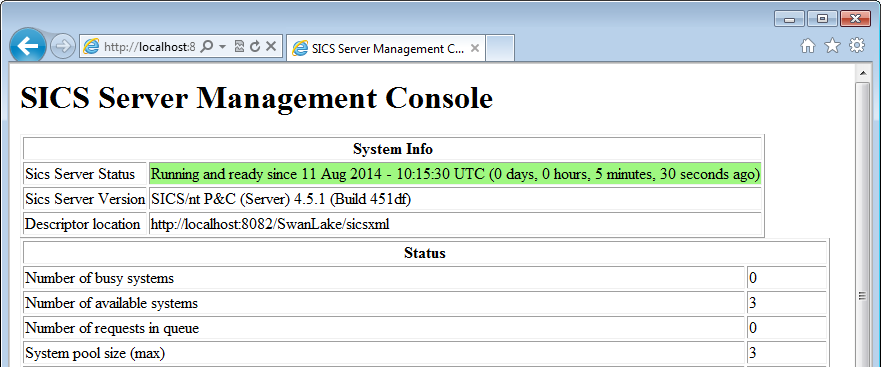
Figure 9 - SICS API Server Management Console Green Status
Verify SICS API Server startup by inspecting the log files
SICS API Server writes important startup messages to the SicsServer.log file (see paragraph “” above for where to find/how to set up this logfile.
The last line in the logfile be SICS Server Started and Ready. Here’s an example of the last 5 lines in this file for a successful startup:
02.03.2016 08:24:43.629Z INFO  WSDL parser finished, using 81 seconds.
02.03.2016 08:24:43.645Z INFO  Finished reading xml files.
02.03.2016 08:24:44.146Z INFO  Finished reading mapping specs
02.03.2016 08:24:44.162Z INFO  SICS Server Interface Started
02.03.2016 08:24:44.162Z INFO  SICS Server Xml Compatibility Type: Axis
02.03.2016 08:24:44.162Z INFO  SICS Server Started And Ready
Verify SICS API Server using sample SOAP calls
The SICS Web Service Tester tool is a simple tool which can be used to test SICS API Server.
- Install the SICS Web Service Tester tool
- Start the tool
- Go to the “Settings” tab
- Select Server = “SICS 4 (Java)”
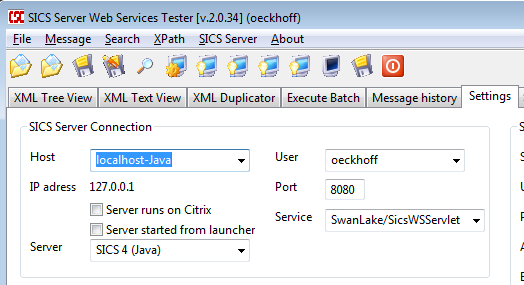
Figure 10 - SICS Web Services Tester
- Set server hostname/IP.
This should be the name of the server running Tomcat. In the example above SICS API Server runs on the local host.
- Set server port number.
This should be the port on which Tomcat is set up. The default value for Tomcat is port 8080.
- Set Service name.
This should be SicsServer/SicsWSServlet.
- Check SICS API Server availability by choosing from the menu SICS Server -> Check SICS Server Connection (Ctrl-R) or press the icon with tooltip “Check if SICS Server is available”. The answer should be “SICS Server is available”.