
Web Services Unlock Key
Before you can send Web Services calls to SICS API Server, you must “unlock” the Web Services.
Enter unlock key
You enter the key from the SICS System Administration -> System Parameter Maintenance -> Module Key (Tab).
Once the correct key has been entered the Web Services will be open for use. Note that you must enter the key once for each relevant SICS database.
Please refer to your local SICS representative to obtain the unlock key.
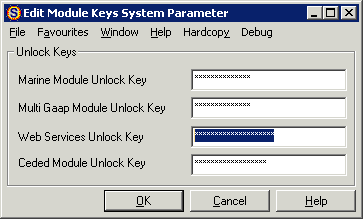
Figure 1 - Module Keys System Parameter