
SICS eMessaging Server
Foreword
Copyright 2021, DXC Technology Company. All Rights Reserved.
Warning: The SICS computer program is protected by copyright law and international treaties. Unauthorized reproduction or distribution of this program, or any portion of it, may result in severe civil and criminal penalties, and will be prosecuted to the maximum extent possible under the law.
DXC, the DXC logo, SICS, and dxc.technology are trademarks or registered trademarks of DXC Technology Company, registered in the United States and other jurisdictions worldwide. Other product and service names might be trademarks of DXC or other companies.
The SICS Product is delivered with Open Source Software (OSS) components potentially developed or owned by third parties. OSS components may be used according to the terms and conditions of the specific license under which the relevant OSS components are distributed, but are provided "AS IS" by such third parties and DXC.
Contents
This delivery consists of the following components:
SicsEMessagingServer.war- Java web application, with WebService interface to SICS eMessaging.- WSDL for the interface
- ACORD documentation
- A Java command line sample client
The individual components are described in greater detail in the respective sections of this document.
SICS eMessaging Server
Only the parts of ACORD, 2007 specifically listed in this section are supported by the SICS eMessaging Server. Since version 4.5.1, SICS eMessaging Server can process several requests concurrently. The maximum number of concurrent requests can be specified in WEB-INF/web.xml by setting the SystemPoolInitialSize context parameter.
Call Service
The interface offers basic support for the Call service described in ACORD, 2007. The Call service allows synchronous processing of an ACORD message. For details refer to the ACORD 2007 specification. This interface may not fully support all elements of the ACORD Call operation. It will attempt to process any request in accordance with the WSDL and the required elements as described in this document and the examples. Elements not described here or part of the examples will be ignored. Furthermore the emphasis of the SICS eMessaging server is on processing the attached ACORD message. As long as SICS is able to successfully unwrap the ACORD message, import and processing of the message will commence. In fact mandatory information in the SOAP request, such as sender and receiver are neither used nor validated by the system.
The basic flow of a Call request:
- Client sends a Call request with an ACORD message attached
- The SICS eMessaging Server will import the message and attempt to process it according to the SICS eMessaging rules.
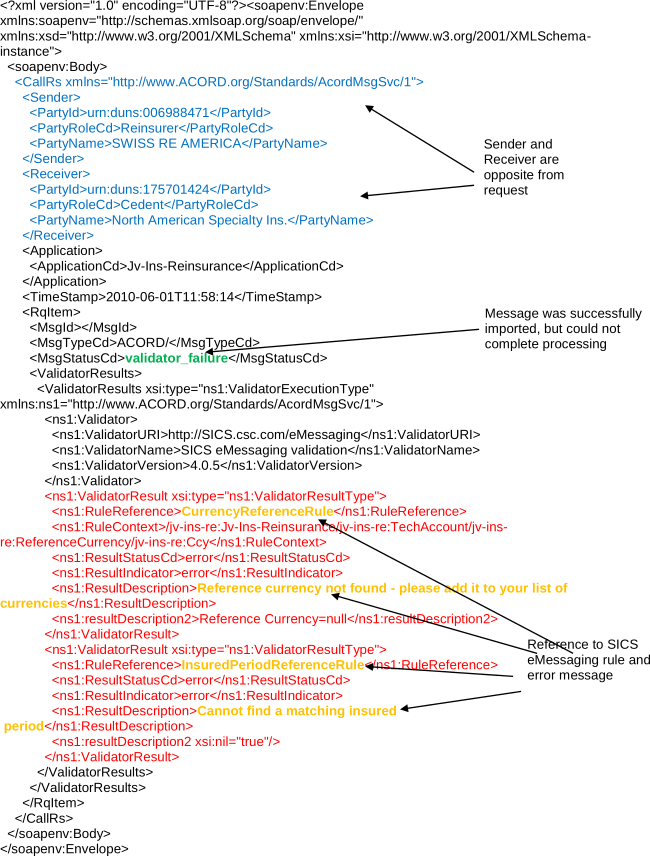
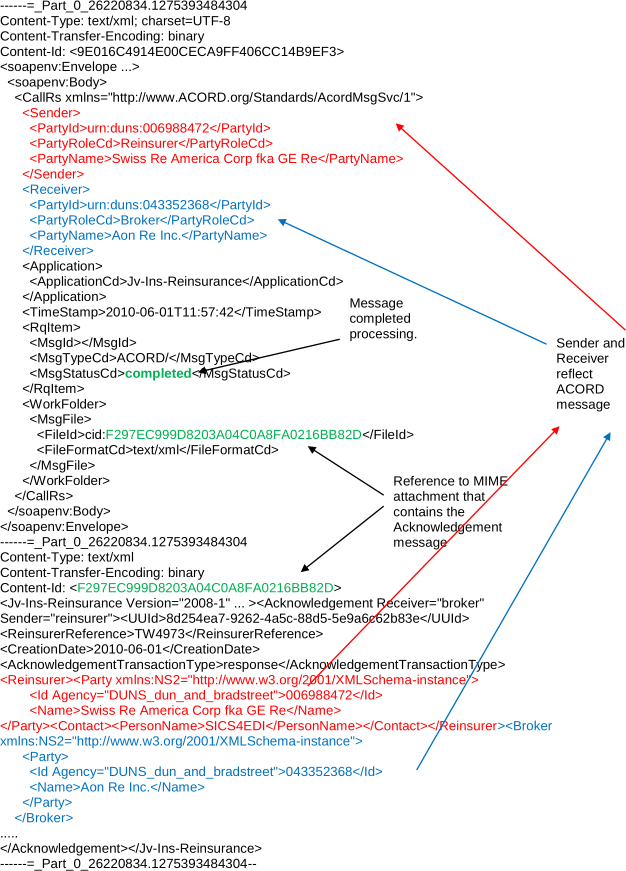
- A Call response is sent to the client, if the ACORD message could be completely processed, an ACORD Acknowledgement message will be attached to the response. If the ACORD message could not be completely processed, the response will in most cases contain one or more validation errors from the SICS eMessaging system.
Outbox Service
The interface offers basic support for the Outbox service described in ACORD, 2007. The outbox must be used by the client to retrieve outbound messages from the server, and acknowledge successful reception of messages.
Retrieve implementation in SICS
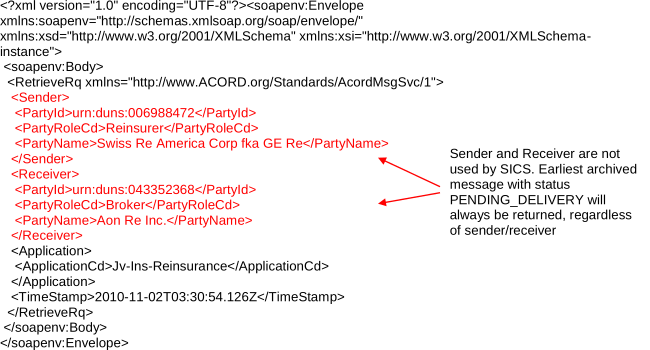
A call to the Retrieve service will search for the ACORD Acknowledgement message with status CREATED and the earliest archive timestamp and attach it to the response. If there are none, Retrieve will respond with SvcIndicCd = “retrieve_empty” and no attachment. If the Retrieve request attempts to retrieve a message specified by UUId, a SOAPFault will be given as ListOut is not supported.
StatusOut implementation in SICS
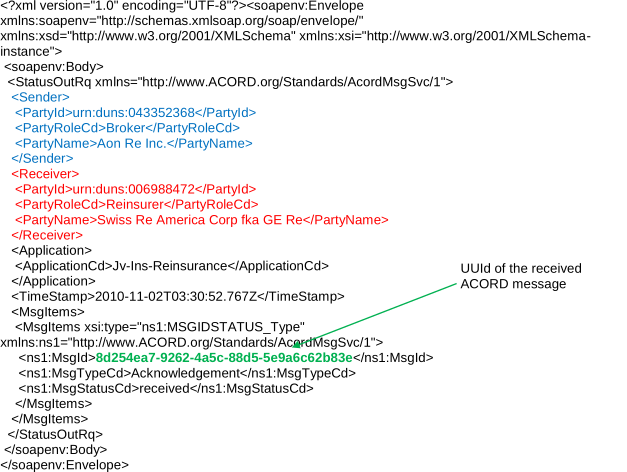
For every successfully retrieved message, the client must invoke the StatusOut operation with the message’s UUId. SICS will change the status of the ACORD message with the UUId specified in the request to SENT. It will therefore no longer be returned from the Retrieve service.
The ListOut operation is NOT SUPPORTED by SICS
In order to simplify synchronization and implementation, the ListOut service is not supported. It simply gives a SOAPFault if a client attempts to invoke it.
Outbox Message Flows
Call response with acknowledgement

Empty Retrieve

Retrieve with ACORD message in response

Limitations
- The SICS eMessaging server is based on SICS/Server and is therefore single threaded. If one request is being processed, subsequent requests must wait for the current request to complete. There is no built in failover support, so if there should occur a critical server failure, all pending requests will fail and must be resent.
- All messages and ACORD message attachments are sent in clear text as MIME attachments. Neither security nor encryption is supported.
- Only ACORD messages are processed, supporting documents are simply ignored
- Only one ACORD message should accompany each request
Installation instructions
- Set the SICS environment name in
WEB-INF/web.xmlif necessary. This is the same as in SICS API Server, refer to the SICS API Server installation document for more details. - Set the UserAuthorizationInterface init-param in
WEB-INF/web.xml, if you plan to use it. This is the same as in SICS API Server, refer to the SICS API Server installation document for more details. - Uncomment the security-constraint element in
WEB-INF/web.xmlto configure the application to always use a secure connection. This ensures that any access via HTTP will automatically be redirected to HTTPS. - Install the web application
SicsEMessagingServer.warin a Java servlet container. - The JNDI resource reference
jdbc/sicsmust be mapped to a JDBC Datasource to a SICS database schema with SICS eMessaging enabled and configured. - If you are using WebSphere, enter in the WebSphere administration console and set the eMessaging Server application’s classloading option to “Classes loaded with application class loader first”.
- Start the webapplication
- Use the sample client / Java Axis to send requests. For other tools or platforms send SOAP requests to the URL:
${url to webapp}/servlet/AxisServlet
Sample Client
General
A sample standalone client is included to demonstrate and document the SICS eMessaging server and how the SOAP messages can be created from ACORD messages using Java. The client contains Java Axis stubs for the web service and a simple command line application which shows how to use them.
Installation
- Copy the folder “sample client” to a suitable location.
- Edit the file acord.client.properties in the subfolder conf, to set up URL to server etc.
Use
- Run the application with command:
acord-client.bat <filename to ACORD message1, message 2 ...> - Various debug feedback information about what happens is displayed in the console.
- Validations errors from the server if any are displayed.
- If there is an ACORD Acknowledgement message in the response it will be stored on disk as:
<UUId of the message>.xml
Example SOAP messages
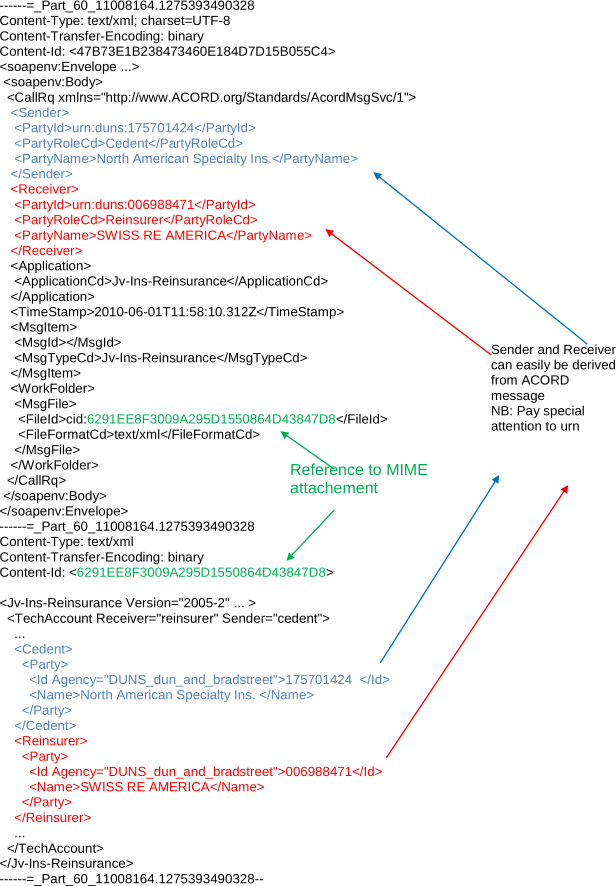
These simple examples show how to set up a message call based on the contents of the ACORD message and what response will be given under different circumstances. The examples are generated by the sample client and reflect the mapping actions provided by its utility classes.
NB! The ACORD and SOAP message contents have been slightly truncated to focus on the most important relationships between ACORD message and SOAP message.
Simple Request Example
Response with Validation Errors
Response with Acknowledgement
StatusOut to Acknowledge Reception of Message
Retrieve request
Retrieve Response with ACORD Message

References
ACORD. (2007, December). ACORD MESSAGING SERVICE XML SPECIFICATION AND SOAP IMPLEMENTATION GUIDE VERSION 1.5.1
| Location | About DXC Technology |
| 1775 Tysons Blvd Tysons, VA 22102 |
DXC Technology (DXC: NYSE) is the world's leading independent, end-to-end IT services company, helping clients harness the power of innovation to thrive on change. Created by the merger of CSC and the Enterprise Services business of Hewlett Packard Enterprise, DXC Technology serves nearly 6,000 private and public sector clients across 70 countries. The company's technology independence, global talent and extensive partner network combine to deliver powerful next-generation IT services and solutions. DXC Technology is recognized among the best corporate citizens globally. For more information, visit www.dxc.technology. |
| www.dxc.technology | © 2021 DXC Technology Company. All rights reserved. |