
Cede Interface Rule
Within the Inbound Interfaces folder, the Cede Interface Rule function allows to register rules that are required by the Cede Interface process. By clicking on the related icon, the system shows a find view that allow the user to find existing rules or to create a new rule
Create Cede Interface Rule
A Cede Interface Rule defines a set of info relevant to set the behavior for specific source data subsets. A rule can for example be to exclude a data subset from the import process.
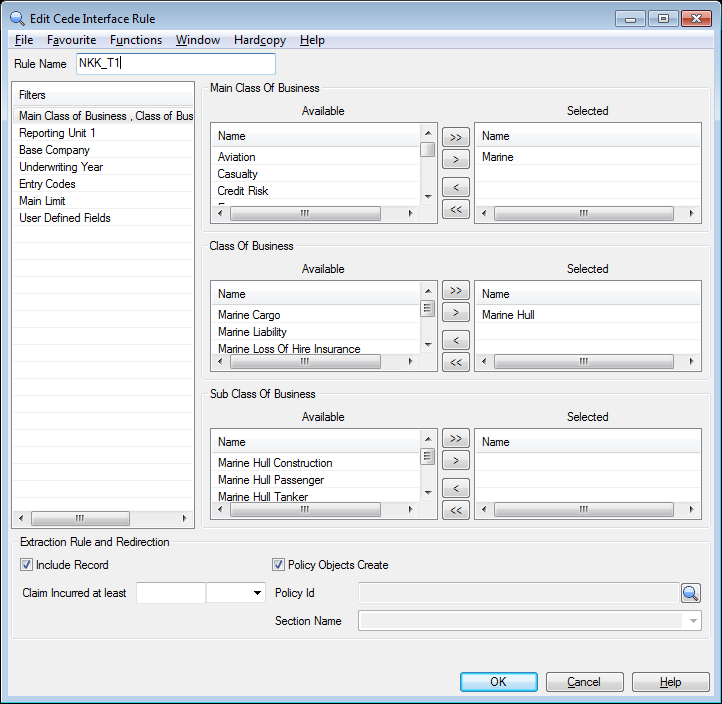
The Rule Name attribute is found in the upper part of the panel.
There are then several Filter Attributes used to filter the source records:
- Main Class, Class and Subclass of Business: Filter by classification items.
- Reporting Unit: Select one or more Reporting Units to be included.
- Base Company: Select one or more Base Companies to be included.
- Underwriting Year: Select a range (from-to) of Underwriting Years to include.
- Entry Codes: Select one or more Entry Codes to be included.
- Main Limit: Select a range (from-to) of Main Limit amounts to include. A currency must be selected
- User Defined Fields: Add filters per UDF field; in total 13 fields (4 string fields, 4 percent fields, 5 amount fields). In addition there is a possibility to extract at User Defined fields defined from reference data.
General note on filter attributes:
- When an attribute is a multiple selection: no selection means “all”. Multiple selection means to include all the records, which have at least one value.
- When an attribute is a text or numeric field: blank value means “no filter”.
- All the filter attributes listed define a selection clause, joined by a logic AND.
Together with the filter attributes, a rule defines other attributes that affect the process behaviour, when a source record matches the filter. Those are:
- Include Record: if ticked the record will be included in the execution. If unticked the record will be excluded and logged as “Excluded by Rule
” - Policy Objects Create: if ticked the interface will create the policy (or parts like sections / amendments) if the policy is missing in SICS. If unticked the interface will reject the record if the policy or the policy section is missing.
- Policy Id: If filled, the record will be redirected to the given policy.
- Claim Incurred at least (with currency): For claim records only (type 2/4) – only those claim records belonging to claims which incurred amount that is at least the one set will be processed. Both currency and amount must be defined to make the rule valid. The incurred amount is the sum of all claim accounting amounts. If that sum is below the rule incurred amount the record will be rejected. If instead the sum is equal to or above the rule amount then the record is processed and all the record previously marked as rejected because of the incurred amount are made ready for re-evaluation.
This behaviour does not apply in case of claims record with Headline Loss attribute set. These records are always processed.