
Mass Update Responsible Person
In SICS you can run a mass update of several businesses if you want to change your company’s ‘responsible person’ for several businesses. For example, earlier the claims handling in your company was split between several different people, but now you only want one person to be responsible. Using the Mass Update function, SICS will update all businesses matching your criteria assigned the responsibility to the person you selected.
This function also allows you to:
-
Change the responsible person
-
Add a responsible person for a certain Business Category (all business for a certain cedent).
-
Add a responsible person for your new cedent’s business agreements.
To change the responsibility using Mass Update:
- Click the Responsible Person Mass Update icon.
You see the Business Responsible Person Mass Update.
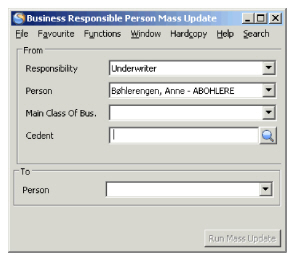
- Select the type of the responsibility.