
Maintain Business Stamps

This is where you register the pre agreed apportionment between entities/ syndicates owned/ managed by the same company. The same Business Stamp can be assigned to multiple Joint Contracts.
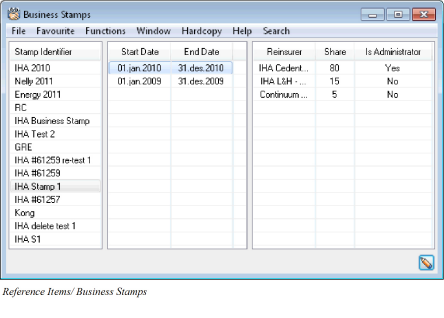
Create a new Business Stamp:
Register the pre agreed apportionment between entities/ syndicates:
-
From SICS desktop select Reference Items
-
Select Business Stamps and open in edit mode
-
Select Add Stamp from the pop-up menu
-
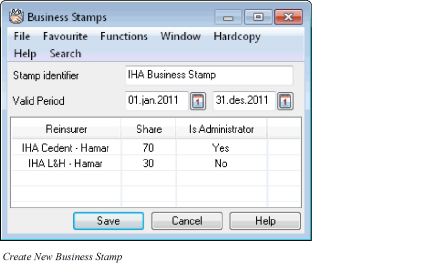
Enter Stamp Identifier and Valid Period
-
Select Add from the pop-up menu to register insurer/ reinsurer
-
Enter business partner ID or use the Find facility to select wanted insurer/ reinsurer
-
Tick off Administrator if selected business partner is the insurer/ reinsurer of the lead contract
-
Enter insurer’s/ reinsurer’s Share
-
Press Save
-
Repeat points 5-9 to add more insurers/ reinsurers
-
When Total share is 100%, press Save to save the new Business Stamp
-
Press OK
Change Business Stamp Details
Update business Stamp with new details:
-
From SICS desktop select Reference Items
-
Select Business Stamps and open in edit mode
-
Click on last Valid Period and select Edit Stamp Values the pop-up menu
-
Change details, e.g. Valid Period and/ or Stamp Identifier
-
Highlight an insurer/ reinsurer and select e.g. Edit from pop-up menu
-
Change insurer’s/ reinsurer’s share and press Save
-
As total share must be 100%, point 5 and 6 must be repeated on another insurer/ reinsurer
-
Press Save
-
Press OK
Renew Business Stamp:
Add a new Valid Period to an existing Business Stamp:
-
From SICS desktop select Reference Items
-
Select Business Stamps and open in edit mode
-
Highlight Business Stamp to be renewed and select Renew stamp from the pop-up menu
-
Enter Valid Period To Date
-
If wanted, change the apportionment between entities/ syndicates
-
Press Save
Delete Business Stamp:
Remove a Business Stamp/ Valid Period not in use on any business:
-
From SICS desktop select Reference Items
-
Select Business Stamps and open in edit mode
-
Highlight Business Stamp to be removed and select Delete from the pop-up menu. If selected Stamp have multiple Valid Periods, last period can be deleted by highlighting the Valid period and select Delete Stamp Values from the pop-up menu.
-
Press Save
Field Description - Business Stamps
| Field | Description |
|---|---|
| Stamp Identifier: | Manually given stamp name. Stamp identifier is not unique. Values: Free text field. Maximum number of characters: 30 Functional Impact: None Applicable for: P&C, SICS Cede |
| Start Date: | First dy of Business Stamp’s valid period Values: Date Validations: Valid Period Start Date < Valid Period End Date Functional Impact: Business Partner Assignment on Joint Contract Applicable for: P&C, SICS Cede |
| End Date: | Last day of Business Stamp’s valid period Values: Date Validations: Valid Period End Date > Valid Period Start Date Functional Impact: Business Partner Assignment on Joint Contract Assumed placements on Joint Contract Applicable for: P&C, SICS Cede |
| Reinsurer: | Company participating in with a pre-agreed portion in a business stamp arrangement Values: Business partner name Validations: Only Base Companies are selectable Functional Impact: Business Partner Assignment on Joint Contract Assumed placements on Joint Contract Applicable for: P&C, SICS Cede |
| Share: | Participating reinsurer’s portion of the business stamp arrangement (UA Share %) Values:_ Numbers Number of decimals: 2 Validations: Maximum value: 100,00 Minimum value: 0,01 Total Share for all reinsurers cannot exceed 100,00% Functional Impact: On assumed placements: Share Condition values Premium and Limit Condition Manual Accounting Automatic Accounting Claims handling Proportional Facultative Protections Applicable for: P&C, SICS Cede |
| Is Administrator: | Indication whether reinsurer is the administrator of the business stamp arrangement or not Values: Yes/ No Validations: One of the reinsurers assigned to the business stamp must be indicated as Administrator Functional Impact: On assumed placements: Business Partner Assignment Claims Handling Applicable for: P&C, SICS Cede |