
Lookup Table Allowable Column Definition
Before you can import or define lookup tablesin SICS, the allowable column types must be defined to the system.
When you define or import a Lookup Table, you must tell SICS what the columns in the table represent. This enables SICS to use the tables more intelligently in the system. It is also used to provide validation on the tables as they are imported.
You define the columns types for a table in a step in the Define or Import Lookup Table Wizard, where you select the Table Type from a drop-down list that appears. What appears in this drop-down list is defined by using the Lookup Table Allowable Column Definition tool.

Lookup Table Allowable Column Definition icon
Click the Lookup Table Allowable Column Definition icon to see the window where you can add and delete column types to use in your tables.
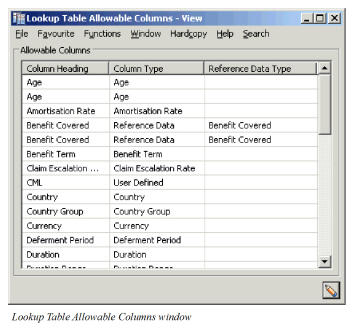
Remember to click the Edit button to switch from View to Edit mode in order to make any changes.
To add a column type, click in the table, select Add Column Type from the pop-up menu. You see the New Allowable Column window.
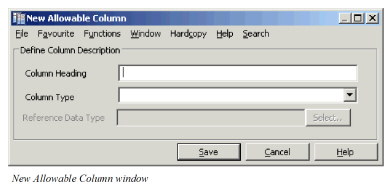
Column Heading: Here you type in whatever you want to name the column. When SICS imports a table it will use this name to try and default a column type based on the column name in the CSV file.
Column Type: The column type is system defined. Select a column type from the drop-down list. This tells the system what kind of values this new column should have.
Reference Data Type: You must select a reference data type for the new column if the column type you selected was Reference Data. When you click the Select button, you see the Select Reference Data Type window where you can select an item from the list and transfer it back to the New Allowable Column window.