Search Functionality
Apart from having a normal full text search functionality, SICS Search has the following search functionalities:
- Search by SICS ID
- Wildcard Search
- Phrased Criteria Search
- Fuzzy Search
Search by SICS ID #
To search by SICS ID you must submit the search term with (ctrl + enter) or by hovering the search icon and click Search by ID.
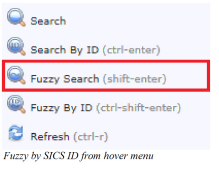
It is also possible to perform a fuzzy search by SICS ID with (ctrl + shift + enter) or by hovering the search icon and click Fuzzy by ID.
Wildcard Search #
SICS Search supports single and multi-character wildcard searches.
A wildcard search can replace the character/characters prefix, infix and suffix for any term.
A wildcard search cannot be placed within a phrased criteria search.
Single character Wildcard Search #
A single character wildcard search uses the question mark symbol (?).
It looks for terms that match with the single character symbol replaced.
For example to search for text or test, you can use the following search term:
te?t.
Multi character Wildcard Search #
A multi character wildcard search uses the asterisk symbol (*).
It looks for terms that match with the multi character symbol replaced by 0 or more characters.
For example, to search for test, tests or tester, you can use the following search term:
test*
Phrased Criteria Search #
A phrased criteria search uses quotation marks around the search phrase.
It looks for phrases that match the search phrase.
For example, to search for the phrase Business Classification, you can use the following search term:
"Business Classification"
A phrased criteria search can also be used in conjunction with Boolean operators:
AND
OR
NOT
For example, to search for Assumed Business and Oslo, you can use the following search term:
"Assumed Business" AND Oslo
Parentheses can be used to group clauses to form sub queries.
For example, to search for Assumed Business that also matches either United States or United Kingdom, you can use the following search term:
"Assumed Business" AND ("United States" OR "United Kingdom")
If you want to search for Assumed Business and not Proportional Treaty, you can use the following search term:
"Assumed Business" AND NOT "Proportional Treaty"
Fuzzy Search #
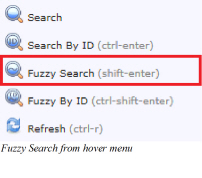
A fuzzy search is submitted with (shift + enter) or by hovering the search icon and click Fuzzy Search.
It looks for terms that are similar in spelling.
For example, to search for business but you don’t know the spelling and use the search term:
basness~
business is similar in spelling to basness and will be included in the search result together with any other similar words.
It is also possible to perform a fuzzy search by applying the tilde symbol (~) at the end of a search term.