Automatic Claim Reserves Accounting
There are three types of automatic claims reserve calculation functions in SICS:
- Balance Reserves Order
- General Reserves Order
- Financial Claim Reserve Order
EachEach of these functions calculates and books the respective amounts according to its defined rules.
The result of the Automatic Booking of Claim Reserves are booked with Entry Codes defined in the System Parameter Accounting/Entry Codes/Accounting Function (refer to the Accounting Functions listed below).
The Accounting Function used for the calculations depends on the type of reserve orders you are running:
- Balance Reserve order (Accounting Function: Balance Reserve Calculation)
- General Reserve order (Accounting Function: General Reserve Calculation)
- Financial Claim Reserve order (Accounting Function: Financial Claims Reserve)
Balance Reserves Order #
The Balance Reserves are determined by calculating the Technical Balance for a certain business, underwriting year and currency, and checking whether this is positive. If so, the amount of positive balance gets booked as a (negative) Balance Reserve such that the total balance for this business, underwriting year and currency(including the balance reserve) becomes zero.
This is only done as long as there are no Original Loss Reserves booked. As soon as there are Original Loss Reserves booked, any previously booked Balance Reserves (up to and including the Accounting Period on which the Original Loss Reserves are booked) are neutralised by a reverse Balance Reserve booking. This means that Original Loss Reserves are seen as the correct reserve amounts as soon as they are known, making any previously booked Balance Reserves superfluous.
Together with the reverse booking, the Technical Balance for all items with Accounting Periods greater than the one on which the Original Loss Reserves were booked, is recalculated. If it is positive, it is booked as a new Balance Reserve for these later booked items.
Original Loss Reserves for this purpose are any amount booked on Entry Codes in the Entry Code subcategories Original Loss Reserves or Additional Loss Reserves in the Entry Code Category Reserves, if these Entry Codes are in the Technical Balance Entry Code Group, which is selected on the order screen. The Entry Code subcategory Additional Loss Reserves may be included, as manual reserve bookings originating from the Underwriter’s or Accountant’s knowledge of the business are seen as being adequate, such that the system should not calculate balance reserves in this case.
Note! If the system is to reverse the Balance Reserve balance after Original Loss Reserves were booked as described, the respective Loss Reserve Entry Codes must be defined in the Technical Balance Entry Code Group for the Balance Reserve calculation. This group determines the selection of items included in the calculation.
Examples and further explanations can be found later in this chapter.
For more detailed information about Creation and Run of this order, refer to the section Create- and Maintain Accounting Orders.
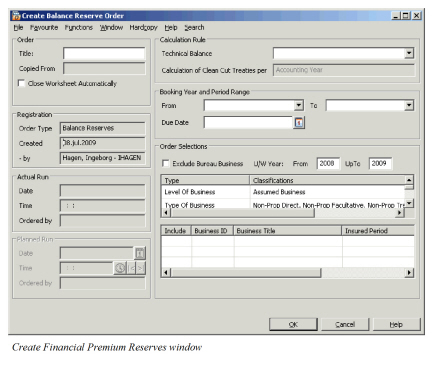
Field description 19. - Balance Reserve Order
| Field | Description |
|---|---|
| Technical Balance | Values: All Entry Code Groups defined in Entry Code Group Category Technical Balance BRES. Functional Impact: For the system to know which Entry Codes to find in each respective Business Ledger, amounts booked with the Entry Codes in the selected group will be the basis for a BalanceReserve. Usually it is enough to define only one valid Entry Code Group to be selected. (This should not be changed after the first calculationEapart from adding any newly created Entry Codes to itEto prevent erroneous results on rerunning the calculation at later dates.) Mandatory: Yes. |
| Calculation of Clean Cut Treaties per | Values: This is an output field only. Functional Impact: Shows the calculation basis applicable for Clean Cut Treaties. For all other businesses the Balance Reserve is determined per Underwriting Year, but for Clean Cut Treaties this can also be calculated per Accounting Year. The respective basis is allocated by your System Administrator using Reference Data Maintenance Dependencies. The selected bases can also be seen in System Administration - System Parameters - Accounting Tab - Entry Code Tab in the column CC Calculation Year on the right side of the screen, when you select the automatic Accounting function Balance Reserves. Mandatory: Yes |
| Booking Year and Period Range | The booking year and period range determines the range of bookings to be selected for the purpose of determining the Technical Balance. The system sums up all bookings on Entry Codes in the selected Technical Balance Entry Code group per U/W year (Clean Cut possibly per Accounting Year, if chosen) and per currency for this range of Booking Years and Periods. |
| From (Booking Year and Period) | Values: The range available in this drop-down list is determined by the Earliest Booking Year and Period set by your System Administrator in System Parameters. All Booking Years and Periods from this earliest one up to and including the most recent Booking Year and Period valid for booking are available in the drop-down list. Functional Impact: After having run the Balance Reserve order on a certain portfolio for the first time and closed the resulting Technical Worksheet, this From Booking Year and Period should not be changed any more and each subsequent order should be run with the same one. Otherwise you risk not summing up all of the same items of the Technical Balance as before, such that comparability of the Technical Balance to the previous calculated one is not given and you might produce erroneous results. Mandatory: Yes |
| To (Booking Year and Period) | Values: This drop-down list comprises the range of Booking Years and Periods open and valid for booking. In addition to the selection purpose, this is the one allocated to the respective result Balance Reserve booking, if any. Mandatory: Yes |
| Due Date | Values: Valid date Functional Impact: This date is assigned as Due Date to the result bookings on the Technical Worksheet. Mandatory: Yes |
Processing the Order #
For more details about running- and order selections of this type of order refer to the chapter Create- and Maintain Account Orders.
Example for BRES calculation 1:
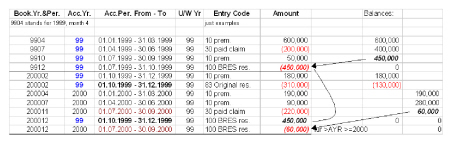
The first Balance Reserve neutralizes the sum of all technical balances booked so far on the treaty ledger. The result in the balance sheet is therefore zero in the financial year 99. During the financial year 2000 an original reserve is booked with booking code 99 on accounting year and period 99/3rd quarter. According to the rules, all Balance Reserve bookings up to and including the accounting year and period with the last original reserves shall be removed (set to zero). This is done when the order is run the next time. In the same run a new Balance Reserve is calculated for all accounts with an accounting year and period which is higher than the one of the last original reserve. If the sum of all technical accounts with an accounting year and period higher than the one of the last original reserve had been negative, the new balance reserve would have become positive. However, the positive Balance Reserve could not have become greater than the absolute value of the last original reserve (example: 310,000).
Example for BRES calculation 2:
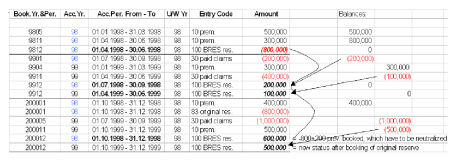
The first Balance Reserve booking does not need further explanation, except to say BYR/P 9801 to 9812 was used on the order screen. After the booking of the first Balance Reserve, the sequence of the technical accounts is irregular. The first and the second account for the 99 accounting year are received before the last account for 98 (4th quarter 98). As no original reserve is booked for accounting year 98, two accounting years are not complete at the same time. For the example above, BYR/P 9801 to 9912 was used on the order screen. The result of the second Balance Reserve run is two Balance Reserves are booked, one for the accounting year 98 and one for 99, instead of booking only one Balance Reserve including all accounts to be neutralized. If only one Balance Reserve had been booked, the result would have been the same. In both cases, the sum of the technical balances (+500,000) is neutralized by the sum of all Balance Reserves (-500,000). In the next financial period (booking year 2000) the 4th quarter account for 98 is booked together with an original reserve. According to the rules, the sum of all Balance Reserves booked up to and including the accounting year and period with the last original reserve is set to zero. This is done with the booking (100 BRES + 600,000). The Balance Reserves after the accounting year and period 98/4th quarter are calculated and adjusted with 100 BRES +500,000. This means that the total of all Balance Reserves after accounting year and period 98/4th quarter is a positive amount of 600,000, which neutralizes the total of all technical balances from accounting year 99 (-600,000). This positive Balance Reserve is possible because of the last original reserve, which amounts to -800,000.
Note! No original reserve has been booked after accounting year 99.
General Reserves Order #
The General Reserves Order enables the reinsurer to calculate and book his or her own claims reserve in addition to the cedent’s reserve. The General Reserve is calculated per Business, per Underwriting Year, per Section, per Accounting Classification and per original currency, if no currency conversion is chosen on the order screen. If you want to make use of the General Reserves calculation function, at least the Main Class of Business should be mandatory for the definition of the Accounting Classifications on the businesses. The reserve percentages to be applied are defined in the General Reserve Percentages table (see System Administration - Accounting - General Reserves Calculation Tab) per Main Class of Business or on a more detailed level.
For more detailed information about Creation and Run of this order, refer to the chapter Create- and Maintain Accounting Orders.
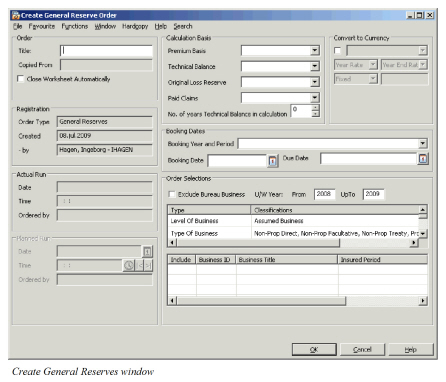
<Field description 20. - General Reserve Order
| Field | Description |
|---|---|
| Premium Basis | Values: Entry Code Groups for the Entry Code Group Category, Premium Income GERC Calculation Functional Impact: For the system to know which Entry Codes to find in each respective Business Ledger, amounts booked with the Entry Codes in the selected group will be the basis for a General Reserve. Usually it is enough to define only one valid Entry Code Group to be selected. (This should not be changed after the first calculationEapart from adding any newly created Entry Codes to itEto prevent erroneous results on rerunning the calculation at later dates.) Mandatory:Yes |
| Technical Balance | Values: Entry Code Groups for the Entry Code Group Category, Technical Balance GERC Calculation: Functional Impact: For the system to know which Entry Codes to find in each respective Business Ledger, amounts booked with the Entry Codes in the selected group will be the basis for a General Reserve. Usually it is enough to define only one valid Entry Code Group to be selected. (This should not be changed after the first calculationEapart from adding any newly created Entry Codes to itEto prevent erroneous results on rerunning the calculation at later dates.) Mandatory: Yes |
| Original Loss Reserve | Values: Entry Code Groups for the Entry Code Group Category, Original Loss Reserve GERC Calculation Functional Impact: For the system to know which Entry Codes to find in each respective Business Ledger, amounts booked with the Entry Codes in the selected group will be the basis for a General Reserve. Usually it is enough to define only one valid Entry Code Group to be selected. (This should not be changed after the first calculationEapart from adding any newly created Entry Codes to itEto prevent erroneous results on rerunning the calculation at later dates.) Mandatory: Yes |
| Paid Claims | Values: Entry Code Groups for the Entry Code Group Category, Paid Claims GERC Calculation Functional Impact: For the system to know which Entry Codes to find in each respective Business Ledger, amounts booked with the Entry Codes in the selected group will be the basis for a General Reserve. Usually it is enough to define only one valid Entry Code Group to be selected. (This should not be changed after the first calculationEapart from adding any newly created Entry Codes to itEto prevent erroneous results on rerunning the calculation at later dates.) Mandatory: Yes |
| Number of years in Technical Balance in calculation | Values: Any valid number Functional Impact: Default value is zero, which means that the Technical Balance does not enter in the calculation at all. If this field is put to any number > 0, the Technical Balance is taken into account in the maximisation for all U/W Years from U/W Year = Booking Year back to U/W Year = Booking Year - No. of years selected here + 1 year. Example: Input in field = 2. Booking Year for which to calculated General Reserves = 2004. Then for both U/W Year = 2004 and U/W Year = 2003, the Technical Balance is included in the maximisation, but not for U/W Years <=2002. Mandatory: Yes |
| Convert to Currency | Selected: If the box is selected, a currency and respective exchange rate has to be selected, according to which all original currencies are converted. The order then produces one result per currency selected here per respective detail level else. Cleared: Calculation is performed per original currency with one General Reserve per Currency. Relevant When: Select this check box if you want to calculate General reserves in one specific Currency only as per rate that you specify in the order. If you want General Reserves to be calculated and booked in original Currency per Business Ledger you leave the check box cleared. Functional Impact: When check box is selected you must select a Currency to book calculated reserve into. Values: All types of rates: Year Rate, Period Rate, Day Rate Functional Impact: Dependent of which value you select the system will convert original (booking) currencies following this rate. Mandatory: Yes, when check box is selected |
| Booking Year and Period | Values: All open Booking Periods from System Parameter Settings Functional Impact: Here the Booking Year and Period for which the General Reserve is to be calculated, has to be entered. The drop-down list comprises the range of (local) Booking Years and Periods open for booking. All bookings on Premium" and “Technical Balance Entry Codes from inception up to and including this Booking Year and Period are taken into account in the calculation. This Booking Year and Period is also assigned to the General Reserve result booking. Mandatory: Yes |
| Booking Date | Values: Input field for a valid date Functional Impact: This date is assigned as Booking Date on the result Technical Worksheet. The system updates the booking date automatically to the current date when retrieving unfinished technical or claim worksheets. This rule applies when the system parameter for booking dates on technical or claim worksheets does not allow closing a worksheet with a booking date in the past. Mandatory: No, system will give today’s date if not specified |
| Due Date | Values: Input field for a valid date Functional Impact: This date is assigned as Due Date to the result bookings on the Technical Worksheet. Mandatory: No, system will give today’s date if not specified |
Processing the Order #
Handling of the General Reserve order is the same as for the other accounting orders; refer to the section Create- and Maintain Account Orders for more details.
Example:
The order calculates the General Reserves per detail level, that is, per business, U/W year, section, Accounting Classification and original currency, if not to be converted, according to the following formula:
General Reserve = - Maximum ((1), (2), - (3), - (4), zero), with
- Premium * Reserve %,
- Technical Balance, if applicable (see above),
- Sum of Original Loss Reserves with Accounting Year less than or equal to Booking Year on order screen
- Sum of Original Loss Reserves with Accounting Year = Booking Year on order screen- 1 year plus Paid Claims with Accounting Year = Booking Year on order screen.
and Premium in (1) and Technical Balance in (2) = all ledger items booked on Entry Codes defined in the respective selected Entry Code Group up to and including the Booking Year & Period on the order screen, and Reserve % in (1) from the General Reserves Table in System Administration - Accounting - General Reserves Tab, if any defined.
Financial Claim Reserves Order #
The Financial Claims Reserves order enables you to calculate and book Claims Reserves on Insured Periods of businesses, on which there are no Original Loss Reserves booked. The system checks whether Original Loss Reserves exist for the current year, and if not, calculate a substitute for them by multiplying the previous Insured Periods Original Loss Reserves by a certain percentage. Details of the calculation rules can be found below. As these rules assume a certain way of accounting, this function is only used in special cases.
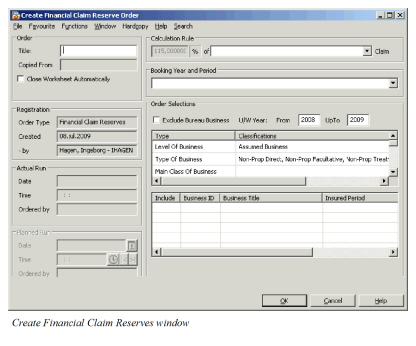
Field description 21. - Financial Claim Reserve Order
| Field | Description |
|---|---|
| Calculation Rule | Values: Output field the percentage is entered by your System Administrator in the System Administration (System Parameter Maintenance - Accounting - Reserve Calc. (P&C); see chapter on System Parameter Maintenance) and cannot be overwritten in this window. Functional Impact: A percentage of e.g. 115% means that the order calculates a Claim Reserve for the current Insured Period as 115% of the previous Insured Periods Original Loss Reserve, if applicable. It is however only reserves on previous U/W Years with Accounting Year equal the U/W Year that is included as basis. Values: Entry Code Groups for the Entry Code Group Category, Original Loss Reserve, FCR Calculation Functional Impact: For the system to know which Entry Codes to find in each respective Business Ledger, amounts booked with the Entry Codes in the selected group will be the basis for a Financial Claim Reserve. At least one Entry Code Group has to be defined, with all the Reserve Entry Codes, which for this purpose are viewed as Original Loss Reserves. Mandatory: Yes |
| Booking Year and Period | Values: All open Booking Periods from System Parameter Settings Functional Impact: Here the Booking Year and Period for which the Financial Claim Reserve is to be calculated, has to be entered. All Claim Reserves booked on Business Ledger with this period or earlier will be included in calculation. This Booking Year and Period is also assigned to the Claim Reserve(s) that is calculated and booked by the order. Mandatory: Yes |
Processing the Order #
Handling of the Financial Claim Reserve Order is the same as for the other accounting orders; refer to the chapter Create- and Maintain Account Orders for more details.
The order calculates the Financial Claim Reserves per detail level, that is, per Business, U/W Year, Section, and Accounting Classification.