Occurrence Year Allocation of Losses order
If you want to reallocate the Occurrence Year of loss bookings and to distribute according to cumulative earned premium per Booking Year, this can be automatically done by running the Occurrence Year Allocation of Losses Order. SICS allocates and reallocates Occurrence Year for all loss bookings on each included business where the Occurrence Year Split has been defined on the Administration Conditions. Loss details found on the business ledger for the actual Underwriting Year and Booking Year/Period are split in one or more loss details per Occurrence Year according to how the relevant accumulated earned premium (both actual and estimates) are split per Booking Year. This is repeated for all Loss Entry Codes included in the selected group Occ. Year Split Loss Basis on the Administration Condition.
- The extraction of premium bookings in the Occurrence Year Allocation of Losses calculation are limited to the estimation period, where estimation period is defined as business Insured Period + Extended Estimation period defined in the system parameter Multi GAAP, General page. If the bookings belong to a business with a Claim Basis/Type of Business defined in the system parameter, the bookings are limited to the booking period up to and including months defined in the Number of Months.
Example;
Business with Insured Period 01.01.2015 - 31.12.2015;
Claim Conditions = Claims Made
Type of Business = Non-Proportional
Number of Months = 12 (after 31.12.2015)
According to above definition, bookings up to and including month 12, 2016 will be included in the Occurrence Year Allocation of Losses calculation.
- The Entry Code for Premium and Loss details used in the Occurrence Year Allocation of Losses calculation are those included in the Entry Code Groups defined in the fields Occ. Year Split Prem. and Occ. Year Split Loss Basis respectively on the Administration Conditions.
Create Occurrence Year Allocation of Losses Order; #
- Open up the Find: Accounting Order Window
- Click the Create New button
- Select Occurrence Year Allocation and then Occurrence Year Allocation of Losses
- Specify your selection criteria for the businesses to be part of the Occurrence Year Allocation of Losses and select List Business
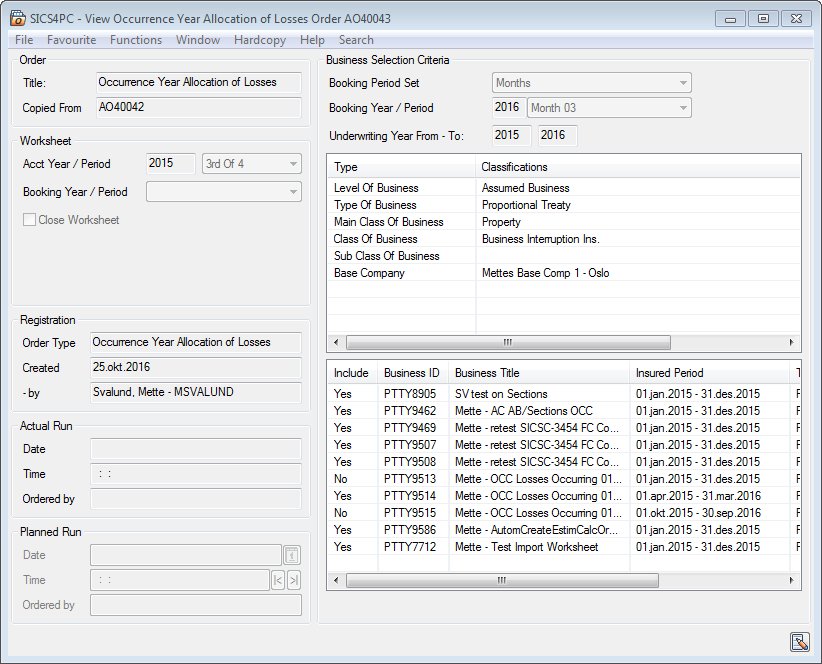
Order Information #
| Field | Description |
|---|---|
| Title: | Type in the title of the order you are creating Value: Free text Functional Impact: Search criterion in the Title field in the ‘Find: Accounting Order’ window Mandatory: No |
| Copied from: | output field with information of the order-id copied from Value: Text field Functional Impact: Information only, to see that one order has been used as a template for the other Mandatory: Always inserted by the system and cannot be overwritten |
Worksheet #
| Field | Description |
|---|---|
| Acct Year / Period: | Enter a year and an Accounting Period to be assigned to all loss bookings created by the order Functional Impact: The loss booking details created according to the allocation of Occurrence Year are assigned with this Accounting Year/Period value. Mandatory: Yes |
| Booking Year / Period: | The Booking Year/Period is used to override the default Booking Year/Period on the worksheet. Value: Booking Year/Period (e.g. year + month/quarter/half-year) Functional Impact: The selected Booking Year/Period is assigned to the loss details created by the order. If no value is given, then the default Booking Year/Period (from <Default Settings>) is assigned. Mandatory: No |
| Close Worksheet: | Default is deselected Selected: Select this field to close the Worksheets created by the order Functional Impact: It is not possible to rerun the order when worksheets are closed. Cleared: Worksheets are created with status ‘Open’ Relevant when: Select the check-box when you want to close the worksheet produced by the order. Do not select the check-box when you want to control the calculated amounts and possibly rerun the order |
Registration Information #
| Field | Description |
|---|---|
| Order Type: | This field displays the accounting order type. Value : Occurrence Year Allocation of Losses. Output field only Functional Impact: Find Occurrence Year Allocation of Losses Order Mandatory: Yes |
| Created: | This field shows the date the order was created. It is output only, so you cannot change this date. Value : Date (ddmmyyyy) Output field only Derived from: Today’s date Functional Impact: Find Occurrence Year Allocation of Losses Order Mandatory: Yes |
| By: | This field shows who created the order. Values: Full name and logon ID Output field Functional Impact: Find Occurrence Year Allocation of Losses Order Mandatory: Yes |
| Actual Run: | Indicates the date the order was run Value : Date (ddmmyyyy) Output field only Derived from: Actual date the order was run Functional Impact: Find Occurrence Year Allocation of Losses Order Mandatory: Yes |
| Time: | The time the order was run Value : Time (hh:mm:ss) Output field only Derived from: Actual time the order was run Functional Impact: Find Occurrence Year Allocation of Losses Order Mandatory: Yes |
| Ordered by: | The name of the person who ran the order Value : Full name and logon ID Output field only Derived from: Register of system users in SICS Functional Impact: Find Occurrence Year Allocation of Losses Order Mandatory: Yes |
Business Selection Criteria #
| Field | Description |
|---|---|
| Booking Period Set: | Defines a group of Booking Periods. Determines the available Booking Periods in the Period field below Values: Months, Quarter or Half Years Mandatory: Yes (only when Booking Year/Period is to be defined) |
| Booking Year/Period: | (Up to and including). If given, used to limit the premium and losses to be included in the calculation. Values: Year: Free input of Year value, Period: A set of periods according to definition in Period Set above, e.g. 1st Quarter, 1st Half Year, Months 09, etc. Functional Impact: All bookings having Booking Year/Period up to and including these defined values are extracted Mandatory: No |
| Underwriting Year From - To | Values: Year From - To yyyy - yyyy Functional Impact: The system finds business(es) with Underwriting Year(s) equal to or within these years. It is possible to enter either a From year, a To year or both Mandatory: No |
| Level of Business: | Values: Administrative Business, Assumed Business, Cedent’s Contract, Insured’s contract, Master Agreement, Outward Cedent’s Contract, Policy Ceded, Portfolio Program, Retrocessionaire’s Participation, Unplaced Share, XL CA Of Inward, XL CA Of Outward. Note; Level of Business must be either inward or outward direction Functional Impact: System will only include the selected Level of Business(es) in order. Mandatory: Yes (at least one item must be selected) |
| Type of Business: | Values: Proportional Treaty, Non-Prop Treaty, Non-Prop Facultative, Proportional Facultative, Proportional Direct, Non-Prop Direct Functional Impact: All businesses having these defined values are extracted Mandatory: Yes (at least one item must be selected) |
| Main Class of Business, Class of Business, Sub Class of Business, Base Company and Additional Classifications | Values: You may select from all values defined in the system Functional Impact: System will include all values if NO selection. If you select one or more values, only the Insured Periods matching one or more of the selected value(s) within each type will be included by the order. Mandatory: No. If not defined, all values are per definition selected |
List business/exclude business/revoke exclusion/add business/clear list/copy order #
When all necessary business selection criteria are defined, you can list business
- From the lower container of the Occurrence Year Allocation of Losses Order, select option ‘List Business’ from the menu. System lists all businesses satisfying the Underwriting Year From - To and the Business Selection Criteria defined on the order. Businesses which are ‘Commuted’ or marked ‘Cease Accounting’ (Business/Insured Period) are not listed.
- Select ‘Exclude Business’ to exclude the selected businesses from the order. This must be done before running the order
- Select ‘Revoke Exclusion’ to include businesses you previously excluded from the order. This must be done before running the order
- Select ‘Add Businesses’ to manually add new businesses to the list
- Select ‘Clear List’ to clear the list of all businesses. This must be done before an order is processed
- Select ‘Properties’ to open the properties of the selected business
Run an Occurrence Year Allocation of Losses Order #
Select the menu option Run Now or Request Scheduled Job. When you run the Occurrence Year Allocation of Losses Order, the system considers all the included businesses/underwriting years on the order where the occurrence year split has been define on the Administration Conditions. The system is splitting loss details found on the ledger for the actual Underwriting Year and Booking Year/Periods (refer to above) in one or more loss details per occurrence year.
Example:
Business with Insured Period 01.01.2014 - 31.12.2014 and with an extended estimation period of 12 months.
| Booking Year | Booking Period | Occurrence Year | Earned Premium | Loss |
|---|---|---|---|---|
| Existing booking on Closed Technical Worksheets | ||||
| 2014 | 1st Half Year | 2014 | 4000 | |
| 2014 | 2nd Half Year | 2014 | 3000 | 2000 |
| 2015 | 1st Half Year | 2014 | 2000 | 1000 |
| Running the Occurrence Year Allocation of Losses order 1stHalf Year 2015 will make the following new loss details | ||||
| 2015 | 1st Half Year | 2014 | -667 | |
| 2015 | 1st Half Year | 2015 | 667 | |
| New bookings on the ledger in next period | ||||
| 2015 | 2nd Half Year | 2014 | 1000 | |
| Running the Occurrence Year Allocation of Losses order 2ndHalf Year 2015 will make the following new loss details | ||||
| 2015 | 2nd Half Year | 2014 | -233 | |
| 2015 | 2nd Half Year | 2015 | 233 | |
| New bookings on the ledger in next period | ||||
| 2016 | 1st Half Year | 2014 | 2000 | 500 |
| Running the Occurrence Year Allocation of Losses order for 1stHalf Year 2016 will make the following new loss details | ||||
| 2016 | 1st Half Year | 2014 | -150 | |
| 2016 | 1st Half Year | 2015 | 150 |
Formulas used in the Occurrence Year Allocation of Losses Order; #
- [Earned Premium BYR (yyyy)/Total Earned Premium IP* Total Loss IP] - Total Loss OYR (yyyy) = Current Loss OYR (yyyy)
- [Earned Premium BYR (yyyy+1)/Total Earned Premium IP* Total Loss IP] - Total Loss OYR (yyyy+1) = Current Loss OYR (yyyy+1) **Actual figures used in the above Allocate Occurrence Year calculation after 1st Half Year 2015:**
Occ Year 2014: [7000/90003000]-3000=-667
Occ Year 2015: [2000/90003000]-0= 667
Actual figures used in the above Allocate Occurrence Year calculation after 2nd Half Year 2015:
Occ Year 2014: [7000/100003000]-2333=-233
Occ Year 2015: [3000/100003000]- 667= 233
Actual figures used in the above Allocate Occurrence Year calculation after 1st Half Year 2016:
Occ Year 2014: [7000/100003500]-2600=-150
Occ Year 2015: [3000/100003500]- 900= 150
Definition of the elements in the above formulas: #
- Earned Premium BYR (yyyy)= Premium booking details made with Entry Codes defined for the selected Entry Code Group in the field Occ. Year Split Prem. Basis. Both actuals and estimates. The Premium BYR (yyyy) is cumulated premium booked on closed Technical Worksheets for one Currency/IP/Section/AC/Booking Year (yyyy)
- Total Earned Premium IP= Premium booking details made with Entry Codes defined for the selected Entry Code Group in the field Occ. Year Split Prem. Basis. Both actuals and estimates. The Total Premium IP is cumulated premium booked on closed Technical Worksheets for one Currency/IP/Section/AC
- Total Loss IP= Loss booking details made with Entry Codes defined for the selected Entry Code Group in the field Occ. Year Split Loss Basis. The Total Loss IP is cumulated loss booked (per Loss Entry Code) on closed Claim/Technical Worksheets for one Currency/IP/Section/AC
- Total LossOYR (yyyy)= Loss booking details made with Entry Codes defined for the selected Entry Code Group in the field Occ. Year Split Loss Basis. The Total LossOYR (yyyy) is cumulated loss booked (per Loss Entry Code) on closed Claim/Technical Worksheets for one Currency/IP/Section/AC/Occurrence Year (yyyy) combination
- CurrentLossOYR (yyyy)= Split of loss booking detail (per Loss Entry Code) with Entry Codes defined for the selected Entry Code Group in the field Occ. Year Split Loss Basis. The Current Loss OYR (yyyy) is the (re)allocation of loss (per Loss Entry Code) to be booked on the current order for one Currency/IP/Section/AC/Occurrence Year (yyyy) combination
NB! The Claim bookings in the above definitions may be booked on Claim or Technical Worksheet. Claim Bookings made on Claim Worksheet are included only when the field ‘Block Claim’ is selected and the field ‘Exclude in Occurrence Year Allocation order’ is deselected (refer to Claim, tab Section Specific) If the Claim fields is not defined according to above, the bookings are limited to Technical Worksheets and Loss bookings with a link to headline Loss are excluded.
After running the order, you can inspect the worksheets produced. From the menu button select the option Worksheet. If the order has produced worksheets with status Open you can inspect the created bookings. You can inactivate the produced worksheets by selecting the menu option Inactivate Worksheet. You can edit the order, e.g. change the extraction criteria or select the Closed Worksheet box, by selecting the option Edit. The edit option is disabled if the created worksheets have status Closed.
From the menu button, select ‘Copy to’ to copy order to another Occurrence Year Allocation of Losses Order