Handle Claim Conditions
You use this condition to register how claims falling within your part of the business should be handled, how expenses should be calculated, whether interests apply and how they should be calculated, and annuity terms. Not all conditions are applicable to all types of business and the Claim Condition window varies depending on the type of business.
|

Claim Condition button | Click the Claim Condition button in the Navigation bar. You see the Claims condition dialog box. |
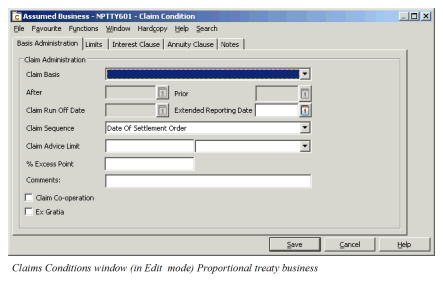
Register Claim Conditions #
- Find and open your business.
- Select the Claim Condition button on the Navigation bar.
- Enter the details specified in your contract.
- Select OK.
| Field | Description | Location |
|---|---|---|
| Claim Basis: | Specifies on which basis claims in your contract should be handled. Values: <None>, Begin Of Construction, Causation, Claims Made, Awards Made, LO/RA After, LO/RA Prior, Losses Occurring, Occurrence Notified, Occurrence With Sunset, Occurrence Without Sunset, Risks Attaching Default: <none> Validation(s): Depends on Type and Level of Business, e.g. for facultative business, multiple values are available, for proportional outward cedent’s contact also Claim Advised Date is available. Functional impact: Validate Claim Loss Dates Proportional Retrocession Accounting Mandatory: Customised by your company |
Basis Administration tab/Basis Administration Limits tab |
| Extended Reporting Date | The date indicates the latest date claims can be reported by the original policyholders to be covered within the insured period. Values: Date-field greater or equal to Insured Period start date. Functional impact: Create Claim Allocate Claim Protection Mandatory: No |
Basis Administration tab/Basis Administration Limits tab |
| Retroactive Date | This date, optional for entrance, indicates the earliest occurrence date (date of loss) accepted by the Reinsurer in case of e.g. Claims basis Claims Made. The claim retroactive date can be defined for facultative and direct business. Values: Date-field Functional impact: Validation against Date of Loss. Mandatory: No |
Basis Administration tab |
| After | Losses occurring on Risks attaching with original policy inception dates prior to this date are not covered by this policy even if loss occurs within insured period Values: Date-field Validation(s): Only for Non-Proportional Treaty business, claim basis LO/RA After Date <= to Inception date Functional impact: claims Mandatory: Yes when claim basis = LO/RA After |
Basis Administration tab |
| Prior | Losses occurring on Risks attaching with original policy inception dates after this date are not covered by this policy even if loss occurs within insured period. Values: Date-field Validation(s): Only for Non-Proportional Treaty business, claim basis LO/RA Prior Date<= to inception date Functional impact: Claims Mandatory: Yes when claim basis = LO/RA Prior |
Basis Administration tab |
| Claim Run Off Date | The claim run-off date will indicate the final termination of the agreement. Values: Date-field Validations: Only for Non-Proportional Treaty business Functional impact: None. Mandatory: No |
Basis Administration tab |
| Claim Sequence: | Used to indicate the sequence in which losses shall be considered. Values: date of loss order, date of settlement order, <none>. Default value: date of settlement order Functional impact: Claims Mandatory: Yes |
Basis Administration tab |
| Claim Advice Limit: | The amount specified in your contract for when a claim has to be advised to the reinsurer. Select the currency. This is automatically set to 0.00 and Main Currency when you check the “Reinstatement Exhausted Drop”, and cannot be modified unless this check-box is cleared. Values: Numeric field. Functional impact: Claims Recovery Mandatory: No |
Basis Administration tab |
| % Excess Point Only for Non-Proportional business |
The percentage of the excess point that a loss has to reach before ceding company has to advise the reinsurer of the occurrence. This is automatically set to 0% when you check the “Reinstatement Exhausted Drop”, and cannot be modified unless this check-box is cleared. Values: Numeric field Functional impact: Claims Recovery. Mandatory: No |
Basis Administration tab |
| Comments | Values: Free text field. Functional impact: None Mandatory: No |
Basis Administration Limits tab |
| Ex Gratia | Select this check box to indicate that ex-gratia payments can be accepted. Values: Selected, cleared Default value: Cleared Functional impact: None. Mandatory: No |
Basis Administration tab |
| Claim Bdx Indicator | Select this check box to indicate that claims are reported through borderaux.Indicator should be set on Main Section only, but if you have created a local condition on a child section, the indicator must be set and admimistered separately for this section, and it must always be set to the value of the Main Section. Values: Selected, cleared Default value: Cleared Functional impact: Assign Claim to existing claim, Claim Program Renewal, Claim Accounting. Mandatory: No |
Basis Administration tab |
| Reinstatement Exhausted Drop | Select this check box to indicate that the layer drops to underlying layer when that has been exhausted. Available on Non-Proportional OCC, Protection Programmes, and their placements only. Values: Selected, cleared Default: Cleared Functional impact: Recovery Calculation Mandatory: No |
|
| Increase FGU with OCC Retention | Indicatives whether the recoveries start with the first dollar; without first deducting the reinsurance contract excess. Values: Selected, cleared Default: Cleared Validations: Level of Business must be Outward Cedent’s Contract Type of Business must be Non-Proportional Treaty ITB rule for retention cannot be defined. Mandatory: No Functional impact: Recovery Calculation |
|
| Apply Inwards Claim Limits for Single Claims | Set this indicator if you want the recovery calculation to apply the assumed claim’s claim limit cover and excess in the calculation, instead of the cover and excess defined on the outwards contract. Values: Selected, cleared Default: Cleared Validations: Level of Business must be Outward Cedent’s Contract Type of Business must be Non-Proportional Treaty ITB rule for Retention cannot be defined. Increase FGU with OCC Retention must be selected. Mandatory: No Functional impact: Recovery Calculation for single claims |
|
| Risk Warranty | Indicates whether the contract is subject to a two risk warranty. Values: Selected, cleared Default: Cleared Validations: Level of Business must be Outward Cedent’s Contract or Placement of OCC Type of Business must be Non-Proportional Treaty Type of Participation must be of type Event Mandatory: No Functional impact: Recovery Calculation Other Claim Condition items |
|
| Minimum Number of Risks | Defines the required number of risks for any one loss to be included. Values: Integer between 2 and 10 Default: 2 Validations: Level of Business must be Outward Cedent’s Contract or Placement of OCC Type of Business must be Non-Proportional Treaty Type of Participation must be of type Event Risk Warranty must be Selected Must be present when Risk Warranty is Selected Functional impact: Recovery Calculation |
|
| Claim Co-operation | Select this check box to indicate that a claim co-operation clause exists. Values: Selected, Cleared Default: Cleared Validations: Type of Business must be: Non-Proportional Direct, Proportional Facultative, Non-Proportional Facultative Mandatory: No Functional impact: None. |
Basis Administration tab |
| Own Account Covered | Indicates whether the protected assumed business own retention is also covered by the Excess of Loss Protection for Common Account. Values: selected, not selected Default: not selected Validations: Level of Business must be XL CA of Outward Mandatory: Yes Functional impact: Retrocession Calculation order for Proportional OCC with XLCA protection |
Basis Administation tab |
| Classification Priority Upon Claims | Used to indicate on which sections claims will have priority compared to claims of another section of the same business. Values: Numeric field two characters Default: 1 Validation: Only for Non-Proportional Direct or Facultative business Functional impact: None Mandatory: No |
Limits tab |
| Loss Adjustment Expenses/Costs | Indicate how the costs should be considered and calculated in the system. Examples: Part of liability and In addition to liability. Values: All values are system defined. Validation(s): Only for Non-Proportional business Functional impact: From Ground Up Claims For further details about the calculation, refer to FGU Handling in the Claims chapter. Mandatory: No |
Limits tab/Basis Administration Limits tab |
| Declaratory Judgement | Let you indicate how declaratory judgement costs should be split between the reinsurer and the reinsured. Amount: You can also indicate an amount to be considered as the maximum amount. Example: Capped means that there can be a certain maximum amount. Uncapped means that there are no limitations. Declaratory judgement costs are particular to the US market. Values: <None>,Follow Form, In addition To, In Addition To - Capped, In Addition To - Uncapped, No Automatic Calculation, Part Of Liability, Proportionate Stabilised Default value: <None> Validation(s): Only for Non-Proportional business Functional impact: None. Mandatory: No |
Limits tab/Basis Administration Limits tab |
| ECO ( Extra Contractual Obligations) | Here you can indicate the percentage specified in your contract. Amount: You can also indicate an amount to be considered as the maximum amount Values: In addition to -Capped and In addition to - Uncapped. Functional impact: None. Mandatory: No |
Limits tab/Basis Administration Limits tab |
| XPL ( Excess Policy Limits) | Here you can indicate the percentage specified in your contract. Amount: You can also indicate an amount to be considered as the maximum amount Values: In addition to -Capped or In addition to - Uncapped. Functional impact: None. Mandatory: No |
Limits tab/Basis Administration Limits tab |
| Original Loss Limit | In these fields you can record warranties concerning the Original Loss Limit plus a currency. Values: Numeric field Mandatory: No |
Limits tab/Basis Administration Limits tab |
| Original Loss Priority | In these fields you can record warranties concerning the Original Loss Priority Plus a currency. Values: Numeric field Mandatory: No |
Limits tab/Basis Administration Limits tab |
| Interest Clause Type | Here you can record how interests should be split between the reinsurer and the reinsured. Values: <None>, No Automatic Calculation, Proportionate Stabilised Validation(s): Only for Non-Proportional business Functional impact: From Ground Up calculation For further details about the calculation, refer to FGU Handling in the Claims chapter. Mandatory: No |
Interest Clause tab |
| System | Indication of how annuity is applied to the contract. Values: None, Additive, Proportional, Annuity Additional Method, Annuity Proportional Method, Method 1, Method 2 Validation(s): Only for Non-Proportional business Functional impact: When defined, the system is displayed on business highlights, claim highlights, and claim business information tab. Mandatory: No |
Annuity Clause tab |
| Redemption | Values: After a number of years, Other arrangements: Validation(s): Only for Non-Proportional business Selecting After a number of Years enables the year field Selecting Other Arrangements enables the redemption arrangements field Mandatory: No |
Annuity Clause tab |
| Redemption Arrangements | Values: <none>, beginning of contract, Date of loss Validation(s): Only for Non-Proportional business |
Annuity Clause tab |
| Interlocking Clause | Select this check box if an interlocking clause exists on the business. Validation: Only for non-proportional treaty business Functional impact: By selecting this, the system allows you to create interlocking claims. For further details, refer to the Claims chapter. Values: Selected, cleared Default: Cleared Mandatory: No |
Limits tab |
| Original assumed Expenses | Used to indicate if the loss expenses booked on assumed business are covered by the retrocessionaires of the outwards cedent contract. Validation: Outwards Cedent’s Contracts- Non-Proportional and Proportional US Quota Share Functional impact: Recovery calculations. Values: Excluded, Part Of Liability, Prorata In Addition. Mandatory: No |
Limits tab |
| Additional Loss Adjustment Expenses | Select this check box if in addition to original expenses retrocessionaires should also pay additional expenses. Validation: Non-Proportional outward cedent’s contract. Functional Impact: Recovery calculations Values: Numeric field Validation: less than or equal to 100% Mandatory: No |
Limits tab |