Handle Deductibles Conditions
Deductible Conditions is where you define conditions for amounts that the reinsurer can deduct from a loss. This is often necessary for offer or quote request evaluation, and for accounting purposes.
|

Deductibles conditions
button | When you click the Deductibles Conditions button you see the Deductibles Conditions window. Select either Loss Participation or Loss Corridor from the drop-down list in order to see the Loss Participation or Loss Corridor window, where you define belonging conditions. (There is also a field for comments, where you can put your cursor and type notes.) |
Loss Participation #
This window is for entering terms defining cedent s' participation in payment of claims exceeding a certain limit. When you select Loss Participation from the drop-down list, you see a new window.
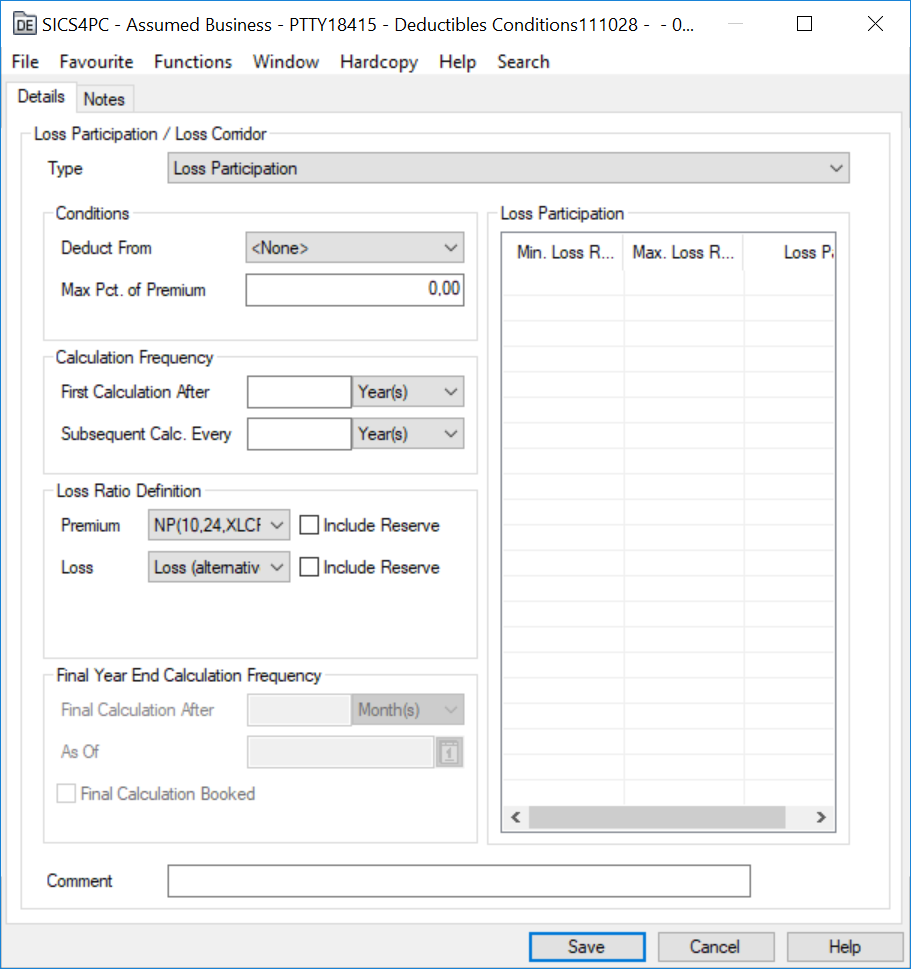
The window is divided into three section s: Condition, Calculation Frequency, and Loss Participation.
Conditions: Here you indicate where the loss participation deduction should be taken from, and what the maximum percentage of the premium is.
Use the drop-down list to select between Loss Reserves, Paid Losses, Paid Losses Then Reserves, or Reserves Then Paid Losses from the Deduct From field. Then, type in the maximum percentage of the earned premium in the field below it.
Loss Participation: This section shows you a chart of loss participation percent related to minimum loss ratio and maximum loss ratio. Click the right-mouse button to add or delete rows.
Enter the minimum loss ratio and the loss participation percentage, and the system will generate a chart that includes the maximum loss ratio. If you make changes to data in the chart, you see the new generated chart when you click OK to save the information and return to View mode.
Calculation Frequency #
First Calculation After refers to the first calculation that is done. For example, if you select Month(s) from the drop-down list, and then type a 2 in front of it, you indicate that the first calculation will be made after the second month of the Insurance From date for that business (indicated on the Navigation bar).
Subsequent Calculations Every refers to how often calculations are to be made after the first calculation. In other words, if you select Year(s) from the drop-down list, and type a 2 in front of it, you indicate that subsequent calculations will be made every other year. The final calculation will always be at the end of the agreement.
Final Year End Calculation Frequency #
This section is for Informational and reporting purpose, which indicates the final calculation for the concerned condition. The application of this section is restricted to the Inwards Level of Business. The values can be filled in this section by selecting the menu option where an option name as ‘Edit Final Year Calculation’ is available and its edit function is restricted through a use case defined in security -“Business Conditions Year End Calculation”.
Final Calculation after To indicate when a last calculation is contractually specified (if applicable). The following field having a drop-down selection of “Month(s)” or “Year(s)”, with Months as default.
As Of will be a date format field for the Final Calculation booking.
Final Calculation Booked Check Box for when a Final Calculation is booked (indicating no further calculation is due).
Loss Corridor #
In this window you can enter conditions for defining the cedent’s share of claims/losses within an agreed corridor. When you select Loss Corridor from the Type drop-down list, you see a new window.
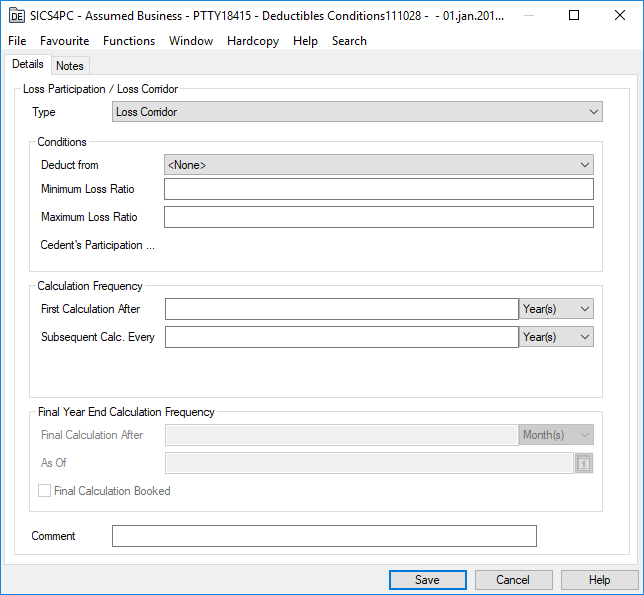
It is divided into two section s: Conditions, and Calculation Frequency.
Conditions: Use the drop-down list to select the loss type from where the loss corridor deduction should be taken. Here you also enter the minimum loss ratio, the maximum loss ratio of the corridor, and the cedent’s participation percentage.
First Calculation after refers to the first calculation that is done. For example, if you select Month(s) from the drop-down list, and then type a 2 in front of it, you indicate that the first calculation will be made after the second month of the Insurance From date for that business (indicated on the Navigation bar).
Subsequent calculations every refers to how often calculations are to be made after the first calculation. In other words, if you select Year(s) from the drop-down list, and type a 2 in front of it, you indicate that subsequent calculations will be made every other year. The final calculation will always be at the end of the agreement.
Final Year End Calculation Frequency #
This section is for Informational and reporting purpose, which indicates the final calculation for the concerned condition. The application of this section is restricted to the Inwards Level of Business. The values can be filled in this section by selecting the menu option where an option name as ‘Edit Final Year Calculation’ is available and its edit function is restricted through a use case defined in security -“Business Conditions Year End Calculation”.
Final Calculation after To indicate when a last calculation is contractually specified (if applicable). The following field having a drop-down selection of “Month(s)” or “Year(s)”, with Months as default.
As Of will be a date format field for the Final Calculation booking.
Final Calculation Booked Check Box for when a Final Calculation is booked (indicating no further calculation is due).