Handle Inuring to Benefit Conditions
|

Inuring to Benefit Rules button | The Inuring to Benefit Rules button appears only on Non-Proportional Outward Cedent’s Contracts and on Proportional US Quota Share. These conditions are mandatory in order to be able to use the Non-Proportional Recovery System (explained in the Retrocession Accounting chapter)to its full extent. The links that are created to a Program Section or OCC from this condition indicate where unrecoverable losses on this Non-Proportional Outward Cedent’s Contract or US Quota Share OCC are considered for possible recovery. |
Click the Inuring to Benefit Conditions button on the Navigation bar of a Non-Proportional Outward Business or a proportional US Quota Share to see the window for entering inuring to benefit conditions
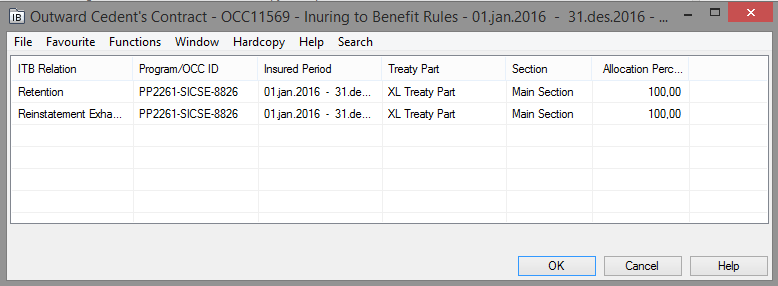
To enter a condition:
- Click the IB button in the Navigation bar.
- Click in the display list and select Add Inuring to Benefit from the pop-up list.
- Select one of the available inuring to benefit reasons from the Retention drop-down list:
- Aggregate Deductible: if loss remains in aggregate deductible
- Reinstatement Exhausted: if aggregate limit has been exceeded
- Retention: the amount below excess
- Through Top: if the amount exceeds cover
- Unplaced: the unplaced share of the Outward Cedent’s Contract
- Select a Program / OCC Identifier and an Insured Period from the drop-down lists.
- Select one of the available sections. And if this is a Program ITB link, a Treaty Part (XL or Prop) can also be selected to indicate which Treaty Part these items should inure to.
- Enter an Allocation Percentage (default given as 100%).
- Click OK when you have allocated all selected inuring to benefit reasons to a protection.
Note! You can only define rules for Retention and Through Top on a Proportional US Quota Share. For Non-Proportional Treaty you cannot define Retention rule if any of the indicators “Increase FGU with OCC Retention” or “Apply Inwards Claim Limits for Single Claims” have been activated on its' Claim Condition..
To delete a condition:
- Click the IB button in the Navigation bar.
- Click the Edit button.
- Select the condition you want to remove in the display list.
- Select Delete Inuring to Benefit from the pop-up list.
This removes the link to the Protection Program Section.