Handle Portfolio of Reserve Calculation Conditions
|

Portfolio Calculation Reserve button | You can define conditions enabling the system to calculate and book: |
- Premium Portfolio based on Premium Reserve
- Loss Portfolio based on Loss Reserves
- Other Portfolio based on Other Reserve
The conditions apply for Outward Cedent’s Contract (OCC) and Retrocessionaire’s Participation (RP). Running the Retrocession Calculation order performs the calculations. (Refer to the chapter The Retrocession Calculation order for further information.)
The Portfolio of Reserve is calculated for an RP 1) when the RP’s share has been changed from one Insured Period to the next or 2) independently of a change in share. Refer to the chapter Calculate Portfolio of Reserve among the Proportional Retrocession Calculations for further information about how the conditions are used in the calculations.
Define Portfolio Calculation Reserve Conditions #
- Select the PO (Portfolio Calculation Reserve) button on the OCC Navigation bar
- Select a Premium Reserve group from the Entry Code Group drop-down list
- Enter a Portfolio Entry % and Withdrawal % and/or
- Select up to 5 Loss Reserve groups from the Entry Code Group drop-down list
- Enter a Portfolio Entry % and Withdrawal % and/or
- Select up to 5 Other Reserve groups from the Entry Code Group drop-down list.
- Enter a Portfolio Entry % and Withdrawal %
- Select if Portfolio Withdrawal/Entry should be calculated only when there is a change in share from one Insured Period to the next or independent of a change in share.
- Click Save to update the conditions
The Entry Code Groups are predefined. (See your system administrator for further information about these predefined groups.)
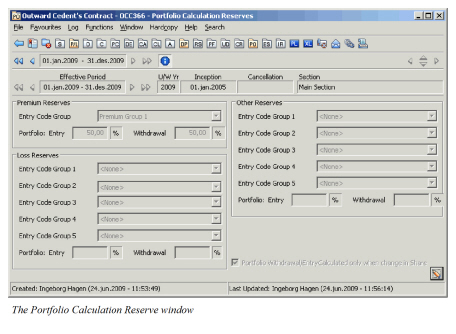
| Field | Description |
|---|---|
| Premium Reserve - Entry Code Group | Predefined groups of Premium Reserve Entry Codes. Entry codes defined in the selected group have to be included in the OCC Business Ledger in booking currency in order to get the portfolio calculated to the RPs. The total amount with these Entry Codes will be the basis for calculating the Portfolio Entry at the start of the Insured Period and the Portfolio Withdrawal at the end of the Insured Period. Values: <None>, Name of Entry Code Groups Default: <None> Mandatory: Yes, for the calculation to be performed Functional Impact: For Outward Proportional Treaty Retrocession Calculation order |
| Portfolio Entry / Withdrawal % | The total amount for premium reserve basis according to the Entry Code group selected is multiplied by the percent values entered to get the portfolio entry/withdrawal calculated. Values: A percent (max value 999,99) Derived from: The field is enabled by selection of a Premium Reserve Entry Code Group. Mandatory: Yes Functional Impact: For Outward Proportional Treaty Retrocession Calculation order |
| Loss Reserves - Entry Code Group 1 - 5 | Predefined groups of Loss Reserve Entry Codes. Entry codes defined in the selected group have to be included in the OCC Business Ledger in booking currency in order to get the portfolio calculated to the RPs. The total amount with these Entry Codes will be the basis for calculating the Portfolio Entry at the start of the Insured Period and the Portfolio Withdrawal at the end of the Insured Period. Up to 5 different Entry Code groups can be selected. Values: <None>, Name of Entry Code Groups Default: <None> Mandatory: Yes, for the calculation to be performed Functional Impact: For Outward Proportional Treaty Retrocession Calculation order |
| Portfolio Entry / Withdrawal % | The total amount for loss reserve basis according to the Entry Code group selected is multiplied by the percent value entered to get the portfolio entry/withdrawal calculated. This calculation is performed for each of the groups within the Loss Reserve, using the same percentage. Values: A percent (max value 999,99) Derived from: The field is enabled by selection of a Loss Reserve Entry Code Group. Mandatory: Yes Functional Impact: For Outward Proportional Treaty Retrocession Calculation order |
| Other Reserves - Entry Code Groups 1- 5 | Predefined groups of Other Reserve Entry Codes. Entry codes defined in the selected group have to be included in the OCC Business Ledger in booking currency in order to get the portfolio calculated to the RPs. The total amount with these Entry Codes will be the basis for calculating the Portfolio Entry at the start of the Insured Period and the Portfolio Withdrawal at the end of the Insured Period. Up to 5 different Entry Code groups can be selected. Values: <None>, Name of Entry Code Groups Default: <None> Mandatory: Yes, for the calculation to be performed Functional Impact: For Outward Proportional Treaty Retrocession Calculation order |
| Portfolio Entry / Withdrawal % | The total amount for other reserve basis according to the Entry Code group selected is multiplied by the percent value entered to get the portfolio entry/withdrawal calculated. This calculation is performed for each of the groups within the Other Reserve, using the same percentage. Values: A percent (max value 999,99) Derived from: The field is enabled by selection of an Other Reserve Entry Code Group. Mandatory: Yes Functional Impact: For Outward Proportional Treaty Retrocession Calculation order |
| Share Difference | The difference in share from the current Insured Period compared to the share from previous Insured Period is shown. (Field is present on RP condition only). Values: A percent (positive or negative) Calculation: The RP’s share from current Insured Period less RP’s share from previous Insured Period. Mandatory: No Functional Impact: No |
| Portfolio Withdrawal/ Entry Calculated only when change in Share |
When selected on the OCC, the portfolio withdrawal/entry calculation will be performed only when there is a change in the RP’s share from one Insured Period to the next. When running the last Account of an Insured Period a portfolio withdrawal amount will be booked when share is reduced in next Insured Period or the participation is ended. A portfolio entry amount is booked when the share is increased in the next Insured Period or it is a new participation. When cleared on the OCC, both a portfolio withdrawal and a portfolio entry amount will be calculated. A portfolio withdrawal amount will be booked in the last Account of the Insured Period and a portfolio entry amount will be booked for the first Account in the next Insured Period. Values: Selected, Cleared Default: Selected Mandatory: No Functional Impact: For Outward Proportional Treaty Retrocession Calculation order |
Enter Commutation Condition #
When business is marked to be commuted, you can define conditions enabling the system to calculate
- Premium Portfolio Withdrawal based on Premium Reserve
- Loss Portfolio Withdrawal based on Loss Reserves
- Other Portfolio Withdrawal based on Other Reserve
- Adjustment of Premium Portfolio Withdrawal based on additional bookings
- Adjustment of Loss Portfolio Withdrawal based on additional bookings
- Adjustment of Other Portfolio Withdrawal based on additional bookings
The conditions apply for Retrocessionaire’s Participation (RP). The Portfolio Withdrawal/Adjustment of Portfolio Withdrawal calculation is performed when running the Retrocession Calculation order for the Account equal to the value in the field Commute per or Portfolio Adj per when Business is to be Commuted. Refer to Handle Business Life Span, Record information of when Business is to be Commuted.
Define Commutation Conditions #
- Select the PO (Portfolio Calculation Reserve) button on the RP Navigation bar
- Select the ‘Commutation’ tab. If the PO conditions is only inherited (not owned by the RP), select Edit button to make a local copy of the condition.
- Select a Premium Reserve group from the Entry Code Group drop-down list
Select an Adjustment of Portfolio group in addition to Premium Reserve group from the Entry Code Group drop-down list Enter a Commutation % and/or
- Select up to 5 Loss Reserve groups from the Entry Code Group drop-down list
Select corresponding Adjustment of Portfolio groups in addition to Loss Reserve groups from the Entry Code Group drop-down list Enter a Commutation % and/or
- Select up to 5 Other Reserve groups from the Entry Code Group drop-down list.
Select corresponding Adjustment of Portfolio groups in addition to Other Reserve groups from the Entry Code Group drop-down list
Enter a Commutation %
- Click Save to update the conditions
The Entry Code Groups and the Adjustment of Portfolio Groups are predefined. (See your system administrator for further information about these predefined groups.)
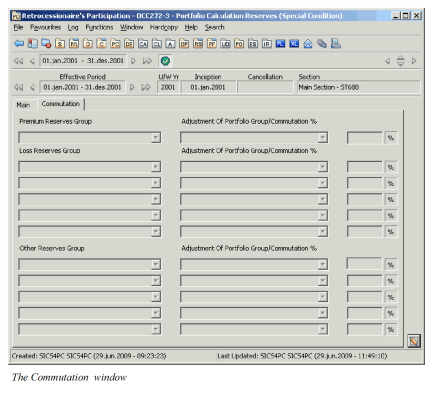
| Field | Description |
|---|---|
| Premium Reserve - Entry Code Group | Predefined groups of Premium Reserve Entry Codes. Entry codes defined in the selected group have to be included in the OCC Business Ledger in booking currency in order to get the portfolio calculated to the RPs. The total amount with these Entry Codes will be the basis for calculating the Portfolio Withdrawal when the business' Insured Period is commuted. Values: <None>, Name of Entry Code Groups Default: <None> Mandatory: Yes, for the calculation to be performed Functional Impact: For Outward Proportional Treaty Retrocession Calculation order |
| Adjustment of Portfolio Group (premium) | Predefined groups of Entry Codes. I.e. the entry codes have to be included in the OCC Business Ledger in booking currency in order to be calculated to the RPs. The total amount with these Entry code will be the basis (in addition to the Premium Reserve group) for calculating an Adjustment of the Premium Portfolio Withdrawal when the business' Insured Period is commuted. Values: <None>, Name of Adjustment of Portfolio Group Default: <None> Mandatory: Yes, for the calculation to be performed Functional Impact: For Outward Proportional Treaty Retrocession Calculation order |
| Commutation % | The premium reserve/adjustment basis according to the Entry Code Group(s) selected is multiplied by the percent value entered Values: A percent (max value 999,99) Derived from: The field is enabled by selection of a Premium Reserve Entry Code Group. Mandatory: Yes Functional Impact: For Outward Proportional Treaty Retrocession Calculation order |
| Loss Reserves - Entry Code Group 1 - 5 | Predefined groups of Loss Reserve Entry Codes. I.e. the entry codes have to be included in the OCC Business Ledger in booking currency in order to be calculated to the RPs. The total amount with these Entry Codes will be the basis for calculating the Portfolio Withdrawal when the business' Insured Period is commuted. Up to 5 different Entry Code groups can be selected. Values: <None>, Name of Entry Code Groups Default: <None> Mandatory: Yes, for the calculation to be performed Functional Impact: For Outward Proportional Treaty Retrocession Calculation order |
| Commutation % | The loss reserve/adjustment basis according to the Entry Code Group(s) selected is multiplied by the percent value entered Values: A percent (max value 999,99) Derived from: The field is enabled by selection of a Loss Reserve Entry Code Group. Mandatory: Yes Functional Impact: For Outward Proportional Treaty Retrocession Calculation order |
| Other Reserves - Entry Code Groups 1- 5 | Predefined groups of Other Reserve Entry Codes. I.e. the entry codes have to be included in the OCC Business Ledger in booking currency in order to be calculated to the RPs. The total amount with these Entry Codes will be the basis for calculating the Portfolio Withdrawal when the business' Insured Period is commuted. Up to 5 different Entry Code groups can be selected. Values: <None>, Name of Entry Code Groups Default: <None> Mandatory: Yes, for the calculation to be performed Functional Impact: For Outward Proportional Treaty Retrocession Calculation order |
| Commutation % | The other reserve/adjustment basis according to the Entry Code Group(s) selected is multiplied by the percent value entered Values: A percent (max value 999,99) Derived from: The field is enabled by selection of an Other Reserve Entry Code Group. Mandatory: Yes Functional Impact: For Outward Proportional Treaty Retrocession Calculation order |