Handle Reinstatement Conditions
|

Reinstatement
Conditions button | The Reinstatement condition specifies how many times the cedent can use the cover during the insured period and how additional premium (reinstatement premiums), if any, will be calculated. The reinstatement calculation and booking is automatic for outward business, but must be booked manually for Inwards. |
Reinstatement condition is available for non-proportional businesses only and the condition looks the same for all types of business.
When type of participation is stop loss or aggregate loss, reinstatement condition is not available.
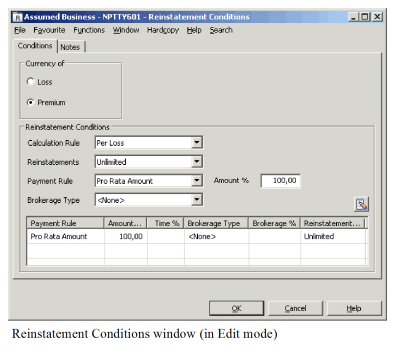
Reinstatement Currency #
Reinstatement premium can be paid in either the same currency(s) as premium or in same currency as the loss.
Currency of Premium #
Reinstatement premium is to be calculated in the same currency as the premium.
When premium is calculated in multiple currencies, reinstatement premium must be split between the different currencies in same percentage as deposit premium.
Fixed rates of exchange premium (entered in Premium and Limit condition) are used when splitting reinstatement premium between the different currencies.
Currency of Loss #
Reinstatement premium is to be calculated in same currency and with the same currency split as the loss.
You must define the exchange rate to be used:
- Daily Rates. Latest available rate of exchange in Reference Items/ Currency and Exchange Rates.
- Fixed Date. Specify at which date the exchange rate should be extracted, e.g. rate of exchange at inception
- Fixed Rate. Rates copied from Rate of Exchange Premium in Premium and Limit condition. Rate can be manually changed
Maintaining Reinstatements #
When creating/editing the reinstatement condition, fields available for input depend on what you select in Reinstatements and Payment Rule.
Reinstatements are defined by the following values:
- None.
No other fields are available for input.
- Specific.
You must enter number of reinstatements. Other fields available for input are depending on the selected Payment Rule.
- Unlimited.
Number of reinstatement is not available, as there is no limitation to how many times the cover can be used.
Other fields available for input are depending on the selected Payment Rule.
Payment rules are described in more details later in this section.
You must also define the Calculation Rule. The Calculation rule can be:
- None
No reinstatement calculation will take place.
- No Calculation
No reinstatement calculation will take place.
- Per Loss
Reinstatement Calculation is made per loss, and is available from within each Claim Worksheet
- Per Insured Period
Reinstatement Calculation is made for the entire Insured Period, and bookings are made on a technical worksheet, with no direct reference to the claims.
Maintain Pro Rata Amount Reinstatements #
When the payment rule is pro rata amount, the calculation of reinstatement premium does not consider when during the insured period the loss happens.
The reinstatement premium is calculated by the following formula:
Claim amount x Premium x Amount %
Cover
Premiums used in calculation are sum of deposit and adjustment premiums.
To create a reinstatement condition:
- Click the Reinstatement button (R) on the Navigation bar.
- Select Specific or Unlimited from the Reinstatement_s_ drop-down list.
- Enter your number of reinstatements (if not unlimited).
- Select Pro Rata Amount from the Payment Rule drop-down list.
- Enter the percentage in the Amount text box.
- If applicable, select Brokerage Type from the Brokerage Type drop-down list and enter the percentage in the Percent text box.
- Select New from the Menu button.
- Click Save.
Edit a Reinstatement Condition
You can edit the reinstatement condition in the same way as you first created the condition.
- Click the Reinstatement button (R) on the Navigation bar.
- Click the Edit button.
- Enter the required condition changes.
- Click the Menu button and select
- New- The previously created reinstatement(s) is removed and new one (s) is created.
-
- A new reinstatement(s) is added to the already existing reinstatement(s).
- Click Save.
You can also edit already created reinstatements directly in the display list.
- Open the Reinstatement condition in Edit mode.
- Click in the Payment Rule column in display list and select another option from drop-down list (if the wrong Payment Rule was registered).
- Click in the Amount or Time columns and make your changes according to the payment rule.
- Click Save.
Add Reinstatements
You can add reinstatements one by one.
- Open the Reinstatement condition in Edit mode.
- Select Add from the pop-up list.
- Click Save.
The added reinstatement will have the same entries as the reinstatement that you selected in the display list.
Delete Reinstatements
It is only possible to delete the last reinstatement in the list.
- Open the Reinstatement condition in Edit mode.
- Select the last reinstatement in the display list.
- Select Delete from the pop-up list.
- Click Save.
Maintain Pro Rata Time Reinstatements #
When payment rule is Pro Rata Time, reinstatement premium calculated is depending on when during the insured period the loss happens.
Reinstatement premium is calculated by the following formula:
Claim amountx Remaining days of IPx Premium x Time %
CoverIP Days
Create Reinstatement Condition
- Click the Reinstatement button (R) in Navigation bar.
- Select Specific or Unlimited from the Reinstatements drop-down list.
- Enter number of reinstatements (if not unlimited) in the Number text box.
- Select Pro Rata Time from the Payment Rule drop-down list.
- Enter the percentage in the Time text box.
- If applicable, select Brokerage Type from the Brokerage Type drop-down list and enter the percentage in the Percent text box.
- Select New from the Menu button.
- Click Save.
For information about how to edit/add or delete reinstatement(s), refer to Maintain Pro Rata Amount Reinstatements .
Maintain Pro Rata Amount and Time Reinstatement #
This is a combination of the two previous methods. In addition to calculating the reinstatement(s) pro rata amount, you take into consideration when the loss happens during the insured period.
Formula used in calculation is:
Claim amountx Remaining IP x Premium x Amount % x Time %
Cover IP Days
Create Reinstatement Condition
- Click the Reinstatement button (R) on the Navigation bar.
- Select Specific or Unlimited from the Reinstatements drop-down list.
- Enter number of reinstatements (if not unlimited) in the Number text box.
- Select Pro Rata Amount and Time from the Payment Rule drop-down list.
- Enter the percentage in the Amount text box.
- Enter the percentage in the Time text box.
- If applicable, select Brokerage Type from the Brokerage Type drop-down list and enter the percentage in the Percent text box.
- Select New from the Menu button
- Click Save.
For information about how to edit/add or delete reinstatement(s), refer to Maintain Pro Rata Amount
Maintain Free Reinstatements #
When reinstatements have Payment Rule Free, cedent will not have to pay any reinstatement premium.
Create Reinstatement Condition
- Click the Reinstatement button (R) on Navigation bar
- Select Specific or Unlimited from the Reinstatements drop-down list.
- Enter number of reinstatements (if not unlimited) in the Number text box.
- Select Free from the Payment Rule drop-down list.
- Select New from the Menu button.
- Click Save.
For information about how to edit/add or delete reinstatement(s), refer to Maintain Pro Rata Amount Reinstatements
| Field | Description | Location |
|---|---|---|
| Currency of Loss | When selected, reinstatement premium is to be calculated in same currency and with same currency split as the loss. Values: Radio button Default: Not selected Validations: When selected, Exchange rate must be defined: Daily Fixed Date Fixed Rate Mandatory: No Functional Impact: Reinstatement premium calculation. |
Conditions tab |
| Currency of Premium | When selected, reinstatement premium is to be calculated in same currency as the premium. Values: Radio button Default: Selected Mandatory: No Functional Impact: Reinstatement premium calculation |
Conditions tab |
| Calculation Rule | Defining whether reinstatements shall be calculated for each claim separately, or for the entire period. Values: None, No Automatic Calculation, Per Loss, Per Insured Period Default: None Mandatory: No Functional impact: Determines whether reinstatement bookings can take place, from where the calculation is available, and the type of worksheet the bookings will be made on. |
Conditions tab |
| Reinstatements | Defining the type of reinstatements Values: None. No other fields available for input * _Specific._ Additional fields available for input is depending on payment rule selected * _Unlimited._ Additional fields available for input is depending on payment rule selected. _Default:None_ _Validations:_ If _Unlimited_, Annual Aggregate Limit (premium and Limit condition) is unlimited. If _Specific_, Annual Aggregate Limit cannot be unlimited. _Mandatory:_ Yes _Functional Impact:_ * Other reinstatement condition values * Reinstatement premium calculation * Annual Aggregate Limit |
Conditions tab |
| Number | Indication number of reinstatements defined Values: * Minimum value: 0 * Number of decimal places: 0 _Default:_ 1 _Validations:_ Only available when Reinstatements is _Specific_ _Mandatory:_ No _Functional Impact:_ Other reinstatement condition values |
|
| No | Indicating in which order reinstatements will be calculated Values: Minimum value: 1 Validations: Only visible when Reinstatement is Specific Mandatory: No |
Conditions tab |
| Payment Rule | Defining how reinstatements are to be calculated Values: Drop-down list with values customised by your company. Typical values are: * Pro Rata Amount * Pro Rata Time * Pro Rata Amount and Time Free _Default:_ Pro Rata Amount _Mandatory:_ No _Functional Impact:_ * Other Reinstatement condition values * Reinstatement premium calculation |
Conditions tab |
| Amount % | How many percent of premium is used in calculation of reinstatement premium Values: * Minimum value: 0 * Number of decimal places: 2 _Default:_ 100% _Validations:_ Only available when Payment Rule is _Pro Rata Amount_ or_Pro Rata Amount and Time_ _Mandatory:_ Yes _Functional Impact:_ Reinstatement premium calculation |
Conditions tab |
| Time % | How many percent of premium is used in calculation of reinstatement premium Values: * Minimum value: 0 * Number of decimal places: 2 _Default:_ 100% _Validations:_ Only available when Premium Type is _Pro Rata Time_ or_Pro Rata Amount and Time_ _Mandatory:_ Yes _Functional Impact:_ Reinstatement premium calculation |
Conditions tab |
| Brokerage Type | How brokerage on reinstatement premium is calculated Values: None * Percent * Original _Default:_ None _Validations:_ Only available when Broker is assigned _Mandatory:_ No _Functional Impact:_ Reinstatement premium calculation |
Conditions tab |
| Brokerage % | Brokerage to be deducted from reinstatement premium Values: * Minimum value: 0 * Number of decimal places: 2 _Validations:_ Only available when brokerage Type is _Percent._ _Mandatory:_ No _Functional Impact:_ Reinstatement premium calculation. |
Conditions tab |
| Notes | Additional tab for free-text | Notes tab |