Handle Share Conditions
|

Share Conditions button | Share condition in SICS represents the conditions relating to the portion (often called line) a reinsurer participates with in a contract. Shares are some of the most central terms and conditions in an agreement and are used in numerous administrative functions in a company. This is also the case in SICS, where shares are used extensively in all from calculation of your part of premiums and claims to calculation of retroceded percents. Ensuring correct entry of share information is therefore crucial. |
The share information varies from one business to another, for example, with or without broker, or non-proportional or proportional treaty.
This section cover the general processes involved in recording and updating the shares of a business. If you want more details on entering shares as part of some other more specific process; like creating a new business, accepting an offer, renewing a business, placing a protection; see the section describing your particular process.
Maintain Proportional Facultative Shares #
If the business you are working on is a proportional facultative business, you can express shares either as percent or amount. For this type of business you may keep a quite comprehensive set of share conditions. For example, you can capture the original cedent’s share of the original policy, the broker’s order of the reinsurance and of course, the reinsurer’s own share.
Enter Shares Expressed as Percent #
To allocate the agreement to participants in portions of 100:
- Open your business and click the Share (S) button in the Navigation bar.
- If required, click the Edit button.
- Select % (percent) from the Expressed drop-down list.
- If relevant, enter possible orders held by other parties in the Placement display list.
- Enter reinsurer’s share figures on the Share Figures tab. Typically, you enter the share in the row called From 100%.
- Click OK.
For information about how to enter share conditions on outward facultative businesses, refer to Place Protection.
Enter Shares as Part of Order #
Express share as part of some other party’s order; e.g. enter your share when it has been informed as a percentage of the broker’s order.
- Open your business and click the Share(S) button in the Navigation bar.
- If required, click the Edit button.
- Select % (percent) from the Expressed drop-down list.
- In the Placement display list, enter the order (e.g. Broker’s Order) of which the share is expressed.
- On the Share Figures tab, enter the reinsurer’s share (e.g. your share), as it is expressed on the order. That is, enter it in the row with equivalent name to the order that is in From Broker’s Order, if the order was Broker’s Order.
- Click OK.
SICS calculates automatically Share From 100% and other share figures based on your input.
#
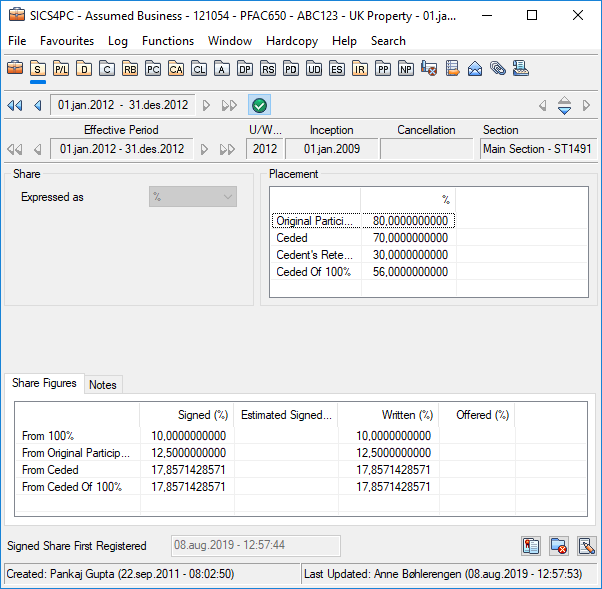
Share Statuses #
Offered: The share proposed by a cedent to a reinsurer at offer stage.
Written: The share that the reinsurer has accepted to participate with but not necessarily confirmed by the cedent.
Estimated Signed: A share that the reinsurer anticipates will be the confirmed share.
Signed: The final and exact share of the reinsurer, confirmed by the cedent after possible sign-downs.
For further description of shares as they relate to the different life cycle statuses of a business, refer to section Handle Offer/ Quotation Process.
| Field | Description |
|---|---|
| Share Expressed As | Indicates unit of measure for allocating the various portions of an agreement. Values: Percent, Amount Default: Percent Mandatory: Yes Functional Impact: Other Share Condition values |
| Original Participation | Original Cedent’s portion of the 100% original policy, (in other words, the co-insurance percent.) Values: Percentages Minimum percentage: 0 Maximum percentage: 100 Number of decimal places: 10 Mandatory: No Functional Impact: Other Share Condition values |
| Ceded | Portion that the cedent reinsures (cedes), expressed of original participation if it exists. Values: Percentages Minimum percentage: 0 Maximum percentage: 100 Number of decimal places: 10 Calculation: 100% - Cedent’s Retention Mandatory: No Functional Impact: Other Share Condition values |
| Cedent’s Retention | Portion that the cedent does not reinsure (not cede), expressed of original participation if it exists. Values: Minimum percentage: 0 Maximum percentage: 100 Number of decimal places: 10 Calculation: 100% - Ceded Mandatory: No Functional Impact: Other Share Condition values. |
| Ceded of 100% | Portion that the cedent reinsures, expressed of the 100% original policy. Values: Minimum percentage: 0 Maximum percentage: 100 Number of decimal places: 10 Mandatory: No Functional Impact: Other Share Condition values. |
| Broker’s Order | The portion that intermediary places expressed of ceded share if it exists. Values: Minimum percentage: 0 Maximum percentage: 100 Number of decimal places: 10 Validations: Only available when a Broker is assigned. Mandatory: No Functional Impact: Other Share Condition values. |
| Broker’s Order of Original Participation | The portion the intermediary places expressed of the original participation if it exists. Values: Minimum percentage: 0 Maximum percentage: 100 Number of decimal places: 10 Validations: Only available when a Broker is assigned. Mandatory: No Functional Impact: Other Share Condition values |
| Broker’s Order of Ceded of 100% | The portion the intermediary places expressed of the portion the cedent reinsures out of the 100% original policy. Values: Minimum percentage: 0 Maximum percentage: 100 Number of decimal places: 10 Validations: Only available when a Broker is assigned. Mandatory: No Functional Impact: Other Share Condition values. |
| Broker’s Order of 100% | The portion the intermediary places, expressed of the 100% Original Policy. Values: Minimum percentage: 0 Maximum percentage: 100 Number of decimal places: 10 Calculation: From Broker’s Order and Original Participation and Ceded Validations: Only available when a Broker exists. Mandatory: No Functional Impact: Other Share Condition values. |
| Share From 100% | Reinsurer’s share expressed of the 100% original policy. (If the business you are working on is assumed, this is your own share.) Values: Minimum percentage: 0 Maximum percentage: 100 for Offered and Signed 99 999 for Written and Estimated Signed Number of decimal places: 10 Calculations: Calculated when share is expressed as part of some other party’s order: (Party’s order x Share from order)/100 Example: (Broker’s Order x Share from Broker’s Order)/ 100 Validations: Signed Share % cannot exceed any other party’s order For example: Signed Share From 100% cannot exceed Broker’s Order Warning if Signed > Written Share Warning if Written > Offered Share Mandatory: No Functional Impact: Premium and Limit Condition Claims Handling Proportional Facultative Protections Accumulation Control Manual Accounting Automatic Accounting Other share condition values. |
| Share From Original Participation | Reinsurer’s portion of original participation Values: Minimum percentage: 0 Maximum percentage: 100 for Offered and Signed 99.999 for Written and Estimated Signed Number of decimal places: 10 Calculation: (Share From 100% x 100)/ Original Participation Mandatory: No Functional Impact: Other Share Condition Values |
| Share From Ceded | Reinsurer’s portion of ceded. Values: Minimum percentage: 0 Maximum percentage: 100 for Offered and Signed 99.999 for Written and Estimated Signed Number of decimal places: 10 Calculation: (Share From 100% x 100)/Ceded Mandatory: No Functional Impact: Other share condition values |
| Share From Ceded of 100% | Reinsurer’s portion of ceded of 100%. Values: Minimum percentage: 0 Maximum percentage: 100 for Offered and Signed 99.999 for Written and Estimated Signed Number of decimal places: 10 Calculation:(Share From 100% x 100)/ Ceded of 100% Mandatory: No Functional Impact: Other share condition values. |
| Share From Broker’s Order | Reinsurer’s portion of broker’s order. Values: Minimum percentage: 0 Maximum percentage: 100 for Offered and Signed 99.999 for Written and Estimated Signed Number of decimal places: 10 Calculation: (Share From 100% x 100)/ Broker’s Order Validations: Only available when a broker exists. Mandatory: No Functional Impact: Other Share Condition values |
| Share From Broker’s Order of Original Participation | Reinsurer’s portion of broker’s order of original participation. Values: Minimum percentage: 0 Maximum percentage: 100 for Offered and Signed 99.999 for Written and Estimated Signed Number of decimal places: 10 Calculation:(Share from 100% x 100)/Broker’s Order of Original Participation Validations: Only available when a broker exists. Mandatory: No Functional Impact: None |
| Share From Broker’s Order of Ceded of 100% | Reinsurer’s portion of broker’s order of ceded of 100%. Values: Minimum percentage: 0 Maximum percentage: 100 for Offered and Signed 99.999 for Written and Estimated Signed Number of decimal places: 10 Calculation: (Share from 100% x 100)/ Broker’s Order of Ceded of 100% Validations: Only available when broker exists. Mandatory: No Functional Impact: None |
| Share From Broker’s Order of 100% | Reinsurer’s portion of broker’s order of 100%. Values: Minimum percentage: 0 Maximum percentage: 100 for Offered and Signed 99.999 for Written and Estimated Signed Number of decimal places: 10 Calculation:(Share from 100% x 100)/Broker’s Order of 100% Validations: Only available when a broker exists. Mandatory: No Functional Impact: Other Share Condition values |
| Signed Share First Registered | Shows what date and time the signed share was first entered for this agreement. Values: Date and time Derived from: Today’s date when entering Signed Share. Validations: Cannot be manually changed. Mandatory: Yes Functional Impact: None |
EXAMPLE: Orders
The example below includes limit amounts at various order levels to illustrate what the different orders represent.
Sum Insured 100% (Original Policy): 1.000.000,00
Broker’s Order: 71,43%
(Rounded figures)
| Order | Order % |
Calculation | Order Amount |
|---|---|---|---|
| Original Participation |
80% | 1.000.000 x 0,80 | 800.000 |
| Ceded | 70% | 800.000 x 0,70 | 560.000 |
| Cedent’s Retention |
30% | 800.000 x 0,30 | 240.000 |
| Ceded Of 100% |
56% | 560.000 x 100 1.000.000 |
560.000 |
| Broker’s Order | 71,43% | 560.000 x 0,7143 | 400.000 |
| Broker’s Order of Original Participation | 50% | 400.000 x 100 800.000 |
400.000 |
| Broker’s Order of Ceded of 100% | 71,43% | 400.000 x 100 560.000 |
400.000 |
| Broker’s Order of 100% | 40% | 400.000 x 100 1.000.000 |
400.000 |
EXAMPLE Reinsurer’s Shares
The calculations below demonstrate what the different shares represent. It uses the same figures as in the example for Orders.
Share From 100%: 11,2 %
(Rounded figures)
| Share | Share % | Calculation | Amount for Share |
|---|---|---|---|
| Share from 100% | 11,2% | 112.000 x 1001.000.000 | 112.000 |
| Share from Original Participation | 14% | 112.000 x 100 800.000 |
112.000 |
| Share from Ceded | 20% | 112.000 x 100 560.000 |
112.000 |
| Share from Ceded of 100% | 20% | 112.000 x 100 560.000 |
112.000 |
| Share from Broker’s Order | 28% | 112.000 x 100 400.000 |
112.000 |
| Share from Broker’s Order of Original Participation | 28% | 112.000 x 100 400.000 |
112.000 |
| Share from Broker’s Order of Ceded of 100% | 28% | 112.000 x 100 400.000 |
112.000 |
| Share from Broker’s Order of 100% | 28% | 112.000 x 100 400.000 |
112.000 |
Enter Shares Expressed as Amount #
To allocate an agreement to participants as fixed monetary amounts:
- Open your business and click the Share (S) button on the Navigation bar.
- If needed, click the Edit button.
- Select Amount From the Expressed As drop-down list.
- Enter the total limit of the agreement in the Main Limit field.
- If required, enter possible orders held by other parties in the Placement display list, as amount (or percent).
- Enter the reinsurer’s share amount in the Share Figures Amount display list.
- Click OK.

Share Statuses #
For description of share statuses like Offered and Written, refer to the field descriptions under Enter Share Expressed as Percent.
| Field | Description |
|---|---|
| Share Expressed As | Indicates unit of measure for allocating the various portions of an agreement. Values: Percent, Amount. Default: Percent Mandatory: Yes Functional Impact: Other Share Condition values. |
| Main Currency | The currency in which the share is expressed. Values: Short Name ISO Standard Derived From: Main Currency of Business. Validation: Cannot be changed. Only available when Share Expressed As is amount. Mandatory: No Functional Impact: None |
| Main Limit | Total share to be placed, i.e. the 100% limit of the agreement Values: Amounts Minimum value: 0 Maximum value: 22 digits Number of decimal places: 0 Derived From: Main Limit in Premium and Limit Conditions Validations: Only available when Share Expressed As is amount. Must always be the same as Main Limit in Premium and Limit Conditions. Entry or update of Main Limit from Share Conditions, updates Main Limit on Premium and Limit Conditions and vice versa. Mandatory: No Functional Impact: Premium and Limit Conditions Claims Handling Other Share Condition values. |
| Original Participation | The original cedent’s amount participation in the 100% Original Policy, (in other words, the co-insurance amount.) Values: Amounts Minimum value: 0 Maximum value: 22 digits Number of decimal places: 2 Validations: Cannot exceed Main Limit amount. Mandatory: No Functional Impact: Other Share Condition values. |
| Ceded | The amount that the cedent reinsures (cedes) to the agreement. Values: Minimum value: 0 Number of decimal places: 0 Calculation: Main Limit - Cedent’s Retention. Mandatory: No Functional Impact: Other Share Condition values. |
| Cedent’s Retention | The amount that the cedent does not reinsure (cede) to the agreement. Values: Minimum value: 0 Number of decimal places: 0 Calculation: Main Limit - Ceded Mandatory: No Functional Impact: Other Share Condition values. |
| Ceded of 100% | The amount that the cedent reinsures (cedes) to the agreement. Values: Minimum value: 0 Number of decimal places: 0 Mandatory: No Functional Impact: Other Share Condition values. |
| Broker’s Order | The amount that the intermediary places to the agreement. Values: Minimum value: 0 Number of decimal places: 0 Validations: Only available when a broker is assigned. Mandatory: No Functional Impact: Other Share Condition values. |
| Broker’s Order of Original Participation | The amount that the intermediary places to the agreement. Values: Minimum value: 0 Number of decimal places: 0 Validations: Only available when a broker is assigned. Mandatory: No Functional Impact: Other Share Condition values. |
| Broker’s Order of Ceded of 100% | The amount that the intermediary places to the agreement. Values: Minimum value: 0 Number of decimal places: 0 Mandatory: No Functional Impact: Other Share Condition values- |
| Broker’s Order of 100% | The amount that the intermediary places to the agreement. Values: Minimum value: 0 Number of decimal places: 0 Calculation: From Broker’s Order. Validations: Only available when a broker is assigned. Mandatory: No Functional Impact: Other Share Condition values. |
| Orders % | For explanation of orders as percent, refer to field descriptions for Enter Share Expressed as Percent. The behaviours are the same, except for that the system calculates the order percentages from the order amounts, when share is expressed as amount. Example: Broker’s Order %: (Broker’s Order Amount x 100)/*Ceded Amount *If Ceded not present, the system uses Original Participation and if this is not present, the system uses Main Limit |
| Share Amount | Reinsurer’s part of the agreement, expressed as a monetary amount. (If the business you are working on is assumed, this is your own share.) Values: Amounts Minimum value: 0 Maximum value: 19 digits Number of decimal places: 2 Validations: Signed Share amount cannot exceed Main Limit amount. Signed Share amount cannot exceed any other party’s order For example: Signed Share amount cannot exceed Broker’s Order amount. Warning if Signed > Written Share Warning if Written > Offered Share When you update other share values, this share amount remains constant, while the system recalculates the other shares. Mandatory: No Functional Impact: Other Share Condition values. |
Share Figures % #
For explanation of shares as percent, refer to the field descriptions under Enter Share expressed as Percent. The behaviours are the same however when share is expressed as amount, the system calculates the share percentages from share amounts.
Example:
Share from 100%:Share Amount x 100
Main Limit
Maintain Non-Proportional Facultative Shares #
Risks negotiated individually and where the reinsurer undertakes payment of all losses up to a pre-agreed limit, might in SICS be allocated with shares expressed as either percent or amount.
The below are field descriptions for shares expressed as percent. For shares expressed as amount, see Enter Share Expressed as Amount under the Maintain Proportional Facultative Shares chapter. For description of how to enter shares and of the share statuses, like Offered and Written, refer to Maintain Proportional Facultative Shares.

| Field | Description |
|---|---|
| Share Expressed As | Indicates unit of measure for allocating the various portions of an agreement. Values: Percent, Amount. Default: Percent Mandatory: Yes Functional Impact: Other share condition values. |
| Broker’s Order | The portion of the reinsurance agreement that an intermediary places. Values: Minimum percentage: 0 Maximum percentage: 100 Number of decimal places: 10 Validations: Only available when a broker exists. Mandatory: No Functional Impact: Other share condition values. |
| Share From 100% | Reinsurer’s share of the non-proportional facultative agreement.(If the business you are working on is assumed, this is your own share.) Values: Minimum percentage: 0 Maximum percentage: 100 for Offered and Signed 99.999 for Written and Estimated Signed Number of decimal places: 10 Calculations: (Broker’s Order x Share from Broker’s Order) /100 Validations: Signed Share % cannot exceed Ceded From 100% From 100% cannot exceed Broker’s Order Warning if Signed > Written Share Warning if Written > Offered Share Mandatory: No Functional Impact: Premium and Limit Condition Claims Handling Proportional Facultative Protections Accumulation Control Manual Accounting Automatic Accounting Other share condition values. |
| Share From Broker’s Order | Reinsurer’s share of broker’s order. Values: Minimum percentage: 0 Maximum percentage: 100 for Offered and Signed 99.999 for Written and Estimated Signed Number of decimal places: 10 Calculation: (Share From 100% x 100)/ Broker’s Order Validations: Only available when a broker exists. Mandatory: No Functional Impact: Other share condition values. |
| Signed Share First Registered | Shows what date and time the signed share was first entered for this agreement. Values: Date and time Derived from: Today’s date when entering Signed Share. Validations: Cannot be manually changed. Mandatory: Yes Functional Impact: None |
Maintain Facultative Outward Cedent’s Contract Share #
To ease registration of large numbers of facultative protections, it is sometimes beneficial to group these into a contract - a proportional or non-proportional facultative outward cedent contract. You can express shares on this level either as percent or as amount.
| Field | Description |
|---|---|
| Share Expressed As | Indicates unit of measure for allocating the various portions of an agreement. Values: Percent, Amount Default: Percent Mandatory: Yes Functional Impact: Other share condition values. |
| Ceded of 100% | The outward cedent’s contract portion of the 100% original risk, e.g. often 100% Values: Minimum percentage: 0 Maximum percentage: 100 Number of decimal places: 10 Validations: Ceded of 100% = Share from 100 % = From Ceded of 100% Mandatory: Yes Functional Impact: Other Share Condition values |
| Share From 100% | The outward cedent’s contract portion of the 100% original risk, e.g. often 100% Values: Minimum percentage: 0 Maximum percentage: 100 for Signed Number of decimal places: 10 Validations: Share from 100 % = Ceded of 100% = From Ceded of 100% Mandatory: Yes Functional Impact: Premium and LimitCondition Claims Handling Placements Accumulation Control Manual Accounting Automatic Accounting Other share condition values. |
| Share From Ceded of 100% | The outward cedent’s contract portion of the 100% original risk, e.g. often 100%. Values: Minimum percentage: 0 Maximum percentage: 100 for Signed Number of decimal places: 10 Calculation : Share from Ceded of 100% = Share from 100% = Ceded of 100% Mandatory: No Functional Impact: Other share condition values. |
| Field | Description |
|---|---|
| Share Expressed As | Indicates unit of measure for allocating the various portions of an agreement. Values: Percent, Amount. Default: Percent Mandatory: Yes Functional Impact: Other share condition values. |
| Main Currency | The currency in which the share is expressed. Values: Short Name ISO Standard Derived From: Main Currency of Business. Validation: Cannot be changed. Only available when Share Expressed As is amount. Mandatory: No Functional Impact: None |
| Main Limit | Total share to be placed, i.e. the 100% limit of the agreement Values: Amounts Minimum value: 0 Maximum value: 22 digits Number of decimal places: 0 Derived From: Main Limit in Premium and Limit Conditions Validations: Only available when Share Expressed As is amount. Must always be the same as Main Limit in Premium and Limit Conditions. Entry or update of Main Limit from Share Conditions, updates Main Limit on Premium and Limit Conditions and vice versa. Mandatory: No Functional Impact: Premium and Limit Conditions Claims Handling Other Share Condition values |
| Share Amount | The outward cedent’s contract part of the agreement, expressed as a monetary amount. Values: Amounts Minimum value: 0 Maximum value: 19 digits Number of decimal places: 2 Validations: Signed Share amount cannot exceed Main Limit amount. Signed Share amount cannot exceed any other party’s order. When you update other share values, this share amount remains constant, while the system recalculates the other shares. Mandatory: No Functional Impact: Other Share Condition values |
For the rest of the fields, refer to Field Description for Share Expresses as Percent
Maintain Proportional Direct Shares #
Direct polices are normally written in total by one insurer, however larger direct policies are often split between several insurers. In any case SICS, lets you give the share information, either expressed of 100% or of a broker’s order.
Enter Share Expressed as Percent #
To allocate the policy in portions of 100:
- Open your business and click the Share(S) button on the Navigation bar.
- If needed, click the Edit button
- If required, enter Broker’s Order in the Placement display list.
- Enter the insurer’s share on the Share Figures tab. Typically you will enter the share in the row called From 100%.
- Click OK.
Enter Share as Part of Broker’s Order #
Express share as part of the intermediary’s share, e.g. enter your share when it has been informed as a percentage of broker’s order.
- Open your business and click the Share(S) button on the Navigation bar.
- If needed, click the Edit button
- In the Placement display list, enter Broker’s Order.
- On the Share Figures tab, on From Broker’s Order row, enter the insurer’s share (e.g. your share), as it is expressed of the order.
- Click OK.
SICS calculates automatically Share From 100% based on your input.

Share Statuses #
Offered: The share proposed by an insured to an insurer at offer stage.
Written: The share that the insurer has accepted to participate with, but not necessarily confirmed by the insured.
Estimated Signed: A share that the insurer anticipates will be the confirmed share.
Signed: The final and exact share of the insurer, confirmed by the insured after possible sign-downs.
For further description of shares as they relate to the different life cycle statuses of a business, refer to section Handle Offer/ Quotation Process.
| Field | Description |
|---|---|
| Expressed As | Indicates unit of measure for allocating the various portions of a policy. Values: Percent Default: Percent Mandatory: Yes Functional Impact: Other share condition values. |
| Broker’s Order | The portion that an intermediary places. Values: Minimum percentage: 0 Maximum percentage: 100 Number of decimal places: 10 Validations: Only available when a broker exists. Mandatory: No Functional Impact: Other share condition values. |
| Share From 100% | Insurer’s share of the 100% Policy. Normally 100%, unless a co-insurance. Values: Minimum percentage: 0 Maximum percentage: 100 for Offered and Signed 99.999 for Written and Estimated Signed Number of decimal places: 10 Calculations : (Broker’s Order x Share from Broker’s Order)/100. Validations: From 100% cannot exceed Broker’s Order. Warning if Signed > Written Share Warning if Written > Offered Share Mandatory: No Functional Impact: Premium and Limit Condition Claims Handling Proportional Facultative Protections Accumulation Control Manual Accounting Automatic Accounting Other share condition values |
| Share From Broker’s Order | Insurer’s portion of broker’s order. Values: Minimum percentage: 0 Maximum percentage: 100 for Offered and Signed 99.999 for Written and Estimated Signed Number of decimal places: 10 Calculation : (Share From 100% x 100)/ Broker’s Order Validations: Only available when a broker exists. Mandatory: No Functional Impact: Other share condition values. |
| Signed Share First Registered | Shows what date and time the signed share was first entered for this agreement. Values: Date and time Derived from: Today’s date when entering Signed Share. Validations: Cannot be manually changed. Mandatory: Yes Functional Impact: None |
Maintain Non-Proportional Direct Shares #
Direct polices where the insurer undertakes payment of all losses up to a pre-agreed limit, are normally written in total by one insurer. Large policies however are often split between several insurers. In any case, SICS lets you record the share either expressed of 100% or of the order of the broker.

The same principles apply here as for proportional direct business. For more details, refer to Maintain Proportional Direct Shares.
Maintain Proportional Treaty Shares #
For business where the reinsurer and cedent have agreed in advance to share premium and losses proportionally, you may store relevant share information depending on the treaty being quota share, surplus or something else (e.g.open cover).
Enter Share for Quota Share Treaties #
Record the share information of the various participants in treaties where the reinsurer assumes a fixed percentage of losses. Quota share treaties may hold a quite comprehensive set of share conditions, e.g. reinsurer’s share and ceded. Note that the quota share percent itself is NOT a share condition. (The only place where you can record this percent is in a reinsurance or protection program.)
Below are field descriptions for quota share treaties. For descriptions on how to enter them and on share statuses, like Offered and Written, refer to Maintain Proportional Facultative Shares.

| Field | Description |
|---|---|
| Expressed As | Indicates unit of measure for allocating the various portions of an agreement. Values: Percent Default: Percent Mandatory: Yes Functional Impact: Other share condition values. |
| Ceded | Portion of the contract that the cedent plans to place with reinsurers. (This is NOT the Quota Share Percent.) Values: Minimum percentage: 0 Maximum percentage: 100 Number of decimal places: 10 Calculation: 100% - Cedent’s Retention. Mandatory: No Functional Impact: Other share condition values |
| Cedent’s Retention | The portion of the contract that the cedent plans to keep for owns retention. Values: Minimum percentage: 0 Maximum percentage: 100 Number of decimal places: 10 Calculation: 100% - Ceded Mandatory: No Functional Impact: Other share condition values |
| Broker’s Order | The portion that an intermediary places, expressed of ceded share if it exists. Values: Minimum percentage: 0 Maximum percentage: 100 Number of decimal places: 10 Validations: Only available when broker exists. Mandatory: No Functional Impact: Other share condition values. |
| Broker’s Order of 100% | The portion that the intermediary places expressed of the 100% reinsurance contract. Values: Minimum percentage: 0 Maximum percentage: 100 Number of decimal places: 10 Calculation: From Broker’s Order and Ceded. Validations: Only available when broker exists. Mandatory: No Functional Impact: Other share condition values |
| Share From 100% | Reinsurer’s share of the 100% reinsurance contract (If the business you are working on is assumed, this is your own share.) Values: Minimum percentage: 0 Maximum percentage: 100 for Offered and Signed 99.999 for Written and Estimated Signed Number of decimal places: 10 Calculations: Calculated when share is expressed as part of some other party’s order: (Party’s order x Share from order)/ 100 Example:(Broker’s Order x Share from Broker’s Order) /100 Validations: Signed Share % cannot exceed any other party’s order For example: Signed Share From 100% cannot exceed Broker’s Order Warning if Signed > Written Share Warning if Written > Offered Share Mandatory: No Functional Impact: Premium and Limit Condition Claims Handling Proportional Single Treaty Protection Accumulation Control Manual Accounting Automatic Accounting Other share condition values. |
| Share From Ceded | Reinsurer’s portion of Ceded. Values: Minimum percentage: 0 Maximum percentage: 100 for Offered and Signed 99.999 for Written and Estimated Signed Number of decimal places: 10 Calculation: (Share From 100% x 100)/Ceded Mandatory: No Functional Impact: Other share condition values |
| Share From Broker’s Order | Reinsurer’s portion of Broker’s Order. Values: Minimum percentage: 0 Maximum percentage: 100 for Offered and Signed 99.999 for Written and Estimated Signed Number of decimal places: 10 Calculation: (Share From 100% x 100)/Broker’s Order Validations: Only available when a broker exists. Mandatory: No Functional Impact: Other share condition values. |
| Signed Share First Registered |
Shows what date and time the signed share was first entered for this agreement. Values: Date and time Derived from: Today’s date when entering Signed Share. Validations: Cannot be manually changed. Mandatory: Yes Functional Impact: None |
| Share From Broker’s Order of 100% | Reinsurer’s portion of Broker’s Order of 100%. Values: Minimum percentage: 0 for all statuses Maximum percentage: 100 for Offered and Signed 99.999 for Written and Estimated Signed Number of decimal places: 10 Calculation: (Share from 100% x 100)/Broker’s Order of 100% Validations: Only available when broker exists. Mandatory: No Functional Impact: Other share condition values |
Enter Share for Surplus Treaties #
For proportional treaties, where the limit is expressed as multiple of the cedent’s retention, you may enter the share either expressed of 100%, of ceded share or of a broker’s order.
Below are field descriptions for surplus treaties. For more information about how to enter these shares and of share statuses, like Offered and Written, refer to Maintain Proportional Facultative Shares.

| Field | Description |
|---|---|
| Expressed As | Indicates unit of measure for allocating the various portions of an agreement. Values: Percent Default: Percent Mandatory: Yes Functional Impact: Other share condition values |
| Ceded | The portion of the contract that the cedent plans to place with Reinsurers. Values: Minimum percentage: 0 Maximum percentage: 100 Number of decimal places: 10 Calculation: 100% - Cedent’s Retention. Mandatory: No Functional Impact: Other share condition values |
| Cedent’s Retention | The portion of the contract that the cedent plans to keep for own retention. Values: Minimum percentage: 0 Maximum percentage: 100 Number of decimal places: 10 Calculation: 100% - Ceded Mandatory: No Functional Impact: Other share condition values |
| Broker’s Order | The portion that an intermediary places. Values: Minimum percentage: 0 Maximum percentage: 100 Number of decimal places: 10 Validations: Only available when broker exists. Mandatory: No Functional Impact: Other share condition values |
| Share From 100% | Reinsurer’s share of the 100% reinsurance contract (If the business you are working on is assumed, this is your own share.) Values: Minimum percentage: 0 Maximum percentage: 100 for Offered and Signed 99.999 for Written and Estimated Signed Number of decimal places: 10 Calculations:(Broker’s Order x Share from Broker’s Order)/100 Validations: Signed Share From 100% cannot exceed Broker’s Order Warning if Signed > Written Share Warning if Written > Offered Share Mandatory: No Functional Impact: Premium and Limit Condition Claims Handling Proportional Single Treaty Protection Accumulation Control Manual Accounting Automatic Accounting Other share condition values |
| Share From Ceded | Reinsurer’s portion of Ceded. Values: Minimum percentage: 0 Maximum percentage: 100 for Offered and Signed 99.999 for Written and Estimated Signed Number of decimal places: 10 Calculation:(Share From 100% x 100)/Ceded Mandatory: No Functional Impact: Other share condition values |
| Share From Broker’s Order | Reinsurer’s portion of Broker’s Order. Values: Minimum percentage: 0 Maximum percentage: 100 for Offered and Signed 99.999 for Written and Estimated Signed Number of decimal places: 10 Calculation : (Share From 100% x 100)/ Broker’s Order Validations: Only available when a broker exists. Mandatory: No Functional Impact: Other share condition values. |
| Signed Share First Registered | Shows what date and time the signed share was first entered for this agreement. Values: Date and time Derived from: Today’s date when entering Signed Share. Validations: Cannot be manually changed. Mandatory: Yes Functional Impact: None |
Enter Share for Other Proportional Treaties when Expressed as Units #
Treaties with risks too large to be accommodated within normal treaties may be included in treaties placed in units, e.g. 10 out of 80 units (or 10 satellites out of 80). Allocate the shares of your treaty as number of units out of a total.
- Open your business and click the Share(S) button in the Navigation bar to see the Share Conditions details.
- Select in the Share group box, “Units” from the drop-down list in Expressed As and enter Total Units.
- Enter in the Placements display list, number of units placed via Broker.
- Enter in Share Figures % group box number of Units accepted by your company
- Click Save.
Note! In SICS, you can express the shares as units for treaties that have type of participation other than surplus (Surplus, Surplus 1, Surplus 2 and Surplus 3) and quota share (Quota Share and US Quota Share). Units are available for, for example for Open Cover.

| Field | Description |
|---|---|
| Expressed As | Indicates unit of measure for allocating the various portions of an agreement. Values: Percent, Units Default: Percent Mandatory: Yes Functional Impact: Limit and Premium Condition Other share condition values. |
| Total Units | Number of units in the reinsurance contract. Values: Minimum value: 0 Maximum value: 99.999 Number of decimal places: 5 Mandatory: Yes Functional Impact: Limit and Premium Condition Other Share Condition values. |
| Broker’s Order | Number of total units placed through a broker Values: Minimum value: 0 Maximum value: 99 999 Number of decimal places: 10 Validations: Only available when broker is assigned Cannot exceed Total Units Mandatory: No Functional Impact: Other Share Condition values |
| Share From 100% | Reinsurer’s number of units in the contract. (If the business you are working on is assumed, this is your own share.) Values: Minimum value: 0 Maximum value: 99 999 Number of decimal places: 10 Validations: Signed and Offered cannot exceed Total Units Warning if Signed > Written Share Warning if Written > Offered Share Mandatory: No Functional Impact: Premium and Limit Condition Claims Handling Proportional Single Treaty Protection Accumulation Control Manual Accounting Automatic Accounting Other share condition values |
| Signed Share First Registered |
Shows what date and time the signed share was first entered for this agreement. Values: Date and time Derived from: Today’s date when entering Signed Share. Validations: Cannot be manually changed. Mandatory: Yes Functional Impact: None |
Maintain Non-Proportional Treaty Shares #
Contracts where the reinsurer has agreed to automatically pay losses exceeding a pre-agreed limit, may be express as percent of 100% or of any order.
Enter Share Expressed as Percent #
Allocate the agreement in portions of 100.
- Open your business and click the Share Condition (S) button on the Navigation bar.
- If needed, click the Edit button.
- If you require, you may enter the Broker’s Order in the Placement display list.
- Enter the reinsurer’s share in the row called From 100% on the Share Figures tab.
- Click OK.
Enter Share as Part of Broker’s Order #
Express share as part of the intermediary’s share; e.g. enter your share when it has been informed as a percentage of broker’s order.
- Open your business and click the Share Condition (S) button on the Navigation bar.
- If needed, click the Edit button.
- Enter Broker’s Order in the Placement display list.
- On the Share Figures tab, in the row called From Broker’s Order, enter the reinsurer’s share (e.g. your share), as it is expressed of the order.
- Click OK.
SICS automatically calculates Share From 100% based on your entries.
Enter Share as Part of any Order #
Express the share as part of some other party’s order; e.g. enter your share when it has been informed as a percentage of an agent’s order.
- Open your business and click the Share Conditions (S) button on the Navigation bar.
- If needed, click the Edit button.
- In the Placement display list, enter the order (Order or Net of Gross) of which the reinsurer’s share is expressed.
- On the Share Figures tab, enter the reinsurer’s share (e.g. your share), as it is expressed of the order (Share From Order or Share From Net of Gross).
- Click OK.
SICS automatically calculates Share From 100%.
Calculate Share from Order(s) #
When the reinsurer has the entire order or net of the treaty, you may enter these and get the reinsurer’s share calculated automatically.
- Open your business and click the Share Conditions (S) button on the Navigation bar.
- If needed, click the Edit button.
- In the Placement display list, enter the order in Net of Gross and/or in Order. The system calculates the Share From 100% automatically from the orders.
- Click OK
The system calculates the Share From 100% only for the share status that is required for the life cycle status of your business. For example, if your business is definite and signed share is required, the system calculates only the signed share, not the written share. If no share is required (e.g. status is new agreement offered), the system calculates share from 100% for the offered share.
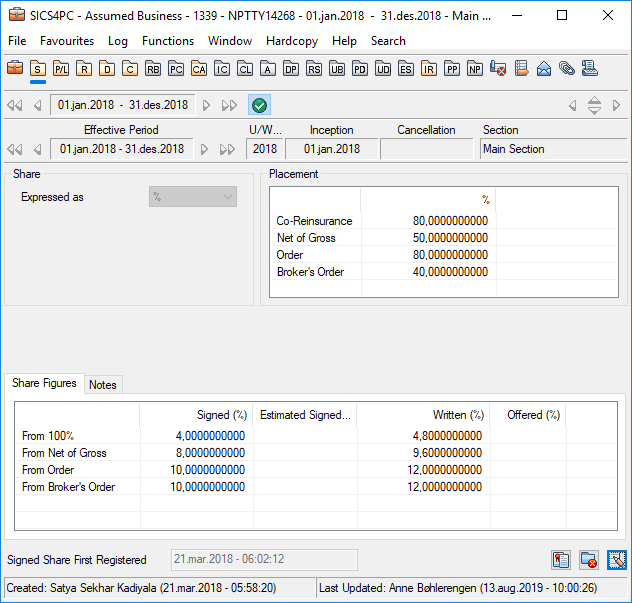
Share Statuses #
For description of share statuses like Offered and Written, refer to the field descriptions in the Maintain Proportional Facultative Shares on page 6-15 section.
| Field | Description |
|---|---|
| Share Expressed As | Indicates the unit of measurement for allocating the various portions of an agreement. Values: Percent Default: Percent Mandatory: Yes Functional Impact: Other share condition values |
| Co-Reinsurance | Cedent’s participation in the Reinsurance Contract Values: Minimum percentage: 0 Maximum percentage: 100 Number of decimal places: 10 Mandatory: No Functional Impact: None |
| Net of Gross | The portion figures to this treaty represents of gross, (e.g. the portion of original figures that becomes the subject premium income). Values: Minimum percentage: 0 Maximum percentage: 100 Number of decimal places: 10 Mandatory: No Functional Impact: Other share condition values On-line statistics |
| Order | The portion of the treaty that an unspecified party (e.g. agent) has. Values: Minimum percentage: 0 Maximum percentage: 100 Number of decimal places: 10 Mandatory: No Functional Impact: Other share condition values On-line statistics |
| Broker’s Order | The portion of the treaty that an intermediary places. Values: Minimum percentage: 0 Maximum percentage: 100 Number of decimal places: 10 Validations: Only available when broker exist Mandatory: No Functional Impact: On-Line Statistics Other share condition values |
| Share From 100% | Reinsurer’s share of the 100% reinsurance contract. (If the business you are working on is assumed, this is your own share.) Values: Minimum percentage: 0 Maximum percentage: 100 for Offered and Signed 99.999,00 for Written and Estimated Signed Number of decimal places: 10 Calculations: When reinsurer’s share expressed as part of some other party’s order: Broker’s Order x Share from Broker’s Order / 100 or Share From Net of Gross x Net of Gross / 100 or Share From Order x Order x Net of Gross / (100 x 100) If reinsurer has the entire order: Order x Net of Gross / 100 Validations: Cannot exceed Broker’s Order Must be according to formulas under Calculations Example: Order: 80% Net of Gross: 50% Share From Order: 10% Share From 100% must be 4% Warning if Signed > Written Share Warning if Written > Offered Share Mandatory: No Functional Impact: Premium and Limit Conditions Claims Handling Accumulation Control Automatic Accounting Proportional Single Treaty Protection Other share condition values On-Line Statistics Underwriters Estimates |
| Share From Order | Reinsurer’s portion of an unspecified party’s order, (e.g. share of agent’s share). Values: Minimum percentage: 0 Maximum percentage: 100 for Offered and Signed 99.999,00 for Written and Estimated Signed Number of decimal places: 10 Mandatory: No Functional Impact: Other share condition values Premium and Limit Conditions Automatic Premium Adjustment Calculation Underwriters Estimates |
| Share From Net of Gross | The reinsurer’s portion, expressed of the net portion to this agreement. Values: Minimum percentage: 0 Maximum percentage: 100 for Offered and Signed 99.999,00 for Written and Estimated Signed Number of decimal places: 10 Validations: Must be = Share from 100% x 100 / Net of Gross Example: Net of Gross: 50% Order: 80% Share From 100%: 4% Share From Order: 10%: Share from Net of Gross must be: 8% Mandatory: No Functional Impact: Other share condition values Premium and Limit Conditions Automatic Premium Adjustment Calculation Underwriters Estimates |
| Share From Broker’s Order | Reinsurer’s share of broker’s order. Values: Minimum percentage: 0 Maximum percentage: 100 for Offered and Signed 99.999,99 for Written and Estimated Signed Number of decimal places: 10 Calculation: Share From 100% x 100/ Broker’s Order Validations: Only available when broker exist Mandatory: No Functional Impact: Other share condition values |
| Signed Share First Registered |
Shows what date and time the signed share was first entered for this agreement. Values: Date and time Derived from: Today’s date when entering Signed Share. Validations: Cannot be manually changed. Mandatory: Yes Functional Impact: None |
Maintain Shares on Sub Levels #
Although it is most common to have only one share per agreement, it might be that it stipulates several shares, e.g. one for fire cover and one for business interruption cover. Within the same agreement, in SICS you can record different shares per:
- Section
- Insured Object Cession
- Declaration
For information on how to override a condition on a sub level in general, refer to Override Inherited Conditions on page 6-3 .
Note! To enter a share on a sub level only, you need to create the business with a pending Life Cycle Status. After you have entered the share information on the relevant sub level(s), you can change the life cycle status to, for example, ‘Definite’. For more information about how to change a status, refer to the Handle Life Cycle Status section.
Maintain Share on Sections #
For a section exactly the same share figures are available as on the agreement/main section level.
Maintain Share on Cessions and Declarations #
For facultative business exactly the same share figures are available on cessions/declaration as on the agreement/section level.
For treaty business however, the shares of a cession or a declaration have special handling. If entering shares items specifically for a cession or declaration, the shares items available will be the same as for a proportional facultative business, with the exceptions that the treaty share will also be available. For details, see the_Field Descriptions - Maintain Share on Cessions and Declarations._
If your cession/declaration is a special acceptance, the shares will be as for a normal overridden cession/declaration, however there are other relevant functions. For more information, refer to Maintain Special Acceptances.
| Field | Description |
|---|---|
| Treaty Share from 100% | The share from 100% assumed by the reinsurer of the treaty. Values: Minimum percentage: 0 Maximum percentage 100 Number of decimal places: 10 Default: Share from 100% value of section that the cession/declaration is belonging to Mandatory: No Validations: Only available for treaty business Functional Impact: Other share condition values |
| Share From 100% | Reinsurer’s share expressed of the 100% original policy. (If the business you are working on is assumed, this is your own share.) Values: Minimum percentage: 0 Maximum percentage: 100 for Offered and Signed 99 999 for Written, Estimated and Signed Number of decimal places: 10 Calculation: (Original Participation x Ceded x Treaty Share from 100%) / (100 x 100) Validations: Signed Share % cannot exceed any other party’s order For example: Signed Share From 100% cannot exceed Broker’s Order Warning if Signed > Written Share Warning if Written > Offered Share Mandatory: No Functional Impact: Premium and Limit Condition Claims Handling Proportional Facultative Protections Accumulation Control Manual Accounting Automatic Accounting Other share condition values |
For the rest of the fields, refer to Maintain Proportional Facultative Shareson page 6-15.
Example: Calculate ‘Share from 100%’ on Cession or Declaration
| Original Participation | Ceded | Treaty share | From 100% | |||
|---|---|---|---|---|---|---|
| 80% | * | 50% | * | 10% | = | 4% |
| ** | * | ** | 10% | = | 10% | |
| 80% | * | ** | * | 10% | = | 8% |
| ** | * | 50% | * | 10% | = | 5% |
| ** | * | * | 20%(changed) | = | 20% | |
| 100% | * | * | 10% | = | 10% | |
| 80 | * | 50% | * | = | Manual |