Evaluate Business for Renewal
As an underwriter you have some existing agreement that soon expires, and you need to look at them to evaluate what decisions you should take upon renewal. You need to have them all listed, and you need to have the possibility to see the most important and relevant information in a review.
List Expiring Businesses #
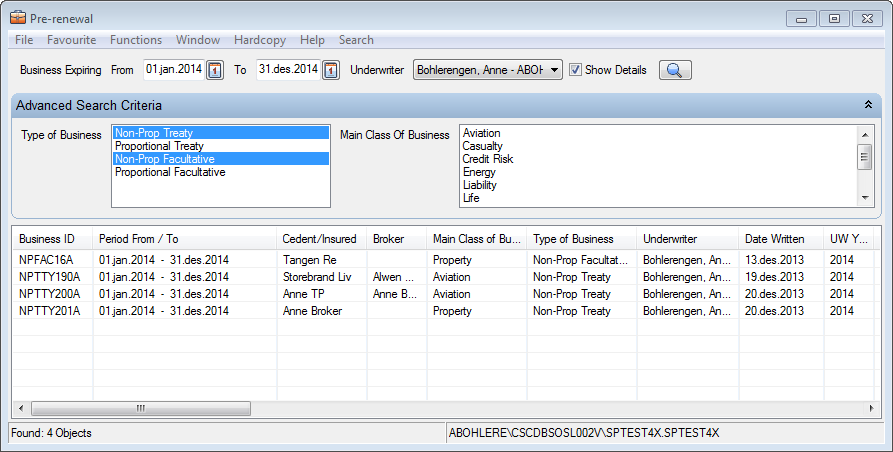
The pre-renewal list enables you to find and list all businesses that expire within a period, from a specific date or before a specific date. The businesses you find in the list are:
- Assumed and Administrative
- Non Proportional and Proportional Treaty/Facultative Business
- Have Basic Status Definite
- Have Share and Limit & Premium
- Are not Definitely Cancelled or set to Not Renewed To list expiring business:
- From the Desktop, click on Business and click Pre Renewal
- Enter a date in Business Expiring From and/or Business Expiring To
- Select any other search criteria.
- Click Find
(For performance reason, the system does not show information in all columns. To see all information, click the Show Details button).
| Field | Description |
|---|---|
| Business Expiring From | Finds businesses with an Insured Period To date equal to this date or later. Values: Date Mandatory: No |
| Business Expiring To | Finds businesses with an Insured Period To date equal to this date or earlier. Values: Date Mandatory: No |
| Underwriter | The name of the underwriter who made the agreement for this business. Finds treaties with this Underwriter as the Change of Life Cycle Status Underwritery. Values: System Users Mandatory: No |
| Type of Business | Finds businesses by their method of reinsurance. Values: - Non-Proportional Treaty - Proportional Treaty - Non-Proportional Facultative - Proportional Facultative Mandatory: No |
| Main Class of Business | Finds business according to the major line of business it covers. Values: Customised by your company, e.g. Maine, Property Mandatory: No |
Review Business to be Renewed #
The pre-renewal review enables you to evaluate the contract before the renewal. The most relevant information regarding this process is given in one overview.
- From the Desktop, click on Business and click Pre Renewal
- Enter a date in Business Expiring From and/or Business Expiring To
- Select any other search criteria
- Select Find
- Double click one of the treaties in the display list

| Fields | Description |
|---|---|
| Period From To | Insured Period on the business |
| Cedent | Name of the cedent |
| Reinsurer | Name of the reinsurer |
| Broker | Name of the broker |
| Leader | Reinsurer being the market leader. Derived from: Position of Reinsurer |
| UW Year | Underwriting year of the insured period of the business |
| Inception | Inception date of the business |
| Written | The date that the Life Cycle Status was changed. |
| Country Group | Treaty covered Country Groups |
| Countries | Treaty covered Countries |
| Main Class Of Business | The nature of the covered business, e.g. property, marine. |
| Class Of Business | Treaty Sub classification of Main Class of Business, e.g. marine hull, marine cargo. |
| Risk Code | Risk Code of the treaty |
| Type Of Participation | Treaty method of reinsurance, e.g. quota share, excess of loss |
| Other Classifications | All other classifications of tretay |
| Signed Share | The Signed ‘Share from 100%’ of the agreement. |
| Est.Signed Share | The Estimated Signed' Share from 100%' of the agreement. |
| Written Share | The Written ‘Share from 100%’ of the agreement. |
| Order | The portion of the treaty that an unspecified party (e.g. agent) has |
| Of Brokers Order % | The portion of the treaty that an intermediary places. |
| Co-Reinsurance % | Cedent’s participation in the Reinsurance Contract |
| Rate on Line % | Expected premium compared to cover. |
| On the Stretch % | A comparison rate that shows how much premium (EPI + reinstatement premium) is expected in comparison with the total cover (cover x number of reinstatements) given. |
| Limits | All limit amounts registered on Limit and Premium Condition e.g. Cover and Excess are shown. |
| Deductions | All deductions registered on Condition e.g. Commission and Brokerage. |
Renew Reviewed Business #
Establish a new insured period on your contract if your review resulted in a
decision of renewal.
- Open the Pre Renewal Review.
- Click the Renew Business button.