Handle Business Partner Bank Accounts
Wire transfers in SICS require bank accounts to be recorded for the partners involved in the transaction. Each bank account must be linked to a bank. In SICS banks are handled as separate partners.
Find Banks by Name and Swift Code #
In situations where you want to update the information on an existing bank or check if the bank exists in the system, you can use the search feature.
- Click the Banks icon in the Business Partner folder on the SICS desktop. You see the Find Bank window.
- On the Name tab, enter a name or a part of its name.
- On the ID tab, select ID Type: Swift, and enter the identifier or part of the identifier.
- Click the Find Now button. You see the results of your search in the display list.
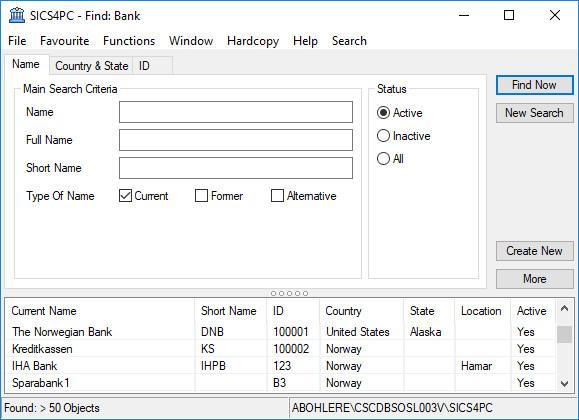
| Field | Definition |
|---|---|
| Name | A Bank’s name. Values: Free-text, maximum 80 characters. |
| Full Name | A Bank’s legal name. Values: Free-text, maximum 300 characters. |
| Short Name | A Bank’s abbreviated name. Values: Free-text, maximum 40 characters |
| Type of Name | A Bank’s existing or former name(s) Values: Current - a bank’s existing name * _Former -_ the name(s) before current * _Alternative_ - other names _Default:_ Current _Validation:_ Allows multiple types. |
| Status | The status indicates if the company is valid and is allowed to make business agreements. Values: * _Active - partner_ is open i.e. allowed to do business/agreement * _Inactive_- Not a valid _partner_, not allowed to do business/agreements * _All -_ both Active and Inactive. _Default:_ Active. _Validation:_ One criterion per search. _Mandatory:_ Yes. |
| Country | The domicile country of a bank Values: Countries |
| State | The domicile state of a bank Values: States. Derived from: Countries with States. Validation: Field enabled when a country with states is selected. |
| ID Type | The Identification type Values: Customised by your company e.g. SICS Identifier, Swift code. |
| ID | The name and/or number that uniquely identifies the bank. Values: Free-text, maximum 20 characters |
Register a Bank #
When you, for example, have received information from a cedent of a new bank account, and their bank does not exist in system, you must create the bank prior to recording the new bank account details.
- Click the Banks icon in the Business Partner folder on the SICS desktop. You see the Find Bank window.
- Click the Create New button, or select New on the pop-up menu. You see the Create Bank window.
- Enter the relevant information and click OK.
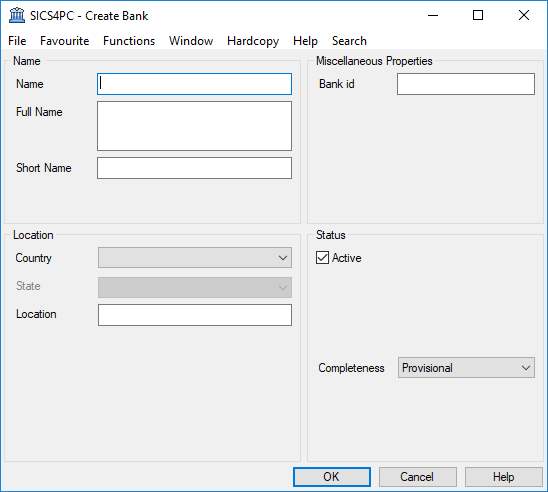
Field description 18. - Create Bank
| Field | Definition |
|---|---|
| Name | A bank’s name. Values: Free-text, maximum 80 characters. Mandatory: Yes. |
| Full Name | A bank’s legal name. Values: Free-text, maximum 300 characters. Mandatory: No. |
| Short Name | A bank’s abbreviated name. Values: Free-text maximum 10 characters. Mandatory: No. |
| Country | The domicile country of a bank. Values: Countries. Mandatory: Yes. |
| State | The domicile state of a bank. Values: States. Validation: Empty field not allowed, if country with states selected. Mandatory: No. |
| Location | The domicile city of a bank Values: Free-text, maximum 45 characters. Mandatory: No. Functional Impact: None. |
| SICS Identifier | The name and/or number that uniquely identifies the bank. Values: Free-text, maximum 20 characters or automatic identifier customised by your company. Validation: Editable or Non-editable, customised by your company. Mandatory: No |
Maintain Bank Accounts of Business Partner #
Bank accounts are recorded for each business partner, and each account is associated with a bank, and a currency. The system allows you to create an indefinite number of accounts with the same or different currencies for each business partner.
Create Bank Account for a Business Partner #
- Find and open the business partner.
- Click the Details tab.
- In the Properties display list, select Bank Accounts.
- In the Bank Accounts display list, select New in the pop-up menu. You see the Create Bank Accounts window.
- Assign a bank and enter relevant information.
- Click OK
Change Bank Account Status #
SICS security ensures that all bank accounts are initially created with a provisional status. Prior to linking a bank account to a remittance worksheet, the status of the account must be set to Approved. SICS security ensures that the user who changes the status of the account is not the one who created the account.
- Open the business partner for which you want to change a Bank Account status.
- Click the Details tab.
- In the Properties display list, select Bank Accounts.
- Select the Account for which you want to change the status.
- Select View from the pop-up menu. You see the View Bank Account window.
- Click the Edit button next to the Account Status field.
- Select a new status from the drop-down list and click OK.
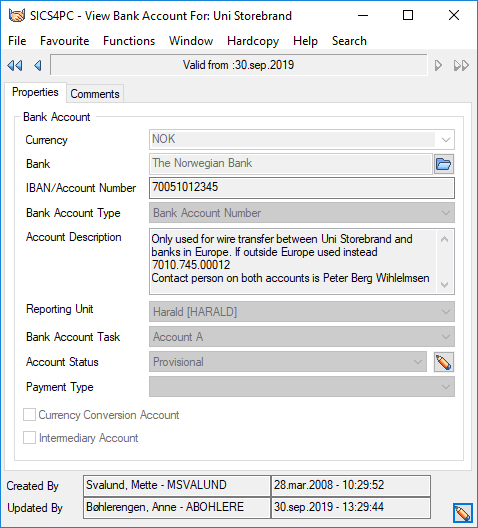
Field description 19. - Bank Account
| Field | Definition |
|---|---|
| Currency | The currency associated with the bank account. Values: Currencies Mandatory: Yes |
| Bank | The bank associated with the bank account. Values: Banks. Mandatory: Yes |
| IBAN / Account Number | The bank account number. Values: Free-text, maximum 40 characters. Only alphanumeric characters are allowed provided the Account is not Intermediary, if the System Administrator of your company has set up the system that way. Mandatory: Yes. |
| Bank Account Type | The bank account type. Mandatory: Yes. When system parameter ‘Bank Account Type Mandatory’ is active, a value different from <None> is mandatory. If the system parameter is inactive, the value <None> is defaulted by the system and is a valid value. Values: Bank Account Types (from the reference data) Functional Impact: None |
| Account Description | A description of the account to make it easier to select right account when used on a remittance worksheet. Values. Free-text, maximum 255 characters. Mandatory: No. Functional Impact: None |
| Reporting Unit | Used on Base Company to relate bank accounts to specific reporting unit s, for reporting purposes. Values: Reporting Unit s. Mandatory: When Base Company Functional impact: None |
| Bank Account Task | Used to give each bank account a reference. SICS compares the bank account task given on the Business' Administration Conditions with the tasks of the bank accounts. When creating Statement of Account documents the system selects and presents the bank account with the same currency and tasks as on the business. This is particularly important when the business partner has several bank accounts with the same currency. (Refer to ‘Handle Business Partners with Accounting/Payment Task’). Values: Customised by your company. Mandatory: No. Functional Impact: Document Production |
| Account Status | The status of the bank account, which reflects whether the bank account can be used. When the account is first registered, the status is Provisional. Another user has to change the status to Approved. SICS security makes sure that the same user cannot change the account number and approve it. Values: Provisional, Approved, Inactive Mandatory: Yes Default: Provisional Functional Impact: Determines whether the account can be used in remittance s. |
| Payment Type | Used to restrict bank accounts available for the payment type selected on the Remittance Worksheet. Values: All payment types selected in the reference data for the data type Remittance Behavior Mandatory: No Default: none Functional Impact: Determines whether the Bank account is available in Remittance Worksheet or not. If a payment type is defined for the reference data type Remittance Behavior, only bank accounts with this payment type will be available in the field Partner’s Bank Account on the Remittance Worksheet when corresponding value is selected in field Payment Type. |
| Currency Conversion Account | Indicator that the account can be used for other than the defined bank account currency. Validation: Field is disabled if business partner is not a Base Company. Mandatory: No Functional impact: Automatic Paid Remittance, EDI Generated Remittance |
| Intermediary Account | Indicator that the Bank Account is an intermediary account. Intermediary accounts are used when there are restrictions paying directly into (or receiving payments directly from) Partner’s account. Mandatory. No Functional Impact: Remittance Worksheet- Intermediary Account |
Maintain User-Defined Information on Bank #
SICS gives the option to register further details on your bank that are specific for your company’s needs. The User-Defined field appears as an extra tab on the Properties tab.