Handle Business Partner Conditions
The business partner conditions are conditions that are valid for certain types of business accepted from (or through) a partner. These conditions can be recorded on the partners, and will be reflected on business involving the partner.
The business partner conditions include:
- Credit Terms
- Brokerage Frame Agreement
- Tax on Interest
Maintain Credit Terms #
Credit terms are the agreed number of days of credit before a settlement has to be made by your business partner. SICS lets you register credit terms for business partners. By registering terms:
- The terms are defaulted to business when the partner has the payment task.
- The calculated Payment Date will consider the days of credit (due date plus credit term) when you book the instalments.
- Find and open the business partner.
- Click the Details tab.
- In the Properties display list, select Credit Terms.
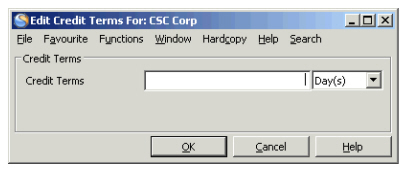
- Click the Edit button. You see the Edit Credit Terms window.
- Enter the relevant information and click OK.
| Field | Description |
|---|---|
| Credit Terms | The agreed period of credit, before settlement, with a company. Values: Numerical text, maximum 3 characters. Functional Impact: Business- Business Partner - Payment Task Premium and Limit Conditions - Instalments - Create Instalments Mandatory: No Values: Day(s), Week(s), Month(s). |
Maintain Brokerage Frame Agreements #
When accepting business through brokers you pay a fee to the broker. With some brokers you might have made an agreement of a fixed brokerage rate (e.g. 10%) that will apply to all their offered business, or only specific classes of business.
SICS lets you register a fixed brokerage rate per class of business for business partners. The system automatically defaults (per class of business, if business is sectioned) the brokerage to the set rate when registering a deduction on a business placed through the broker.
- Click the Business Partners icon in Partners folder on the SICS desktop.
- Find and open the broker (business partner) that you want to add a fixed brokerage rate for.
- Click the Details tab in the View Business Partner window.
- In the Properties display list, select Brokerage Frame Agreement.
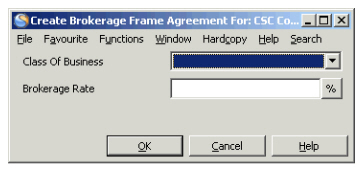
- In the Brokerage Frame Agreement display list, select New from the pop-up menu. You see the Create Brokerage Frame Agreement window
- Select a class of business from the drop-down list, enter a rate and click OK.
| Field | Description |
|---|---|
| Class of Business | The class of business the brokerage agreement is valid for. Values: Customised by your company. Validation: Allow multiple classes of business Mandatory: No Functional impact: Business - Main Section or Sections with matching class of business. |
| Brokerage Rate | The agreed fixed rate (fee) to the broker Values: Numerical text, maximum 12 integer and 5 decimals. Percentage, Per mille Mandatory: No Functional Impact: Deductions Conditions- Deduction type: Brokerage |
Maintain Tax on Interest #
Depending on which country the business originates from (cedent’s country) your company may have to pay tax on earned interest on premium and loss deposits. Each country’s fiscal authorities advise the tax on interest rate.
The Tax on Interest Rate can be recorded in three different ways:
- Per business.
- Per business partner. The tax interest rates will be transferred to all business with that partner.
- Per country. The rates will then automatically default to the business partners for respective country.
Define Tax on Interest Rate for a Business Partner #
- Find and open the business partner.
- Click the Details tab in the View Business Partner window.
- In the Properties display list, select Tax on Interest.
- Select the Edit button in the lower right-hand corner. You see the Edit Tax on Interest window.
- Enter the relevant information for Inwards and Outwards business, and click OK.
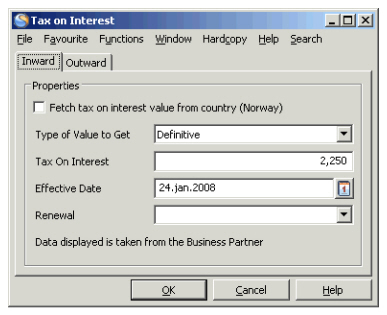
Field description 22. - Tax on Interest
| Field | Description |
|---|---|
| Fetch Tax on Interest Value from Country | Gives you the Tax on Interest defined per country. Values: Active, Inactive Default: Active Mandatory: No Functional impact: Tax on Interest |
| Type of Value to Get | Defines the status of the tax on interest rate. Values: Definite, Provisional, None Default: Definite Functional impact: 'Fetch Tax on Interest' is active: - Value: ‘Provisional’ gives Provisional tax on interest rate from Country. - Value: ‘Definite’ gives Approved tax on interest rate from Country. - Value: ‘None’ gives Provisional tax on interest rate from Country. Mandatory: Yes |
| Tax on Interest | The Tax on Interest rateadvised by each country’s fiscal authorities Values: Free numerical field, if ‘Fetch Tax on Interest’ is inactivated. Validation: Non-editable field if ‘Fetch Tax on Interest’ is activated Cannot exceed 100%. Derived from: Country - Tax on Interest, if ‘Fetch Tax on Interest’ is activated. Mandatory: No Functional Impact: - Definite Tax on Interest rate - Inward / Outward - Assumed Business: Deposit Conditions - Retrocessionaire’s Participation - Deposit Conditions |
| Effective Date | Defines the effective date of the tax on interest rate Values: Date Derived from: Country - Tax on Interest, if Fetch Tax on Interest is activated. Default: Current date, if Fetch Tax on Interest is inactivated. Validation: Non-editable field if Fetch Tax on Interest is activated. Mandatory: Yes |
| Renewal | Indicates the renewal procedure for the Tax on Interest rate. Values: Annual, Definitive, Request, None Mandatory: No |