Maintain Partner's Areas of Business
When you are looking for partners with which you want to do business, SICS can help you identify those companies that write the specific class of business and are approved to do so in the area in question.
Approve Partner for Countries #
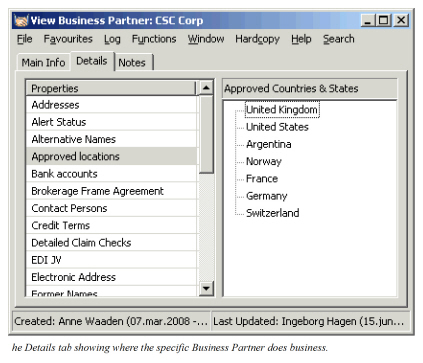
You can register the countries in which your business partners are allowed to write insurance. This information is crucial when you are trying to obtain coverage in certain countries.
- Find and open the business partner.
- Click the Details tab.
- In the Properties display list, select Approved Locations.
- In the Approved Countries & States display list, select Edit in the pop-up menu
- Select the countries and click OK.
 .
.
Approve Partner for States #
In some countries, for example the United States, insurance companies have specific requirements that they have to comply with in order to receive a license to do underwriting in a particular state. SICS lets you register the states in which your partner has been approved to do business.
- Find and open the business partner.
- Click the Details tab.
- In the Properties display list, select Approved Locations.
- In the Approved Countries & States display list, select Edit from the pop-up menu.
- Select country and expand the list if it includes states.
- Select the required states and click OK.
Classify the Business Partner’s Business #
Some companies specialise in certain main classes of business, for example, only property, aviation, and liability. You can register this information on each business partner.
- Find and open the business partner and then click the Details tab.
- In the Properties display list, select Main Class of Business.
- In the Name display list, select Edit from the pop-up menu
- Select the required Main Classes of Business and click OK.
Classify Partner by Original Fund Type #
In some places it is required by local accounting legislation that the origin of the business is identified, e.g. whether it is domestic insurance funds or non-domestic insurance funds. SICS can capture this on the business partner (and the country) in the form of a SICS ‘additional classification’. If you do, SICS will set this classification (fund type) when you create a treaty with this business partner acting as a cedent.
- Find and open the business partner and then click the Details tab...
- In the Properties display list, select Fund Type .
- In the Fund Type group box, select Edit from the pop-up menu
- Select the required fund type in the drop-down list and click OK.