Assign Internal Responsibilities per Partner
You can assign people within your own organisation to be the main responsible person for a certain business partner and a certain task, e.g. accounting. If any issues arise with this partner related to accounting, everyone within the organisation would know whom to contact.
- Open a business partner and click the Details tab.
- In the Properties display list, select Responsible Person.
- In the Responsibility/Responsible display list select Add Responsible Person in the pop-up menu.
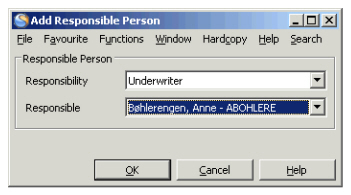
You see the Add Responsible Person window. - Select the responsible person and click OK
The responsibilities for a person in your company depend on who has been authorised to do what kind of job.
Field description 3. - Responsible Person
| Field | Description |
|---|---|
| Responsibility | A duty a person has when it comes to this partner. Values: Customised by your company e.g. Accounting, Underwriting, Claims Handling Validation: Field is mandatory if a responsible person is selected. You can assign multiple Responsibilities. Functional Impact: None Mandatory: Yes |
| Responsible | The person responsible within an area. Values: Customised by your company with names. Validation: Mandatory if Responsibility selected. Multiple responsible persons allowed, one per responsibility. Mandatory: Yes Functional Impact: None |