Record New Business Partner
When a previous record of the partner does not exist, SICS lets you register the new partner and detailed information about the company.
Record a Business Partner only #
- Double-click the Business Partner icon on the Partners folder on the desktop. You see the Find: Business Partner window
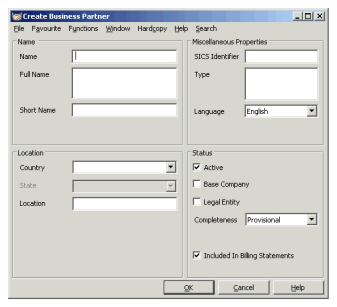
- Click ‘Create New’ button, or select New on the pop-up menu. You see the Create Business Partner window.
- Enter relevant information and click ‘OK’.
Record a Business Partner while Creating a New Business #
- You are in the middle of assigning a business partner to a business, and you need to create the business partner to be assigned.
- Click the ‘Find’ button in the Assign Role window. You see Find: Business Partner window.
- Click’Create New ‘button, or select ‘New’from the pop-up menu. You see the Create Business Partner window.
- Enter relevant information and click ‘Save’.
Ensure Standardised Registration of Partners #
When registering a business partner for the first time, your company might have standards for how to name or give a location to a partner to avoid double registration. Also there might be minimum information required about a partner before it can be used. Whether these requirements are fulfilled can be monitored by the Completeness Status.
Set Completeness Status while Recording a New Partner #
You can create your business partner even if your company not yet has approved it, by selecting a status representing incomplete.
- In the Find Business Partner window, click the ‘Create New ‘button, or select ‘New ‘from the pop-up menu. You see the Create Business Partner window.
- Select relevant completeness status and click OK.
Change Business Partner Completeness Status #
Changing the completeness status from provisional to approve indicates that the registration of the partner is according to your company’s requirements and that business can be accepted from the partner.
- Open a business partner. You see the View Business Partner window.
- Click the ‘Edit ‘button.
- Change relevant completeness status and click ‘OK’.