Handle Third Party
On facultative reinsurance business, one of the business partners is the insured. This has a direct relationship with the cedent, but normally not with the reinsurer. Such companies are defined as third parties in SICS.
In general, the system handles third parties the same way as business partners. It does however not require as much information and it has some restrictions, like not being able to have a business partner ledger.
When you have a direct relationship with the insured, you can transform the third party to a full business partner. Refer to Record Full Business Partner Information on Third Party on page 3-96 Business Partner Information on Third Party.
Find Third Party #
In situations where you for example want to update a business partner or check if a partner exists, you use the search functionality. To access the find third party:
- Double-click the Third Party icon in the Partners folder on the desktop.
- You see the Find Third Party window.
The same principal of entry exists for find third party as described for_Find a Business Partner on page 3-1_ _Business Partner_.
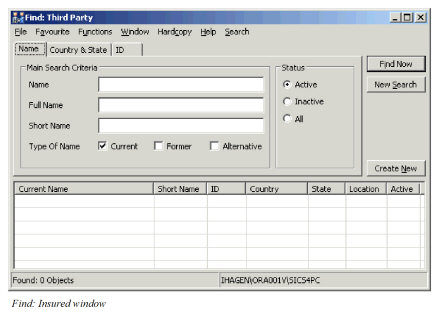
Field description 23. - Find Third Party
| Field | Description |
|---|---|
| Name | A company’s name. Values: Free-text, maximum 80 characters. |
| Full Name | A company’s legal name. Values: Free-text, maximum of 300 characters. |
| Short Name | A company’s abbreviated name. Values: Free-text, maximum 40 characters. |
| Type of Name | A company’s existing or past name(s). Values: * _Current_ - means company’s existing name * _Former_ - means the name(s) before current name * _Alternative_- used when company have other names _Default:_ Current. _Validation:_ Allows multiple types. _Mandatory:_ No |
| Status | The status indicates if the company is valid, and is allowed to make business agreements. Values: * _Active_- _partner_ is open i.e. allowed to do business/agreements * _Inactive_ - Not a valid _partner_ allowed to do business/agreements * _All_ - both Active and Inactive _Default:_ Active _Mandatory:_ Yes _Validation:_ One criterion per search. |
| Country | The domicile country of a company. Values: Countries Mandatory: No. |
| State | The domicile state of a company. Values: States Validation: Depends on Country. Mandatory: No |
| ID Type | A party identifier type. Values: Customised by your company e.g. SICS Identifier Mandatory: No |
| ID | The name and/or number that uniquely identifies the partner. Values: Free-text, maximum 20 characters. Mandatory: No |
Record a New Third Party #
When a previous record of the third party does not exist, SICS offers quick registration of new third parties.
Record a Third Party only #
- Double-click the Third Party icon in the Partner folder on the SICS desktop. You see the Find: Third Party window.
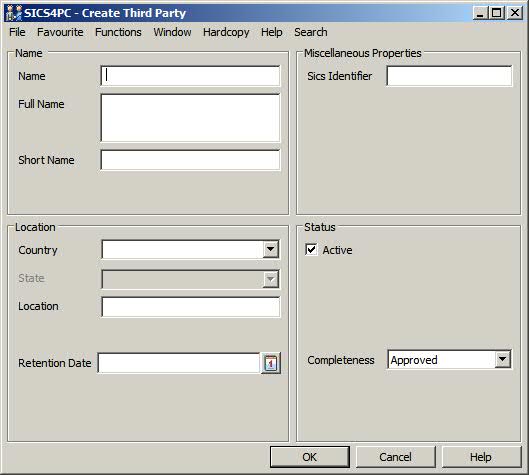
- Click the Create New button, or select New on the pop-up menu. You see the Create Third Party window.
- Enter the relevant information and click OK. Your business partner has now been recorded as a third party in SICS.
Record a Third Party while Creating a New Business #
- On the second page of the Create New Business wizard (Assign Business Partner), click the Insured button. You see the Assign to Insured to Insured Period window.
- Click the Find button. You see the Find: Third Party window.
- Click the Create New button, or select New on the pop-up menu. You see the Create Third Party window.
- Enter the relevant information and click Save.
Maintain Third Party Main Information #
The main information about your third party is shown on the View Business Partner window. This window contains the minimum information needed to create and assign third parties to businesses.
- Double-click the Third Party icon in the Partners folder on the SICS desktop. You see the Find: Third Party window.
- Find and open the business partner. You see the View Third Party window.
- Click the Edit button.
- Change the information and click OK.
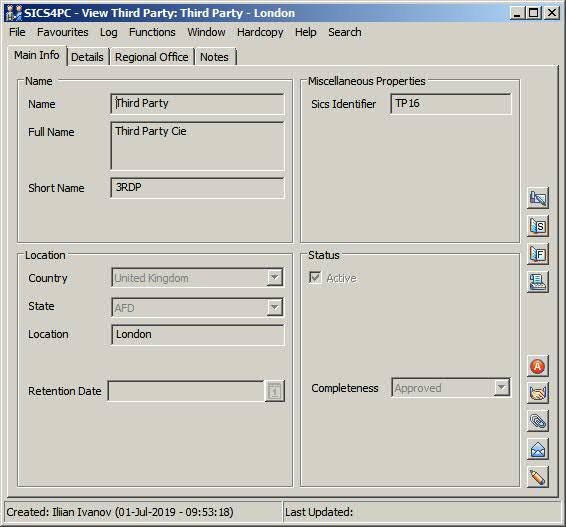
Field description 24. - Maintain Third Party Information
| Field | Description |
|---|---|
| Name | A company’s name. Values: Free-text, maximum 80 characters. Mandatory: Yes. |
| Full Name | A company’s legal name. Values: Free-text, maximum 300 characters. Mandatory: No. |
| Short Name | A Company’s abbreviated name. Values: Free-text, maximum 10 characters. Mandatory: No. |
| Country | The domicile country of a company. Values: Countries. Mandatory: Yes. |
| State | The domicile state of a company. Values: States. Validation: Empty field not allowed, if country with states selected. Mandatory: No. |
| Location | The domicile city of a company. Values: Free-text, maximum 45 characters. Mandatory: No Functional impact: None |
| Retention Date | Date serving as criteria for anonymization of personal information via Mass Update function Anonymize Personal Data. Values: Date Field. Mandatory: No Functional impact: None |
| SICS Identifier | The name and/or number that uniquely identifies the partner. Values: Free-text, maximum 20 characters - or customised by your company. Validation: Editable or Non-editable customised by your company. Mandatory: No |
Record Full Business Partner Information on Third Party #
Insureds (third parties) do not require as much information as full-fledged business partners do. If needed however, the third party can be defined also as a full business partner and get the option of capturing the same information as a full partner. For example it can have a business partner ledger, and thus handle settlements to and from the base company.
- Double-click the Third Party icon in the Partners folder on the SICS desktop. You see the Find: Third Party window.
- Find and open the third party. You see the View Third Party window.
- On the Main Info tab, click the Transform Third Party into Business Partner button.
- Click Yes to warning message ‘Transforming a Third Party into a Business Partner is not reversible. Do you want to continue?’ You see the View Business Partner (Third Party) window.
Make a Business Partner Become a Third Party #
When handling facultative reinsurance business, the insured is handled separately in SICS, and is defined as a third party. A third party is a partner that has a role in the business but with whom you, as the reinsurer, do not have a direct relationship.
You may have situations where the company you write business with acts both as a business partner and a third party.
To avoid recording the same company both as a business partner and a third party, SICS lets you transform a business partner to a third party. The company can then be used both for reinsurance and direct business having different roles.
- Double-click the Third Party icon in the Partners folder on the SICS desktop. You see the Find: Third Party window.
- Find and open the business partner. You see the View Third Party window.
- On the Main Info tab click Transform Business Partner into Third Party button.
- Click Yes on warning message ‘Transforming a Business Partner to a Third Party is not reversible. Do you want to continue?’. You see the View Business Partner (Third Party) window.
Maintain Third Party User Defined Information #
SICS gives the option to register further information on your third parties that is specific for your company’s needs. The user-defined field is displayed as an extra tab on Third Parties.
- Double-click the Third Party icon in the Partners folder on the SICS desktop. You see the Find: Third Party window.
- Find and open the third party. You see the View Third Party window.
- Click the User Defined Fields tab.
- Select the Edit button.
- Change the relevant information and click OK.