Assign a Claim to Claimants or an Insured (Third Party)
For specific types of business and claims you may want to record the Claimants and/or the Insured. These parties can be maintained as Third Parties in SICS. As for the Claim Business Partners, payments can be made directly to them. Third Parties can also be used as extract criteria in Find Claim. The Third Party relationship is maintained on the Links Tab - sub tab Business Partner - in the Claimant/Insured display list.
Add a Link to a Third Party #
- Find and open the claim you want to define a Third Party (Claimant or Insured) on.
- Open the Links tab and then the Business Partners sub tab.
- In the Claimant/Insured display list, select Add from the pop-up menu. You see the Claimant/Insured dialog box.
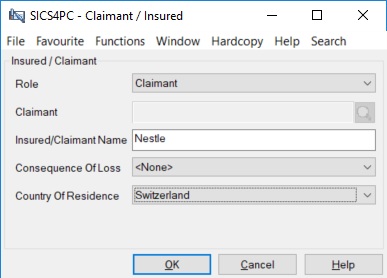
- In the Claimant/Insured dialog box enter Role and link the Claim to an existing Third Party, or alternatively type the Claimant/Insured name in the Insured/Claimant Name field, and enter the Consequence of Loss.
- If you define the Claimant, and this is a Third Party, the country of residence is defaulted to that of the Thrid Party. If the claimant is recorded as a Name, you can select the Country of Residence from dropdown.
- Click OK.
- Repeat steps 3-6 for all Third Parties you want to create a link to.
Edit a Link to a Third Party #
- Find and Open the claim you want to edit the Third Party link for
- Open the Links tab, sub tab Business Partners.
- In the Claimant/Insured list box, select the relationship you want to edit
- Select Edit from the pop-up menu.
- Enter updated information about Role, Third Party or Consequence of Loss.
- Click OK.
Remove a Link to a Third Party #
- Find and Open the Claim you want to remove a Third Party link for
- Open the Links tab, sub tab Business Partners
- In the Claimant/Insured list box, select the relationship you want to remove
- Select Remove from the pop-up menu.
- Confirm that you want to remove the link from the database.
Note! The system automatically displays the Insured as defined on the Business as a Third Party for Direct Business. This partner is copied from the business, and is displayed on the claim to enable the retrieval of claims per insured in Find Claims. The relationship cannot be edited or removed on the claim itself. If your System Administrator has activated this functionality, Claimant is mandatory for Lines of Business with Casualty behaviour, and you will not be allowed to remove all Claimants.
View Third Party Properties #
- Open the Links tab, sub tab Business Partner
- Select the Third Party in the Claimant/Insured list box.
- Select View Properties from the pop-up menu.
Note! This option is only made available when the Third Party is recorded as a link, and not as a name
.
| Field | Description | Location |
|---|---|---|
| Role | The responsibility Third Party has for the specific claim. Value: Claimant, Insured Default: Claimant Mandatory: Yes Functional impact: Search criteria in Find Claims |
Links - Business Partners - Claimant/Insured |
| Claimant | The Third Party registered as a Third Party in the system that has the role of claimant. Values: All Third Parties registered in the system. Mandatory: If Claimant Name has not been defined. Functional impact: Search criteria in Find Claims, possibility to pay claim balances directly to Third Party. |
Links - Business Partners - Claimant/Insured |
| Insured | The Third Party registered as a Third Party in the system that has the role of insured. Values: All Third Parties registered in the system. Mandatory: If Insured Name has not been defined. Functional impact: Search criteria in Find Claims, possibility to pay claim balances directly to Third Party. |
Links - Business Partners - Claimant/Insured |
| Insured/Claimant Name | The Name of the Insured or Claimant. Values: Free-text entry. Mandatory: If link to Third Party has not been defined. Functional impact: Search criteria in Find Claims |
Links - Business Partners - Claimant/Insured |
| Consequence of Loss | The consequence of the loss from the claimant’s perspective. Values: Customised Default: The Consequence of Loss defined in Claim Classifications. Validations: None Functional impact: None |
Links - Business Partners - Claimant/Insured |
| Country of Residence | The country of residence for the claimant. Values: The country defined on the selected Third Party, or a country defined in SICS. Default: The country defined on Third Party, if claimant is created as a link. Validations: None Functional impact: None |
Links -Business Partners - Claimant/Insured |