Claim Program
The Claim Program functionality facilitates claims administration in general, and especially when the claim affects multiple treaties. Linking both treaties and claims to a Claim Program enables you to view both claims and corresponding premium figures for all the linked treaties in one place. The treaties can be grouped in a Reinsurance Program but this is not required. The functionality available to you from the Claim Program enables efficient Claims Handling, and improved workflow. The Claim Program has its own classification items, and all claims created from the Claim Program will inherit these. If the Program consists of many treaties, the claim is simultaneously created on all.
The Claim Program functionality is available on your desktop if enabled by your System Administrator. Refer to System Administration Guide - Claim Parameters.
Find Existing Claim Program #
To look for all existing Claim Programs for a cedent or a period for example, you can use the Find Claim Program functionality. The Find Claim Program window is accessed if you select “Claim Program” from the desktop. You use this window to search for all existing Claim Programs within the system using various search criteria.
The Find Claim Program window is similar to other Find windows in SICS, and allows you to enter various search criteria for Claim Program Properties, Claim Program Period and Claim Program Locations. The Find window allows the use of wildcards as part of most search criteria. Refer to Getting Started chapter in this Guide.
The following search procedures are examples of some of the search options available to you.
Search for a Claim Program for a Specific Cedent #
- Double-click the Claim Programs icon in the Claims folder on the SICS desktop to open the Find: Claim Program window.
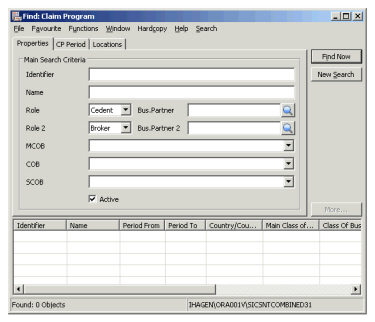
- Select Business Partner by using the Find facility or you can type in the Business Partner name or part of it directly into the field and receive possible matches for the text (alternatively with wildcard). If you know the Business Partner ID, you can also type this.
- Click Find Now.
The system displays the single Claim Program with the identifier, or the Claim Programs that have an identifier containing the part defined.
Search for Claim Programs within a Specific Period #
- Double-click the Claim Programs icon in the Claims folder on the SICS desktop to open the Find: Claim Program window
- Click the CP Period tab.
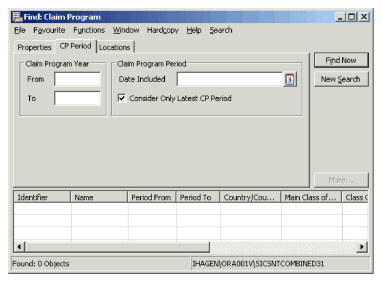
- Enter the Claim Program Year From and To.
- Click Find Now.
Search for Claim Program within a Specific Country #
- Double-click the Claim Programs icon in the Claims folder on the SICS desktop to open the Find: Claim Program window.
- Open the Claim Program Locations tab.
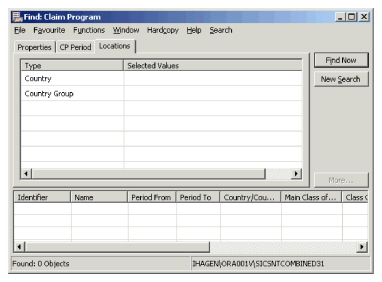
- Select the Country you want to include in your search.
- Click Find Now.
Search for Claim Programs for Cedent, MCoB, Period and Location #
- Double-click the Claim Programs icon in the Claims folder on the SICS desktop to open the Find: Claim Program window.
- On the Properties tab, select the Cedent you want to include in your search.
- On the Properties tab, specify the Main Class of Business you want to retrieve Claim Programs for.
- On the CP Period tab, enter the Claim Program Year From and To.
- On the Locations tab, select the Country you want to include in your search.
- Click Find Now.
| Field | Description | Location |
|---|---|---|
| Identifier | The unique identifier generated by SICS by which the Claim Program is known. Value: Free-text entry |
Properties |
| Name | The name you have given to a Claim Program. Value: Free-text entry, maximum 100 characters. |
Properties |
| Role | The role the Business Partner has on a Business. Value: Reference table value - either Cedent, Broker or Reinsurer. Default: Cedent |
Properties |
| Bus.Partner | The Business Partner with the defined Role. If the business partner belongs to a merger group and system parameter ‘Include merged companies and merge parent at search by business partner’ is selected, all other members of this business partner’s merger group will be automatically added also. Value: Business Partner ID. |
Properties |
| Role 2 | The role the Business Partner has on a Business. . Value: Reference table value - either Cedent, Broker or Reinsurer. Default: Broker |
Properties |
| Bus. Partner 2 | The Business Partner with the defined Role. If the business partner belongs to a merger group and system parameter ‘Include merged companies and merge parent at search by business partner’ is selected, all other members of this business partner’s merger group will be automatically added also. Value: Business Partner ID. |
Properties |
| MCOB | The Main Class of Business covered by the Claim Program. Value: Any values defined as Main Class of Business |
Properties |
| COB | The Class of Business covered by the Claim Program. Value: Any values defined as Class of Business. If Main Class of Business has been specified, only valid Classes of Business can be selected. |
Properties |
| SCOB | The Sub Class of Business covered by the Claim Program. Value: Any values defined as Sub Class of Business. If Main Class of Business or Class of Business has been specified, only valid Sub Classes of Business can be selected. |
Properties |
| Active | Indicator of whether the Claim Program is Active or Inactive. Value: True/False Default: True |
Properties |
| Claim Program Year From | The first Claim Program Year you want to include in your search. Value: Any year - YYYY |
CP Period |
| Claim Program Year To | The last Claim Program Year you want to include in your search. Value: Any year - YYYY. |
CP Period |
| Claim Program Period Date Included | A date covered by a Claim Program period. Value: Any date - DD/MM/YYYY |
CP Period |
| Consider Only Latest CP Period | Only the latest Claim Program period is included in the display list. Value: True/False Default: True |
CP Period |
| Country | The country covered by a Claim Program. Value: Any country defined in the system. |
Locations |
| Country Group | The country group covered by a Claim Program. Value: Any area group defined in the system. |
Locations |