Claim References
The Claim references are useful since they can be used in Find Claims, and therefore helps you identify the correct claim based on for example the cedent’s or the broker’s claim reference. SICS allows you to record as many Claim references as you require.
Create Claim Reference #
- In Find Claims, retrieve the Claim Loss for which you want to record a Claim Reference.
- Open the Claim.
- Open the Section Specific tab.
- Select Edit from the pop-up menu in the Claim References section. You see the Edit Claim Reference Types window.
- Enter reference ID and Type in the container, to add more simply navigate to the next line.
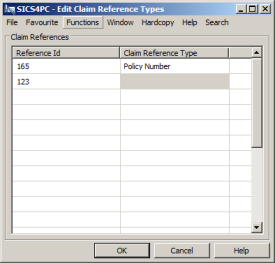
- Click Save.
Edit Claim Reference #
- In Find Claim, retrieve the Claim for which you want to edit a Claim Reference.
- Open the Claim.
- Open the Section Specific tab.
- Select Edit from the pop-up menu in the Claim References section.
- Edit the references and/or reference IDs as required
- Click save
Delete Claim Reference #
- In Find Claim, retrieve the Claim for which you want to delete a Claim Reference.
- Open the Claim.
- Open the Section Specific tab.
- In Claim References section, select the claim reference you want to remove, and select Delete from pop up menu.
- Confirm that you want to delete the reference
| Field | Description | Location |
|---|---|---|
| Reference ID | The Identifier that is used to denote the Claim for example the cedent’s or the broker’s claim number. Values: Free-text field Mandatory: If Reference Type is selected. Functional impact: Unique Claim Reference is used to identify claims in EDI. |
Section Specific - Claim References |
| Reference Type | The type of reference the reference ID refers to, for example Cedent, Broker, Unique Claim Reference Values: Customised Mandatory: If Reference ID is recorded. Functional impact: None |
Section Specific - Claim References |