Claim Review and Update Information
The Claim Review and Update information fields allows you to record when you were advised of the claim, when you last reviewed it, and when you plan to review it next. In addition the claim “footer” will always display when and by whom the claim was created, and last updated.
You find the claim’s review and update information fields on the Section Specific tab, and the entry fields are also accessible through the various claim wizards (The entry fields are initially created in the wizards).
Create Claim Review and Update Information #
- On the Claim Section Specific Properties page of Claim wizard, define the Claim Advised Date, Claim Action Date, and any Action Comments, Received Date and Advice Amount and Currency.
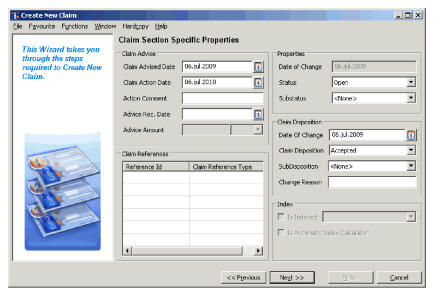
- Click Next and complete the wizard.
Edit a Claim Review and Update Information #
- Find and open the claim you want to edit Review or Update information for.
- Click the Section Specific tab.
- Click the Menu button of the Claim Section Update Information fields. You see the Edit Claim Section Details window.
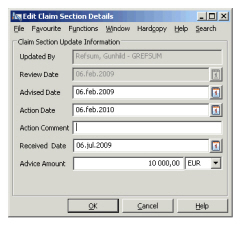
- Edit the Advised Date, Action Date, and any Action Comments, Received Date and Advice Amount and Currency.
- Click OK.
| Field | Description | Location |
|---|---|---|
| Updated By | Output field, indicating the user who last updated the claim. | Section Specific |
| Review Date | Output field only - indicating the date the claim was last updated. The claim is updated when new status or disposition information is added. | Section Specific |
| Advised Date | The cedent or insured advised the date the claim to you. Values: Date field. Default: Today’s date Mandatory: When disposition is not “Informational” Validations: Must be greater or equal to date of loss and less or equal to today’s date. |
Section Specific |
| Action Date | The date when you next want to review the claim. Values: Date field. Default: When creating claim the date defaults to today’s date + defined period by your System Administrator. When a worksheet is created (a claim booking is made for this claim), the Action Date is derived from as-of-date on worksheet + defined period. Functional impact: Will generate a Notifier that the Claim must be reviewed. |
Section Specific |
| Action Comment | Comments to the planned action. Values: Free-text entry. Functional impact: None |
Section Specific |
| Received Date | The date you received the initial claim advice. Values: Date field. Default: None Mandatory: When system parameter Claim Advice Fields Mandatory is on. Validations: Must be greater or equal to date of loss, and less or equal to today’s date. |
Section Specific |
| Advice Amount | The loss amount you received in the initial claim advice. Values: Numeric Default: None Mandatory: No Validations: Must be equal to or greater than 0,00. |
Section Specific |
| Advice Currency | The currency the initial loss amount is reported in. Values: Any valid currency. Default: Main currency of the section. Mandatory: When Advice Amount is registered. |
Section Specific |