EDI FGU Figures
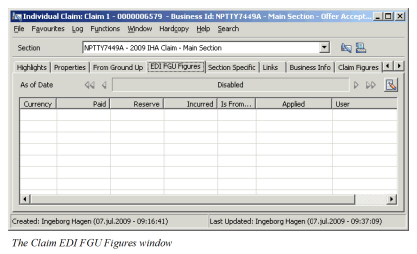
EDI LIMNET CLASS New Claim and Existing Claim Messages contain From Ground Up (FGU) information. This information is for each currency provided on incurred basis and is automatically added to the Incurred FGU field of the EDI FGU Figures section upon processing. You may also record this FGU information manually. The EDI FGU information is held on an overall level of the claim meaning that the same information applies for all sections of the claim.
The EDI FGU Figures fields are enabled when system parameter Use EDI CLASS is activated.
Create EDI FGU Figures #
When you process New Claim and Existing Claim messages, FGU figures received in the message are added to the claim’s EDI FGU Figures tab if not already existing for currency and date. This information can also be added manually.
To manually create EDI FGU information:
- Open the claim you want to create EDI FGU Figures for.
- Click the EDI FGU Figures tab.
- Select New As Of Date from Menu button. You see Create New EDI From Ground Up Figures window.
- Specify As Of Date.
- Select Currency.
- Record FGU Paid and/or FGU Reserve figures. The system calculates FGU Incurred automatically.
- Click OK.
You may also add EDI FGU figures for an existing As Of Date for another limit currency. To record EDI FGU figures for new currency:
- Navigate to the As Of Date you want to add a currency to.
- Select New Currency from the pop-up menu.
- Select Currency.
- Record FGU Paid and/or FGU Reserve figures. The system calculates FGU Incurred automatically.
- Click OK
Edit EDI FGU Figures #
It is possible to edit existing FGU Figures. If the FGU information is created by EDI, you are allowed to enter Paid and Reserves FGU amounts as long as they add up to the Incurred FGU amount. If the FGU information has been created manually, you are allowed to modify the Paid and Reserves FGU amounts, and the Incurred FGU amount is calculated accordingly.
- Open the claim you want to edit EDI FGU Figures for.
- Navigate to the As Of Date for which you want to modify the EDI FGU amounts.
- Select Edit Currency from the pop-up menu. You see Edit EDI From Ground Up Figures window.
- Modify FGU Paid and/or FGU Reserve figures.
- Click OK.
Delete EDI FGU Figures #
You are allowed to delete EDI FGU Figures both created through EDI and manually.
- Navigate to the As Of Date from where you want to remove EDI FGU Figures.
- Select the currency you want to delete.
- Select Delete Currency from the pop-up menu.
| Field | Description | Location |
|---|---|---|
| As Of Date | The date the FGU figures will be associated with Value: Date field. Mandatory: Yes Derived From: The message Bureau Date when created through EDI. Validations: Must be later or equal to the Date of Loss From or the Claim Trigger Date. Must be less or equal to today’s date. |
EDI FGU Figures |
| Currency | Limit currencies in which FGU figures can be recorded. Output field only. Mandatory: Yes Derived From: The message Original Currencies if EDI created. Limit currencies if manually created. |
EDI FGU Figures |
| Paid | The amount the cedent/insured has paid for loss. Values: Amount with two decimals. Validations: Must be greater or equal to zero. |
EDI FGU Figures |
| Reserve | The amount that the cedent/insured has not yet paid for the loss, but maintained as outstanding. Values: Amount with two decimals. |
EDI FGU Figures |
| Incurred | The overall incurred amount in the currency. Output field only. Derived From: From Ground Up Current Estimate field from message if EDI created. Total of Paid FGU and Reserve FGU amounts if manually created. Validations: Must be greater or equal to zero. |
EDI FGU Figures |
| Is From EDI | Indicates whether the FGU information is created by EDI or manually. Output field only. Values: Yes/No |
EDI FGU Figures |
| Applied | The date and time the EDI information was created or modified. Output field only. | EDI FGU Figures |
| User | The user who created or modified the EDI information. Output field only. | EDI FGU Figures |