FGU Distribution
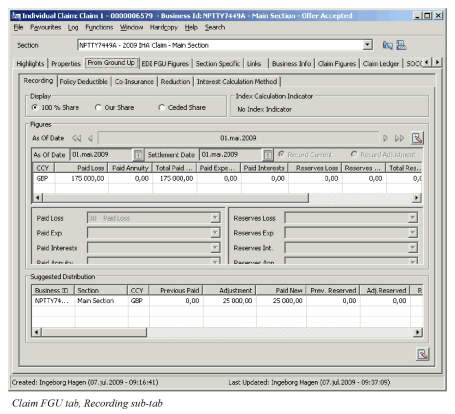
Having performed all the calculations of limits and claim figures, and taking into consideration amounts already booked, the system calculates and displays the result in the Suggested Distribution Display List.
| Field | Description | Location |
|---|---|---|
| Business ID | The unique identifier generated by SICS by which the business linked to the claim is known. | FGU Recording |
| Section | The name of the section the claim is linked to. | FGU Recording |
| CCY | The limit currencies of the linked sections. | FGU Recording |
| Previous Paid | The amount previously booked for selected section in this currency with entry code sub category “(Technical) Loss”, either through FGU, or through manual worksheets that will affect the FGU distribution. If your System Administrator has activated the function Enable Minor Adjustments in FGU Worksheet any minor adjustment bookings are included in this amount. | FGU Recording |
| Adjustment | The difference between Paid New and Previous Paid and reflects the amount now due. Functional impact: If different than zero, a FGU worksheet can be generated. |
FGU Recording |
| Paid New | The calculated Paid Loss amount based upon the current FGU Advisory. If FGU with Annuities is in use, the Paid New is the calculated Paid Loss and Paid Annuity amount based upon the current FGU Advisory. | FGU Recording |
| Prev. Reserve | The amount previously booked with entry code sub categories Reserve-Original Loss Reserve, or “Reserve-Additional Loss Reserve”, either through FGU, or through manual worksheets that will affect the FGU distribution. | FGU Recording |
| Adj. Reserved | The difference between Reserve New and Previous Reserve. Functional impact: If different than zero, a FGU worksheet can be generated. |
FGU Recording |
| Reserve New | The calculated Loss Reserve amount based upon the current FGU Advisory. If FGU with Annuities is in use, the Reserve New is the calculated Loss Reserve and Annuity Reserve amount. Functional impact: If different than zero, a FGU worksheet can be generated. |
FGU Recording |
| Prev. Client IBNR | The amount previously booked with entry code sub category Reserve- Client IBNR, either through FGU, or through manual worksheets that affects the FGU distribution. Enabled if your System Administrator has activated this functionality. | FGU Recording |
| Adj. Client IBNR | The difference between Client IBNR New and Previous Client IBNR. Enabled if your System Administrator has activated this functionality. | FGU Recording |
| Client IBNR New | The calculated amount for Client IBNR based upon the current FGU Advisory. Enabled if your System Administrator has activated this functionality. | FGU Recording |
| Prev. ACR | The amount previously booked with entry code sub categories Reserve- Additional Case Reserve, either through FGU, or through manual worksheets that affects the FGU distribution. | FGU Recording |
| Adj. ACR | The difference between ACR New and Previous ACR. | FGU Recording |
| ACR New | The calculated amount for ACR based upon the current FGU Advisory. | FGU Recording |
| Incurred | The sum of Paid New, Reserve New, New Exp., Res.Exp. New, Paid Interests New, Res. Interests New | FGU Recording |
| Cover | The cover amount that is considered when calculating the Payment amount to layer for the currency. If Claim limits has been recorded, the payment limits are considered. If there are no FGU Paid amount, the amount displayed will be zero. | FGU Recording |
| Excess | The excess amount that is considered when calculating the Payment amount to layer for the currency. If Claim limits has been recorded, the payment limits are considered. If there are no FGU Paid amount, the amount displayed will be zero. | FGU Recording |
| Incurred Cover | The cover amount that is considered when calculating the Incurred amount to layer for the currency. If claim limits has been recorded, the Incurred Limits are considered if the Index Calculation indicator is either Payment and Incurred or None, otherwise only Payment Limits are considered. | FGU Recording |
| Incurred Excess | The excess amount that is considered when calculating the Incurred amount to layer for the currency. If claim limits has been recorded, the Incurred Limits are considered if the Index Calculation indicator is either Payment and Incurred or None, otherwise only Payment Limits are considered. | FGU Recording |
| Client IBNR Cover | The cover amount that is considered when calculating the Client IBNR amount to layer for the currency. Enabled when functionality is activated by your System Administrator. If claim limits has been recorded, the Incurred Limits are considered if the Index Calculation indicator is either Payment and Incurred or None, otherwise only Payment Limits are considered. | FGU Recording |
| Client IBNR Excess | The excess amount that is considered when calculating the Incurred amount to layer for the currency. Enabled when functionality is activated by your System Administrator.If claim limits has been recorded, the Incurred Limits are considered if the Index Calculation indicator is either Payment and Incurred or None, otherwise only Payment Limits are considered. | FGU Recording |
| Incurred ACR Cover | The cover amount that is considered when calculating ACR amount to layer for the currency. If claim limits has been recorded, the Incurred Limits are considered if the Index Calculation indicator is either Payment and Incurred or None, otherwise other Payment Limits are considered. | FGU Recording |
| Incurred ACR Excess | The excess amount that is considered when calculating the Incurred amount to layer for the currency. If claim limits has been recorded, the Incurred Limits are considered if the Index Calculation indicator is either Payment and Incurred or None, otherwise only Payment Limits are considered. | FGU Recording |
| Pol. Deductible | The amount recorded as Policy Deductible. | FGU Recording |
| Prev. Paid Exp | The amount previously booked with entry code sub category Technical- Loss Expense, either through FGU, or through manual worksheets that will affect the FGU distribution. | FGU Recording |
| Adj. Exp | The difference between New Exp. And Prev. Paid Exp. Functional impact: If different than zero, a FGU worksheet can be generated. |
FGU Recording |
| New Exp. | The calculated Paid Expense amount based upon the current FGU Advisory. | FGU Recording |
| Prev. Res. Exp. | The amount previously booked with entry code sub category Reserve-Loss Expense, either through FGU, or through manual worksheets that will affect the FGU distribution. | FGU Recording |
| Adj. Res. Exp. | The difference between New Res. Exp. And Prev. Res. Exp. Functional impact: If different than zero, a FGU worksheet can be generated. |
FGU Recording |
| New Res. Exp. | The calculated New Res. Exp. Amount based upon the current FGU Advisory. | FGU Recording |
| Prev. Client IBR LAE | The amount previously booked with entry code sub category Reserve - Client IBNR LAE. Enabled when functionality is activated by your System Administrator | FGU Recording |
| Adj. Client IBNR LAE | The difference between New Client IBNR LAE and Prev. Client IBNR LAE. Enabled when functionality is activated by your System Administrator | FGU Recording |
| New Client IBNR LAE | The calculated New Client IBNR LAE amount based upon the current FGU Advisory. Enabled when functionality is activated by your System Administrator | FGU Recording |
| Prev. ACR LAE | The amount previously booked with entry code sub category Reserve - ACR LAE. | FGU Recording |
| Adj. ACR LAE | The difference between New ACR LAE and Prev. ACR LAE | FGU Recording |
| New ACR LAE | The calculated New ACR LAE amount based upon the current FGU Advisory. | FGU Recording |
| Adj. Res. Exp. | The difference between New Res. Exp. And Prev. Res. Exp. Functional impact: If different than zero, a FGU worksheet can be generated. |
FGU Recording |
| Prev. Paid Interests | The amount previously booked with entry code sub category Technical-Interests, either through FGU, or through manual worksheets that will affect the FGU distribution. | FGU Recording |
| Adj. Interests | The difference between New Interests and Prev. Paid Interests. Functional impact: If different than zero, a FGU worksheet can be generated. |
FGU Recording |
| New Interests | The calculated Paid Interests amount based upon the current FGU Advisory. | FGU Recording |
| Prev. Res. Interests | The amount previously booked with entry code sub category Reserve - Interest Reserve, either through FGU, or through manual worksheets that will affect the FGU distribution. | FGU Recording |
| Adj. Res. Interests | The difference between New Res. Interests and Prev. Res. Interests. >Functional impact: If different than zero, a FGU worksheet can be generated. |
FGU Recording |
| New Res. Interests | The calculated Interests Reserve amount based upon the current FGU Advisory. | FGU Recording |
| Franchise | The amount allocated towards Franchise (paid and outstanding/reserve) for this claim based upon the current advisory. | FGU Recording |
| AAD Paid | The amount allocated towards Paid in Annual Aggregate Deductible for this claim based upon the current advisory. Functional impact: If different than zero and a change in amount from previous advisory, a FGU worksheet can be generated. |
FGU Recording |
| AAD O/S | The amount allocated towards Annual Aggregate Deductible O/S (Reserve) for this claim based upon the current advisory. >br/>Functional impact: If different than zero and a change in amount from previous advisory, a FGU worksheet can be generated. |
FGU Recording |
| Client IBNR AAD | The amount allocated towards Annual Aggregate Deductible for Client IBNR amounts for this claim based upon the current advisory.Enabled when functionality is activated by your System Administrator >br/>Functional impact: If different than zero and a change in amount from previous advisory, a FGU worksheet can be generated. |
FGU Recording |
| ACR AAD | The amount allocated towards Annual Aggregate Deductible for ACR amounts for this claim based upon the current advisory. >br/>Functional impact: If different than zero and a change in amount from previous advisory, a FGU worksheet can be generated. |
FGU Recording |
Annual Limit, Event Limit, AAD Exhausted #
The FGU functionality does not take into consideration the annual limit or the event limit. It is therefore necessary to manually adjust the claim worksheet when the Annual Limit or Event Limit is exhausted. Warnings to this effect will appear when closing the claim worksheet, if so defined by your System Administrator.
The Annual Aggregate Deductible is considered in the allocation, and will be correct for the claim in question. However, as the generated claim worksheet only contains the loss currently being adjusted, it will be necessary to create new FGU Advisories for claims that will be affected by a reallocation of the Annual Aggregate Deductible.
Create Worksheets from FGU #
The FGU suggested distribution might result in adjustment amounts in the respective columns. If any adjustments are calculated, the Create Claim Worksheet option in the menu is enabled for Open Claims. If the adjustments are a result of the advisory automatically created by clearing the FGU Indicator, the Create Claim Worksheet option in the menu is disabled. The worksheet already has the booking information recorded (business, claim, balance information, currency and booking details). The option is only enabled when worksheets have not already been generated for the selected or subsequent Advisories.
The generated worksheet is created reflecting the share option selected when viewing the FGU figures. If you are viewing the FGU figures for “Ceded” share, the worksheet is created in our share. If the claim has a claim share, the worksheet is always generated in our share, regardless of the FGU View option.
If the claim has more than one section linked, and these have different booking/transfer to ledger information, the system generates one worksheet per transfer option.
Create Worksheets with Zero Adjustments from FGU #
If the current advisory did not result in any actually movements or adjustments, you can still generate a worksheet with zero adjustments to confirm the current position. The option is enabled provided the FGU incurred amount exceeds or is equal to the lowest priority of the linked sections, and if the advisory, or subsequent advisories, have not been already booked, or the claim is closed. Further, the option requires that entry code for Original Loss reserves has been defined. The generated worksheet contains all linked sections, for which no adjustments are calculated.
Split FGU Booking into multiple Accounting Classifications #
If your System Administrator has enabled this functionality, it is possible to split the generated FGU worksheet bookings into multiple Accounting Classifications.
Create FGU worksheet #
- Open Claim’s From Ground Up recording window
- Create the Advisory
- Select Create Worksheet from menu in lower right corner
- The claim worksheet window opens with all bookings for the layer or layers

- On first row define an Accounting Classification if not populated
- The worksheet details section is enhanced with two new columns; Distribution and Remaining. The Distribution reflects the distribution amount as calculated by FGU. This amount is the same regardless of which row you are inspecting. The Remaining column displays the amount which is yet to be distributed across all Accounting Classifications. This amount is automatically updated when you make adjustments to an entry code on any row. Values in the columns only appears if the entry code is derived from FGU distribution.
- Make the necessary adjustments to the Adjustment column for each entry code derived from FGU Recording. As this is the first booking, the previous amount is blank. By default the entire distribution amount is allocated to the first row. When making adjustments, the Remaining amount column is updated.
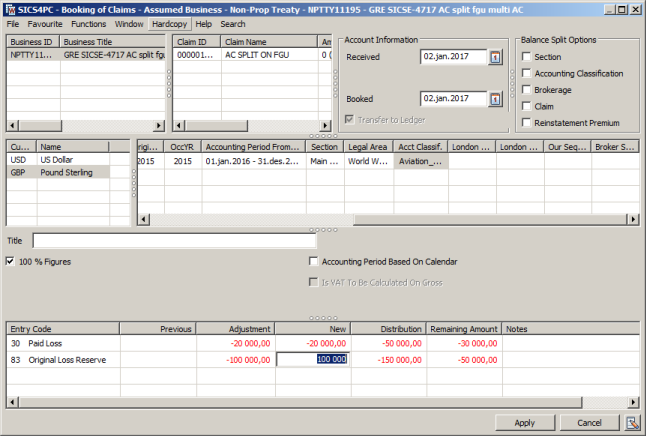
- In upper section, select to Add new booking row. Note that this option is only enabled if you have defined an Accounting Classification on the first row. A new booking row is added to the worksheet, with the same row ID. All booking information (including the Accounting Classification) is copied from the first row.
- Change the Accounting Classification. The detail section updates to reflect all entry codes derived from FGU as well as any manually added bookings made on the selected Accounting Classification.
- Change the adjustment amount for the entry codes. By default, the amount column is blank for all. When adding Adjustment Amounts, the remaining column updates automatically.
- Continue adding rows, and adjusting the adjustments for each until you have completed the booking.
- Perform reinstatement calculation if relevant and required.
- Apply the worksheet, or close. The system validates the input. If the system parameter Enable Minor Adjustments in FGU Worksheet has not been activated, the system validates that the remaining amount is zero for all FGU derived entry codes. The worksheet cannot be saved or closed.
If the parameter is activated, the system validates that the remaining amount is zero for all FGU Entry codes except Paid Loss, and you need to make necessary adjustments for one or more Accounting Classifications for these entry codes. If there is a remaining amount for Paid Loss, the system gives you an option to generate a minor adjustment booking. If you respond yes, the system validates that the required minor adjustment booking does not exceed the defined tolerance limit, and automatically adds the booking to the worksheet, thus allowing you to save/close the worksheet.
If you inadvertently selected the same Accounting Classification on more than one row, the system validates that the same entry code cannot be included in the same balance more than once.