FGU Indicator
The FGU indicator on Individual claims allows you to indicate that Claim Accounting for the claim should primarily use the From Ground Up functionality. Refer to Claim From Ground Up Handling later in this chapter. The indicator is only available if your System Administrator has enabled the functionality. The default value depends on the type of participation of the business on which you are creating the claim, or the corresponding indicator on the Claim Program from which you are creating your claim.
When the indicator is cleared the option to create new From Ground Up advisories is no longer available. Manual worksheets may be created regardless of indicator setting.
To edit the indicator:
Sometimes you may want to use another accounting method (Manual or FGU) for a specific claim than the default FGU indicator suggests.
- Open the Claim Properties of the Claim for which you want to change the FGU indicator
- From the menu in the Heading Section, select Edit FGU Indicator.
The option is only enabled if you have been granted this access right, and the claim’s status is Open. The Edit FGU Indicator window is opened.
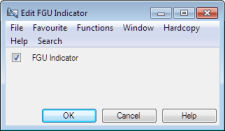
- Change the FGU indicator to required value, and press OK.
If you clear the FGU Indicator, the system checks whether there are any FGU records created. If there is an existing record, the system creates an automatic advisory, as per current date, reducing all FGU entries to zero. The impact, if any, of this automatically created advisory cannot be booked from FGU. If you activate FGU Indicator, the system validates that the balances of all entry codes are zero.