Find Claim Groups
When you decide that you want to link the claim to a Claim Group, the first step would be to search for any existing Claim groups in the system.
The Claim group consists of a Category and a Name, and can be active or Inactive.
- Double-click the Claim Group icon in the Claim folder on the SICS desktop. You see the Find Claim Group window.
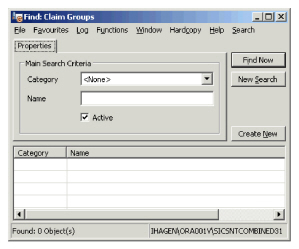
- Select category from the drop-down list.
- Enter the name.
- Select the Active check box if you want to search for active group. Clear the check box if you want to search for inactive groups.
- Click Find Now.
| Field | Description | Location |
|---|---|---|
| Category | The type of Claim Group. Can be used to narrow the search. Values: Customised. |
Properties |
| Name | The Name of the Claim Group. Values: Free-text entry. |
Properties |
| Active | Indicator of whether the Claim Group is Active or Inactive. | Properties |