Indexed Claims
Index calculation of claims is common in markets where the inflation is very high, or the nature of the policy is long tailed. To ensure that the reinsured has the same cover that he originally bought in monetary terms, despite inflation, and that the reinsurers are not held liable for claims before the reinsured has retained a share equivalent to the monetary amount agreed upon at contract inception, an index clause is introduced. Refer to Maintain Index Clause in the Business Chapter.
When an Index Clause is present on a Non-Proportional business, SICS allows you to flag Individual Claims on the business as being subject to the Index Clause. The system has a facility for automatic calculation of the indexed Cover and Excess, which will also be applied, in the FGU calculation and distribution. Alternatively, you can create Claim Limits (refer to Create Claim Limit and Share Condition) that reflects the indexed limits. These manually created limits will then be used in the FGU calculation, and index tables and points are not considered.
Although the business contains an Index Clause, this does not necessarily mean that all linked claims are indexed. You must therefore mark each claim that the index clause applies to.
Note that the FGU distribution will validate that each linked non-proportional section has the same index information. Refer to FGU Handling - Distribution
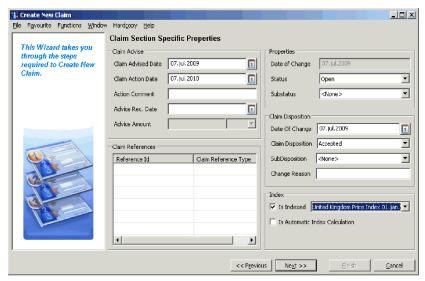
Indicate a New Claim as being indexed #
- In the Create Claim Wizard, on Claim Section Specific Properties page, select Is Indexed in the lower right corner.
- Select the Index Table that applies to this claim.
- If required, select Is Automatic Index Calculation.
Indicate an existing Claim as being indexed #
- Open the Claim - Claim Figures window.
- Click the Edit button in the Amounts section. You see the Edit Claim Section Amounts dialog box.
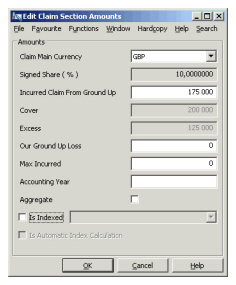
- Select the Is Indexed check box.
- Select the Index Table that applies to the claim.
- If required, select the Is Automatic Index Calculation check box.
- Click OK
Indicate assigned Claims as being indexed #
When you assign a claim to an existing claim that is indexed, the system does not automatically indicate the new claim-link as being indexed. You must therefore ensure that the Is Indexed flag is selected (or not selected) for all the non-proportional links. Refer to the procedures for New and Existing Claims.
Indicate a Claim in a Claim Program as being Indexed #
If you create the claim from a Claim Program, the system will automatically set the flag for all the linked sections.
| Field | Description | Location |
|---|---|---|
| Is Indexed | An indicator denoting that the claim is subject to an index clause. Values: Selected/cleared. Available only if index clause is defined on a non-proportional business. Mandatory: No Functional impact: FGU calculations, assign to existing claim validations, closing validations. |
Claim Figures |
| Index Table | The actual index table and row the claim figures will be considered against, for example Norway, Cost Index, 01/01/2000 Values: All index tables defined on business Mandatory: If Is Indexed is selected. Functional impact: FGU calculations, assign to existing claim validations, closing validations. |
Claim Figures |
| Is Automatic Calculation | Indicator that the FGU Calculations will be subject to the index clause, and an automatic recalculation of Cover and Excess will take place based upon the index points recorded in the selected Index Table and row. Values: Selected/Cleared Mandatory: No Functional impact: FGU Calculations |
Claim Figures |
Index Indicator on FGU #
When you have indicated a Claim as being indexed, irrespective of whether it is Automatic or Manual calculations, the FGU window will display an Index Indicator. The indicator is determined by the value of the Index Clause, Parts Specification -“Payments/Reserves” field, and implies whether only Payments, or Both Payments and Reserves should be indexed. When Payments has been selected on the Index Clause, the indicator will display Payments. For all other options, the indicator will be “Payments and Incurred Limits”. When the claim is not indexed, the indicator will be No Index Indicator.
Manual Index Calculation, see Claim Limits #
If you do not want to record Index information in the system, or if your Index Clause cannot be handled by the automatic calculation (refer to “Automatic or Manual Index Calculation”), you can use the Claim Limits to manually record the indexed limits. Refer to Create Claim Limits for further details.
Automatic Index Calculation #
The Automatic Index Calculation will recalculate the Cover and Excess according to the selected Index Table and Row, provided these have been recorded in the System. Refer to Location - Index Handling in the System Administrator’s Guide.
The automatic calculations are as follows:
- Paid FGU Adjustment = Paid FGU New - Paid FGU Previous
- Index Adjusted Paid FGU Adjustment = Paid FGU Adjustment * Contractual Base Index/Current Index
- Total Index Adjusted Paid FGU = Index Adjusted Paid FGU Adjustments
- Index Ratio Paid = Paid FGU New / Total Index Adjusted Paid FGU
- Indexed Excess Paid= Index Ratio Paid * Excess
- Indexed Cover/Limit Paid = Index Ratio Paid * Limit
- Paid Adjustment = Paid FGU New - Indexed Excess Paid - Previous Paid
Note: These indexed will also be used for calculation of reinstatement premium when the claim is indexed. For more information see Accounting Chapter - Reinstatement Calculation for Assumed Business.
Automatic or Manual Index Calculation #
Whether or not you can use the automatic index calculation basically depends on the Index Clause itself. The Automatic Calculation does not cover all options, and also has some limitations.
- Only Standard Index Clause can be calculated. This means that if your Index Clause is either Severe Inflation or Margin, you should not select Automatic Calculation.
- Both Limit and Excess Increase. This means that if your Index Clause implies that Cover should decrease or remain unchanged, you should not select Automatic Calculation.
- Only Payments trigger Index Calculations, and only payments are indexed.
- Reserves are distributed using nominal figures only.
Index Point Retrieved in Automatic Index #
The Index Table and the index row selected on the claim and the Index Clause indicates where the system will go to find the index values (or points) that shall be applied in the calculations. Which point the system actually retrieves, is determined by the Settlement Date field for each FGU Advisory. The point created for this date, or the one prior if no point exists for the exact date, is the point that will be retrieved and applied in the calculation.