Informational Claim Amounts
If you want to record informational figures of the claim impact on the second level without booking any amounts, SICS allows you to record informational details of the Claim Figures.
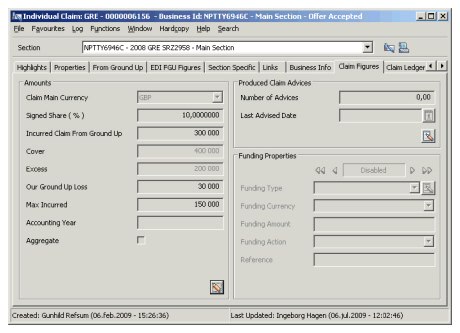
Create and Edit Claim Figure Amounts #
- Find and open the claim you want to define the claim amounts for.
- Click the Claim Figures tab and then click the Edit button in the Amounts section. You see the Edit Claim Section Amounts window.
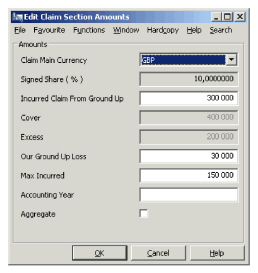
- Record the information as required.
- Click OK.
| Field | Description | Location |
|---|---|---|
| Claim Main Currency | The Main Currency of the Claim, in which all other amounts, is expressed. Values: All currencies defined in the system. Default: Main Currency of the Business or section. Mandatory: Yes Validations: None Functional impact: None |
Claim Figures |
| Share | Output field only. The share as it is expressed on Share Condition of the business or section. Indicates whether share is expressed as a percentage or unit, and whether it is written or signed. | Claim Figures |
| Incurred Claim From Ground Up | The Incurred Claim Figure From Ground Up (including any Deductibles or Excess or other Recovery) expressed in the Claim Main Currency. Values: Integer Default: 0, or the Incurred Amount recorded on the FGU tab Validations: None Functional impact: None |
Claim Figures |
| Cover (on Non Proportional Business only) | The Cover expressed in Claim Main Currency (the limit to be considered for this specific claim and business). The field is editable only if your System Administrator has enabled this. Values: Integer Default: Business Limit Validations: None Functional impact: None |
Claim Figures |
| Excess | The excess amount that must be considered for this specific claim and business expressed in Claim Main Currency. The field is editable only if your System Administrator has enabled this. Values: Integer Default: Business Excess Validations: None Functional impact: None |
Claim Figures |
| Liability (on Proportional Business only) | The Liability expressed in Claim Main Currency (the limit to be considered for this specific claim and business). The field is editable only if your System Administrator has enabled this. Values: Integer Default: Business Limit “Liability” Validations: None Functional impact: None |
Claim Figures |
| Liability 1 line (on Surplus Claims only) | The Liability 1 line amount that must be considered for this specific claim and business expressed in Claim Main Currency. The field is editable only if your System Administrator has enabled this. Values: Integer Default: Business Limit for Liability 1 line Validations: None Functional impact: None |
Claim Figures |
| Our Ground Up Loss | The amount of the loss that will impact this Business/section, expressed for your share in the Claim’s Main Currency. Values: Integer Default: 0 Validations: None Functional impact: If proportional treaty business, the amount can be applied in Underwriter’s Estimates Calculations if a corresponding variable is used. |
Claim Figures |
| Max Incurred | The maximum incurred amount for your share, expressed in the Claim’s Main Currency. Values: Integer Default: 0 Validations: None Functional impact: None |
Claim Figures |
| Accounting Year | Entry of the Accounting Year to be associated with the claim. Values: YYYY Default: Current Year Validations: None Functional impact: None |
Claim Figures |
| Aggregate | Indicator that the claim is affected by the inner Aggregate Deductible. Available only when an Annual Aggregate Deductible Condition has been defined on the Limit condition. Values: Selected, cleared Default: Cleared Validations: None Functional impact: None |
Claim Figures |