Inuring Recovery
If your treaty is subject to Florida Hurricane Catastrophe Fund (FHCF) inuring protection, or other inuring amounts you can register this on the From Ground Up tab, if your System Administrator has activated the functionality.
In order to register the Inuring Recovery, you must first register the FGU advisory, as described earlier in this section, as the calculation is based on the FGU figures.
To register Inuring Recovery: #
- Open the From Ground Up tab of the claim for which you want to register Inuring Recovery
- From the latest advisory, open the sub tab Inuring Recovery
- From the menu, select New. The system opens the Inuring recovery window.
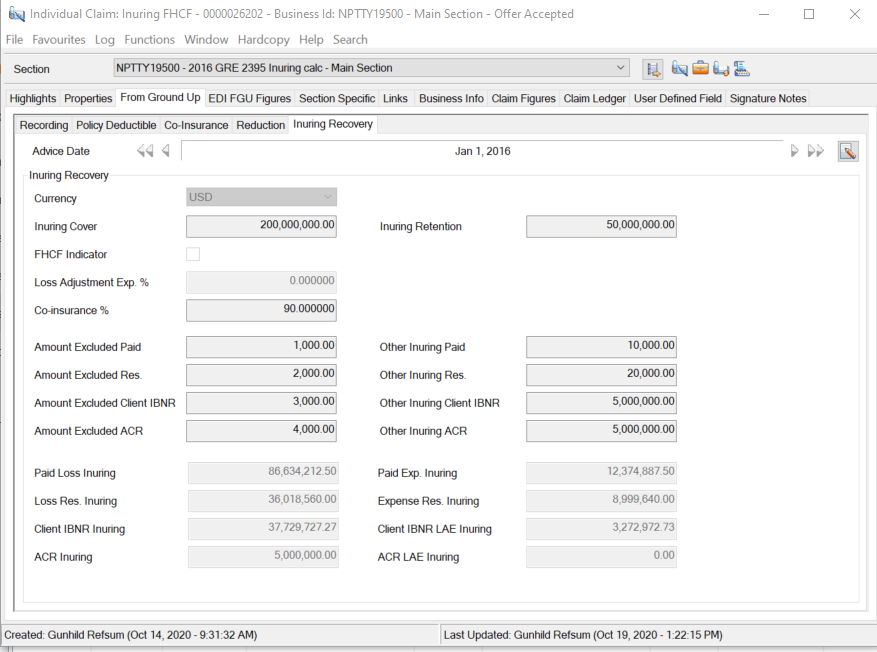
- Enter the inuring information.
- Press Calculate to trigger the calculation of inuring amounts
- Press OK
| Field | Description |
|---|---|
| Advice Date | The reference to the FGU Advisory to which the Inuring Calculation should be attached. Output field only. |
| Currency | The currency in which the Inuring information is recorded, and inuring amounts are calculated. Default: Main Currency for first registration. Previous inuring currency for subsequent registrations. Available values: Any limit currency Mandatory: Yes |
| Inuring Cover | The limit of the inuring protection Default: As registered on previous Inuring Records Mandatory: No Functional impact: Inuring Calculation |
| Inuring retention | The retention of the inuring protection Default: As registered on previous Inuring Records Mandatory: No Functional impact: Inuring Calculation |
| FHCF Indicator | Indication of whether the inuring cover is to be calculated as per Florida Hurricane Catastrophe Fund Available values: Selected/ Not selected Default: Selected Mandatory : Yes Functional impact: When the FHCF indicator is selected it enables the Loss Adjustment Exp % field, and inuring amounts are loaded with the given percentage |
| Loss Adjustment Exp % | The percentage by which inuring amounts should be loaded to take LAE into consideration Available values: Any value between 0 and 100. Default: 5 Mandatory: No Functional impact: The inuring amounts are loaded with the given percentage |
| Co-insurance % | The percentage by which inuring amounts are reduced for co-insurance Available values: Any value between 0 and 100 Default: Empty Mandatory: No Functional impact: Calculation of inuring amounts |
| Amount excluded paid | Any amounts which should not be considered in the calculation of Paid Inuring Validation: Must be less or equal to FGU Paid Loss Mandatory: No Functional impact: The value defined is deducted from the FGU Paid before calculating any inuring. |
| Amount excluded reserves | Any amounts which should not be considered in the calculation of Loss Res Inuring Validation: Any amount which is less or equal to than FGU Reserve Loss Mandatory: No Functional impact: The value defined is deducted from the FGU Reserve before calculating any inuring. |
| Amount excluded Client IBNR | Any amounts which should not be considered in the calculation of Client IBNR Inuring. Field is only available if your System Administrator has activated the Client Ibnr functionality. Validation: Any amount which is less or equal to than FGU Client IBNR Mandatory: No Functional impact: The value defined is deducted from the FGU Client IBNR before calculating any inuring. |
| Amount excluded ACR | Any amounts which should not be considered in the calculation of ACR Inuring Validation: Any amount which is less or equal to than FGU ACR Amount Mandatory: No Functional impact: The value defined is deducted from the FGU ACR before calculating any inuring. |
| Other inuring Paid | Any additional inuring amount paid Mandatory: No Functional impact: The value defined is added to the calculated Inuring Paid |
| Other inuring reserve | Any additional inuring amount reserve Mandatory: No Functional impact: The value defined is added to the calculated Inuring Loss Res |
| Other inuring Client IBNR | Any additional inuring amount for Client IBNR. The field is only available if your System administrator has activated the Client IBNR functionality. Mandatory: No Functional impact: The value defined is added to the calculated Inuring Client IBNR |
| Other inuring ACR | Any additional inuring amount ACR Mandatory: No Functional impact: The value defined is added to the calculated Inuring Loss Res |
Calculation of Inuring Amounts #
The calculation of inuring is performed in steps, and the result from each step is considered in calculation of other inuring amounts for the same step, as well as in the calculation of the same inuring amount in the next step. At each step the inuring limit and retention is considered.
FGU expense amounts are considered in the calculation only when the FHCF indicator is cleared. The system returns warnings when you either clear the indicator and your cost clause indicates expenses should be calculated as In Addition To, or the opposite, you select the indicator whereas the cost clause indicates expenses are Part Of Liability.
| Step number | Step description |
|---|---|
| Step 1: | Deduct exclusions, and calculate the inuring amount net of inuring retention |
| Step 2: | Apply LAE % (only applicable if FHCF indicator is set) |
| Step 3: | Apply co-insurance |
| Step 4: | Calculate the final inuring amounts considering other inuring |
| Calculated amount | Calculation details |
|---|---|
| Paid Loss Inuring | The calculated inuring amount for Paid Loss, which is deducted from the FGU Paid Loss in the distribution If FHCF is selected: Step 1: (FGU Paid Loss - Paid Amount Excluded - inuring retention), max inuring cover Step 2: Above multiplied with co-insurance Step 3: Above loaded with LAE % (1+LAE%) up to maximum (inuring limit * co-insurance) Step 4: Result from step 3 + Other Paid inuring If FHCF is cleared: Step 1: (FGU Paid Loss + FGU Paid Expenses- Paid Amount Excluded - inuring retention), maximum inuring cover Step 2: Above multiplied with co-insurance Step 3: Not applicable Step 4: Amount is split into Loss and Expense. For Paid Loss inuring the amount recorded as Other Inuring Paid is added. Paid loss inuring = FGU Paid Loss /(FGU Paid Loss + FGU Paid Expense) * Inuring from step 2 + Other Paid inuring |
| Res Loss Inuring | The calculated inuring amount for Reserve Loss which is deducted from the FGU Reserve Loss in the distribution If FHCF is selected: Step 1: ((FGU Paid Loss + FGU Reserve Loss - Paid Amount excluded - Reserve Amount Excluded - inuring retention), maximum inuring cover - inuring paid loss from step 1 Step 2: Above multiplied with co-insurance Step 3: If Inuring Paid Loss in step 3 < Inuring cover * Co-insurance: Res Loss Inuring in step 2 multiplied with (1+LAE%), maximum Inuring Cover * co-insurance - Paid Loss Inuring in step 3 If Inuring Paid Loss in step 3 >= Inuring cover * Co-insurance, go to step 4 Step 4: Res Loss Inuring = Res Loss Inuring from step 3 + other reserve inuring If FHCF is cleared: Step 1: (FGU Paid Loss + FGU Paid Expenses + FGU Reserve Loss + FGU Reserve Expense- Paid Amount Excluded - Reserve Amount Excluded- inuring retention), maximum inuring cover - inuring paid loss from step 1 Step 2: Above multiplied with co-insurance Step 3: Not applicable Step 4: Amount is split into Loss and Expense. For Res Loss inuring the amount recorded as Other Inuring Reserves is added. Res Loss inuring = FGU Loss reserve /(FGU Loss Reserve + FGU Expense Reserve) * Inuring from step 2 + Other reserve inuring |
| Client IBNR Inuring | The calculated inuring amount for Client IBNR which is deducted from the FGU Client IBNR amount before applying loss to layer. If FHCF is selected: Step 1: ((FGU Paid Loss + FGU Reserve Loss + FGU Client IBNR - Paid Amount excluded - Reserve Amount Excluded - Client IBNR excluded - inuring retention), maximum inuring cover - inuring paid loss from step 1 - res loss inuring from step 1 Step 2: Above multiplied with co-insurance Step 3: If (Inuring Paid Loss in step 3 + Res Loss Inuring from step 3) < Inuring cover * Co-insurance: Inuring Client IBNR from step 2 * (1+ LAE%), but maximum Inuring Cover * co-insurance - Paid Loss Inuring in step 3 - Res Loss Inuring from step 3 Step 4: Inuring Client IBNR = Inuring from step 3 + Other Inuring Client IBNR If FHCF is cleared: Step 1: (FGU Paid Loss + FGU Paid Expenses + FGU Reserve Loss + FGU Reserve Expense + FGU Client IBNR + FGU Client IBNR LAE- Paid Amount Excluded - Reserve Amount Excluded- Client IBNR excluded-inuring retention); maximum inuring cover - Paid Loss Inuring from step 1 - Res Loss Inuring from step 1 Step 2: Multiply Inuring Client IBNR from step 1 with co-insurance % Step 3: Not applicable Step 4: Inuring Client IBNR = Inuring from step 2 + Other Inuring Client IBNR |
| ACR Inuring | The calculated inuring amount for ACR which is deducted from the FGU ACR amount before applying loss to layer. If FHCF is selected: Step 1: ((FGU Paid Loss + FGU Reserve Loss + FGU Client IBNR+ FGU ACR - Paid Amount excluded - Reserve Amount Excluded - Client IBNR excluded - ACR excluded - inuring retention), maximum inuring cover - inuring paid loss from step 1 - res loss inuring from step 1 - Client IBNR from step 1 Step 2: Above multiplied with co-insurance Step 3: If (Inuring Paid Loss in step 3 + Res Loss Inuring from step 3 + Client IBNR Inuring from step 3) < Inuring cover * Co-insurance: Inuring ACR from step 2 * (1+ LAE%), but maximum Inuring Cover * co-insurance - Paid Loss Inuring in step 3 - Res Loss Inuring from step 3 - Client IBNR from step 3 Step 4: Inuring ACR = Inuring from step 3 + Other Inuring ACR If FHCF is cleared: Step 1: (FGU Paid Loss + FGU Paid Expenses + FGU Reserve Loss + FGU Reserve Expense + FGU Client IBNR + FGU Client IBNR LAE+FGU ACR + FGU ACR LAE- Paid Amount Excluded - Reserve Amount Excluded- Client IBNR excluded - ACR excluded - inuring retention); maximum inuring cover - Paid Loss Inuring from step 1 - Res Loss Inuring from step 1 - Client IBNR inuring from step 1 Step 2: Multiply Inuring ACR from step 1 with co-insurance % Step 3: Not applicable Step 4: Inuring ACR = Inuring from step 2 + Other Inuring ACR |
| Paid Exp Inuring | The calculated inuring amount for Paid Expense which is deducted from the FGU Loss Expense amount before applying expenses to layer. If FHCF is selected: Paid Exp Inuring = 0 If FHCF is not selected: Steps 1 - 3: Refer to calculation of Paid Loss Inuring. Step 4: Paid Exp inuring = FGU Paid Expense /(FGU Paid Loss + FGU Paid Expense) * Paid Loss Inuring from step 2 |
| Expense Res Inuring | The calculated inuring amount for Expense Reserve which is deducted from the FGU Expense Reserve amount before applying expenses to layer. If FHCF is selected: Expense Res Inuring = 0 If FHCF is cleared: Steps 1 - 3; Refer to calculation of Res Loss Inuring Step 4: FGU Expense reserve /(FGU Loss Reserve + FGU Expense Reserve) * Res Loss Inuring from step 2 |
| Client IBNR LAE Inuring | The calculated inuring amount for Client IBNR LAE which is deducted from the FGU Client IBNR LAE amount before distributing towards layer. If FHCF is selected: Client IBNR LAE inuring = 0 If FHCF is cleared: Step 1: (FGU Paid Loss + FGU Paid Expenses + FGU Reserve Loss + FGU Reserve Expense + FGU Client IBNR + FGU Client IBNR LAE- Paid Amount Excluded - Reserve Amount Excluded- Client IBNR excluded -inuring retention), maximum inuring cover -Paid loss inuring from step 1 - Res Loss Inuring from step 1 - Client IBNR inuring from step 1 Step 2: Multiply above with co-insurance % Step 3: Not applicable Step 4: Inuring Client IBNR LAE = Inuring Client IBNR LAE from step 2 |
| ACR LAE Inuring | The calculated inuring amount for ACR LAE which is deducted from the FGU ACR LAE amount before distributing towards layer. If FHCF is selected: ACR LAE inuring = 0 If FHCF is cleared: Step 1: (FGU Paid Loss + FGU Paid Expenses + FGU Reserve Loss + FGU Reserve Expense + CFGU Client IBNR + FGU Client IBNR LAE+ FGU ACR + FGU ACR LAE- Paid Amount Excluded - Reserve Amount Excluded- Client IBNR excluded - ACR excluded - inuring retention), maximum inuring cover -Paid loss inuring from step 1 - Res Loss Inuring from step 1 - Client IBNR Inuring from step 1 - ACR inuring from step 1 Step 2: Multiply above with co-insurance % Step 3: Not applicable Step 4: Inuring ACR LAE = Inuring ACR LAE from step 2 |
Inuring Recovery and Multiple Currencies #
Inuring information can be registered and calculated in a single currency only. When you have a claim in multiple currencies, the system converts the FGU figures into the selected inuring currency using the contract rates of exchange. In the calculation of the distribution, the system splits the inuring amounts into each currency using paid split to the Paid inuring, the reserve split to the Reserve Inuring, and the Incurred split incl client IBNR to the Client IBNR amounts, and Incurred split including ACR to the ACR amounts.
Example - single currency #
Layer limit 750,000 xs 250,000
FGU Paid Loss: 3,500,000
FGU Reserves: 400,000
FGU Client IBNR: 200,000
FGU ACR: 200,000
Inuring information
Inuring Limit: 5,000,000 xs 500,000
FHCF: Selected
LAE: 5%
Co-insurance: 90%
Amount excl Paid: 100,000
Amount excl Res: 20,0000
Amount excl Client IBNR: 10,000
Amount excl ACR: 10,000
Other inuring Paid: 5,000
Other inuring Res: 10,000
Other inuring Client IBNR: 15,000
Other inuring ACR: 20,000
Paid Loss Inuring: 2,745,500
Res Loss Inuring: 369,100
Client IBNR Inuring: 194,550
ACR Inuring 199,550
Distribution layer 750,000 xs 250,000
Paid loss: 504,500
Loss Reserve: 30,900
Client IBNR: 5,450
ACR: 450