Maintain Headline Loss Location, Classifications and References
When the headline loss has been created, you can register additional loss information such as location, risk zone indicator, classification items, and headline loss references.
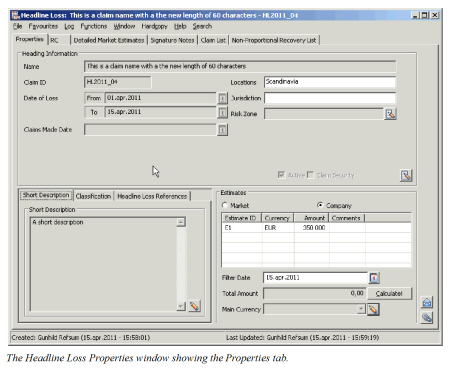
Edit Headline Loss Location and/or Risk Zone #
The Headline Loss location is optional information, but when recorded all linked claims will be validated against this. The Area of Jurisdiction and Risk Zone are purely informational.
- In Find Headline Loss, retrieve the Headline Loss for which you want to record or edit a location.
- Open the Headline Loss.
- Click the Edit button in the Heading Information section.
- In the Locations field select Edit from the pop-up menu.
- Select the Location or Locations of the Headline Loss and click Save.
- In the Jurisdiction field, select Edit from the pop-up menu.
- Select the Area of Jurisdiction and click Save.
- Click the Menu button next to the Risk Zone field and select Find.
- Select the Risk Zone you want to link your Headline to, and select Transfer from the pop-up menu.
- Click OK
| Field | Description | Location |
|---|---|---|
| Location | The location the Headline Loss occurred. Value: Any location or area group defined in the system Default: The location of any template the Headline Loss is created from, otherwise none. Validations: None Mandatory: No Functional impact: All losses linked to the Headline must be within the defined Location, unless system parameter Claim Location Not Validated Against Headline is activated by your system administrator. |
Properties |
| Jurisdiction | The Area of Jurisdiction determines under which laws any legal disputes shall be settled Value: Any area group, country, state or city defined in the system. More than one location is allowed. Default: None Validations: None Mandatory: No Functional impact: None |
Properties |
| Risk Zone | The Risk Zone in which the Headline Loss occurred. Value: Any risk Zone defined in the system. Validations: None Mandatory: No Functional impact: None |
Properties |
Classify Headline Loss #
The classifications of a Headline Loss are equivalent to the Claim Classifications of a claim. They are purely informational, and the linked claims are not validated against these.

- In Find Headline Loss, retrieve the Headline Loss that you want to classify.
- Open the Headline Loss.
- In the Classifications section, select the Classification item you want to record or Edit from the pop-up menu.
- Select the Classification item from the pop-up menu in the Edit Classification window.
- Select the required value or values and click Save.
- Repeat steps 4 and 5 for all the classification items you want to record.
- Click OK.
| Field | Description | Location |
|---|---|---|
| Claim Cause of Loss Group | A grouping of various Loss Causes, or “reasons” primarily introduced to facilitate the search. Values: Customised. Only one value can be defined. Default: The Cause of Loss Group defined as default value by your System Administrator. Mandatory: If Cause of Loss shall be recorded. Validations: No Functional impact: None |
Properties/Classification tab |
| Cause of Loss | The “reason” for the loss occurrence. Values: Customised. Any of the Causes belonging to the selected Cause of Loss Group. More than one value can be defined. Only the first one will be used in searches Mandatory: No Functional impact: None |
Properties/Classification tab |
| Consequence of Loss Group | A grouping of various Loss Consequences or “results” primarily introduced to facilitate the search. Values: Customised. Only one value can be defined Default: The Consequence of Loss Group defined as default value by your system administrator Mandatory: If Consequence of Loss shall be recorded. Validations: No Functional impact: None |
Properties/Classification tab |
| Claim Consequence of Loss | The “result” of the loss occurrence. Values: Customised. Any of the Consequences belonging to the selected Consequence of Loss Group. More than one value can be defined. Only the first one will be used in searches Mandatory: No. Functional impact: None |
Properties/Classification tab |
| Claim Risk Event Indicator | Indicator of whether this claim is an event or risk claim. Values: Risk, Event Mandatory: No Functional impact: None |
Properties/Classification tab |
| Type of Risk | Indicator of the type of risk affected by the claim, for example Oil Refinery. Values: Customised. For Direct and Facultative business any of the values defined on the business' classifications. For all other, any of the values belonging to the business' Main Class of Business, Class of Business, Sub Class of Business, or any values without a dependency defined. More than one value can be defined, only the first one will be included in a search. Default: None Mandatory: No Functional impact: None |
Properties/Classification tab |
| Claim Loss Risk Detail | A further description of the loss and type of risk, example Type of Risk is Aviation, and the Loss Risk Detail could be Phase: Taxiing. Values: Customised. Any value belonging to the selected Type of Risk. Mandatory: No Functional impact: None |
Properties/Classification tab |
| Claim Classification | A completely user defined classification item. Available only when defined by your System Administrator. Values: Customised Mandatory: No Functional impact: None |
Properties/Classification tab |
| Type of Loss | A description of the type of engineering claim. Values: Customised. Mandatory: No Functional impact: None |
Properties/Classification tab |
| Object | A further description used in claim classifications of the type of object affected by the loss. Values: Customised. Mandatory: No Functional impact: None< |
Properties/Classification tab |
| Loss Characteristics | A further description giving characteristics of the engineering claim. Values: Customised Mandatory: No Functional impact: None |
Properties/Classification tab |
| Machinery Code | A further description of the type of machinery affected by the loss. Values: Customised. Mandatory: No Functional impact: None |
Properties/Classification tab |
Maintain Headline Loss References #
The Headline Loss references are useful since the major losses quite often will be allocated a so-called Cat. Number or a Code by which it is known within a specific market. These numbers and codes do not necessarily follow the naming structure of your own company. SICS allows you to record Headline Loss References, and use these as criteria in the Find process.
Create Headline Loss Reference #
- In Find Headline Loss, retrieve the Headline Loss for which you want to record a Headline Loss Reference.
- Open the Headline Loss.
- Open the References tab (next to the Classifications).
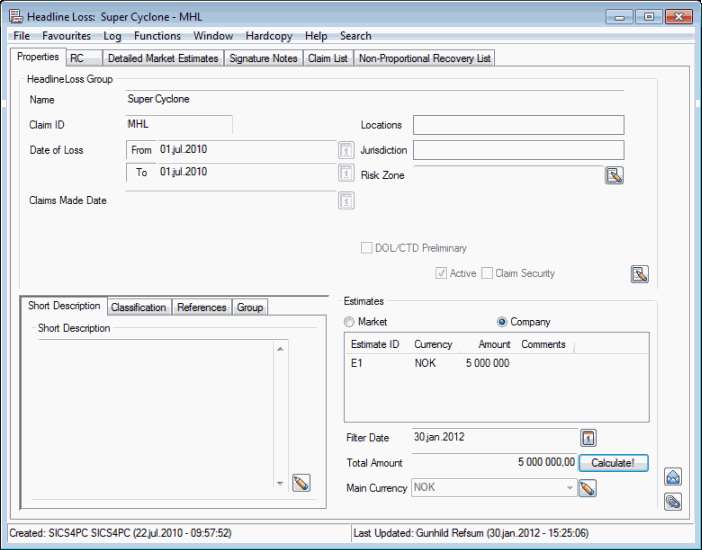
- Click the Edit button.
- Select Add from the pop-up menu.
- Enter the ID and the Headline Loss Reference Type.
- Click OK.
Edit Headline Loss Reference #
- In Find Headline Loss, retrieve the Headline Loss for which you want to edit a Headline Loss Reference.
- Open the Headline Loss.
- Open the References tab (next to the Classifications).
- Click the Edit button.
- Click the field you want to edit, and make the required changes.
- Click OK.
Delete Headline Loss Reference #
- In Find Headline Loss, retrieve the Headline Loss for which you want to delete a Headline Loss Reference.
- Open the Headline Loss.
- Open the References tab (next to the Classifications).
- Click the Edit button.
- Select the Headline Loss Reference you want to delete.
- Select Delete from the pop-up menu.
- Click OK.
| Field | Description | Location |
|---|---|---|
| Reference ID | The Identifier that is used to denote the Headline Loss other than the unique SICS identifier, for example Cat.20. Values: Free-text entry Mandatory: If Reference Type is selected Functional impact: Displayed on linked claims, Headline Loss, Properties-, References. |
Headline Loss Properties - References |
| Reference Type | The type of reference the reference ID refers to, for example ISO Cat number Values: Customised Mandatory: If Reference ID is recorded Functional impact: Headline loss is displayed once per reference type on the linked claim. |
Headline loss Properties - References |
Headline Loss linked to Headline Loss Group #
SICS lets you link two or more headline loss to indicatethat these are a part of a bigger catastrophe. The grouping of these headline losses is made on the Headline Loss Group. If the Headline Loss is linked to a Headline Loss Group the name of this Headline Loss Group is shown on the Headline Loss, Properties tab - Group tab.