Maintaining Market From Ground Up Loss Figures
In order to study loss trends, frequency of losses, as well as develop size of loss distributions, it is necessary to register the true “Ground Up losses”. SICS allows you to maintain the latest Market GU Loss figures for a claim, provided your System Administrator has enabled this functionality. Whenever FGU figures are registered, the system defaults the amounts from FGU into the Market Ground Up Loss
figures.
You can at any time modify the Market GU Loss figures manually, but the “Market Ground Up Loss Review” checkbox is only enabled when at least one of the claim-to-section links is open.
To register Market From Ground Up Loss:
- Open the claim for which you want to register Market Ground Up Loss Figures
- Open the Market Ground Up (GU) Loss window
- Click the edit button. The Market Ground Up Loss window opens in edit mode.
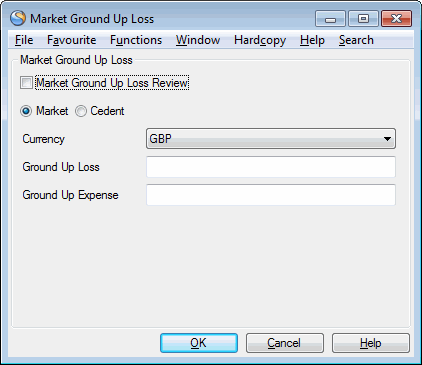
- Define whether the GU Loss figures to be recorded are “Market” or “Cedent”
- Define the currency.
- Define the Ground Up Loss and/or Ground Up Expense
- If required, set the “Market Ground Up Loss Review” indicator.
- Press OK
To edit Market From Ground Up Loss:
- Open the claim for which you want to edit Market Ground Up Loss Figures
- Open the Market Ground Up (GU) Loss window. The current Market GU Loss figures are displayed.
- Click the edit button. The Market Ground Up Loss window opens in edit mode.
- Define whether the GU Loss figures to be recorded are “Market” or “Cedent”
- Define the currency.
- Define the Ground Up Loss and/or Ground Up Expense
- If required, set the “Market Ground Up Loss Review” indicator.
- Press OK
| Field | Description |
|---|---|
| Market Ground Up Loss Review | Indicator that the Market GU Loss figures have been reviewed. The field is enabled when at least one claim-to-section link is Open. Values:Selected /cleared Mandatory: Yes Default: Cleared Functional impact: Claim Status Handling - Closing validations |
| Market/Cedent | Indication of whether registered amounts reflect the “true” Ground Up Market Loss, or the Cedent’s Ground Up Values:Market, Cedent Default: Market If the Market Ground Up Loss figures are automatically updated by a From Ground Up Loss recording, the indicator is defaulted to “Cedent” Mandatory: Yes Functional impact: None |
| Currency | The currency in which the GU Loss amounts are registered Values: Limit currencies Default: Limit currency, if only one is registered If the Market Ground Up Loss figures are automatically updated by a From Ground Up Loss recording, the currency is the same as the FGU currency. If FGU in multiple currencies, Market Ground Up Loss currency is same as business' main currency. Mandatory: Yes Functional impact: None |
| Ground Up Loss: | The GU Loss figure Values:Decimal Default: If the Market Ground Up Loss figures are automatically updated by a From Ground Up Loss recording, Ground Up Loss = Paid Loss FGU + Paid Annuity FGU Mandatory: No Functional impact: No |
| Ground Up Expense: | The GU Expense figure Values:Decimal Default: If the Market Ground Up Loss figures are automatically updated by a From Ground Up Loss recording, Ground Up Expense= Paid Expense FGU Mandatory: No Functional impact: No |