Quotation Figures
It can be useful to maintain loss information on a claim record without linking this to accounting. These ground up loss figures can, for example, be used as basis for quotation and pricing upon contract renewal.
- Open the individual claim for which you want to register the quotation figures.
Open the From Ground Up tab/Quotation Figures sub tab
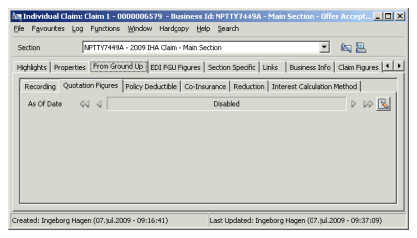
- Select New from the menu.
- Define the quotation information as required, and click OK.
Edit Quotation Figures #
When you recorded incorrect quotation information, it is always possible to edit this when the error is discovered.
- Select the date for which you want to edit the quotation figures.
- Select Edit from menu.
- Change the quotation information as required and click OK.
Delete Quotation Information #
If you recorded quotation information for the incorrect claim, you can easily delete the incorrect quotation record:
- Select the date containing the quotation figures that you want to delete.
- Select Delete from the menu and click OK.
| Field | Description | Location |
|---|---|---|
| As of Date | The date the Quotation Figures are expressed as at. Value: Date field. Mandatory: Yes Validations: Must be later or equal to the Date of Loss From or the Claim Trigger Date. Must be less or equal to today’s date. Functional impact: None |
FGU Quotation Figures |
| CCY | Output field only - Limit currencies in which FGU Quotation figures can be recorded or the Main currency of the section if no limit has been defined. | FGU Quotation Figures |
| Paid Loss | The amount the cedent/insured has paid for loss. Values: Amount with two decimals. Validations: Only positive amounts are allowed. The current position for Paid and Reserves in that currency is greater or equal to zero, and the overall Incurred in that currency is greater or equal to zero. |
FGU Quotation Figures |
| Paid Annuity | The amount the Cedant/insured has paid in respect of annuities. Enabled: When your System Administrator has enabled the “FGU with Annuities” function. Values: Amount with two decimals Validations: Only positive amounts are allowed. The new current position for Paid and Reserves in that currency is greater or equal to zero, and the overall Incurred in that currency is greater or equal to zero. |
FGU Quotation Figures |
| Total Paid Loss And Annuity | The sum of the Paid Loss and Paid Annuity. Enabled: When your System Administrator has enabled the function “FGU with Annuities” Values: Output field only |
FGU Quotation Figures |
| Paid Expenses | The amount the cedent/insured has paid in respect of expenses. Values: Amount with two decimals. Validations: O nly positive amounts are allowed. The current position for Paid Expenses and Reserve Expenses in that currency is greater or equal to zero, and the overall Incurred in that currency is greater or equal to zero |
FGU Quotation Figures |
| Paid Interests | The amount the cedent/insured has paid for interests related to the claim. Enabled: When non-proportional claim condition has an interest clause defined. Values: Amount with two decimals. Validations: Only positive amounts are allowed. The current position for Paid Interests and Reserve Interests in that currency is greater or equal to zero, and the overall Incurred in that currency is greater or equal to zero |
FGU Quotation Figures |
| Reserves Loss | The amount that the cedent/insured has not yet paid for the loss, but maintained as outstanding. Values: Amount with two decimals. Validations: The new current position for Paid and Reserves in that currency must be greater or equal to zero, and that the overall Incurred in that currency must be greater or equal to zero |
FGU Recording |
| Reserves Annuity | The amount the Cedant/insured has reserved in respect of annuities. Enabled: When your System Administrator has enabled the “FGU with Annuities” function. Values: Amount with two decimals Validations: The new current position for Paid and Reserves in that currency must be greater or equal to zero, and that the overall Incurred in that currency must be greater or equal to zero |
FGU Quotation Figures |
| Total Reserves Loss And Annuity | The sum of the Reserves Loss and Reserves Annuity. Enabled: When your System Administrator has enabled the function “FGU with Annuities” Values: Output field only |
FGU Quotation Figures |
| Reserve Expenses | The expense amount that the cedent/insured has not yet paid for the loss, but maintained as outstanding. Values: Amount with two decimals. Validations: The new current position for Incurred Expenses in that currency must be greater or equal to zero, and that the overall Incurred in that currency must be greater or equal to zero |
FGU Quotation Figures |
| Reserve Interests | The interest amount that the cedent/insured has not yet paid for the loss, but maintained as outstanding. Enabled: When non-proportional claim condition has an interest clause defined. Values: Amount with two decimals. Validations: The new current position for Incurred Interests in that currency must be greater or equal to zero, and that the overall Incurred in that currency must be greater or equal to zero |
FGU Quotation Figures |
| Incurred | The overall incurred amount in the currency. Output field only. Derived from: Other advisory amounts. Functional impact: FGU Calculation, may update the “Incurred From Ground Up” field on Claim Figures. |
FGU Quotation Figures |