Technical Booking on a Co-Insurance Agreement
Technical Bookings on a Co-Insurance Agreement are made on the Insured’s Contract level of the Business
When you make a booking on the Insured’s Contract, the system will also automatically book on the linked Assumed/Policy Ceded and Administrative Businesses according to each of these businesses Share of the Co-Insurance Agreement.
Before any bookings can be made on the Insured’s Contract, the system checks that the Placement Complete is set to yes for the Insured Period on which you are trying to book (If not, the system gives you a validation message).
Refer to the Place Protection section for more information on Placement Complete.
Automatic Bookings made on Assumed (or Policy Ceded) and Administrative Businesses linked to an Insured’s Contract #
All the original bookings for both the Assumed (or Policy Ceded) and all the Administrative Businesses will be made on the same Worksheet. This means that all original balances for all linked businesses will have the same Worksheet Identifier.
The system calculates and books the corresponding amounts on each placement according to their share and conditions, with a few exceptions:
When calculating the Assumed/Policy Ceded and Administrative Businesses share of the
- Insurance Premium Tax
- Local Tax On Insurance
The system will in addition read the indicator on each Business’s Deduction Condition, to check whether these Taxes shall be
- 100% booked on the Assumed Business/Policy Ceded only, or
- Pro rata booked on each placement according to their share.
Special Automatic Bookings on Administrative Businesses linked to an Insured’s Contract #
Bookings on the Administrative Businesses will be automatically reversed (as their bookings are not relevant to you as the Administrator of the Co-Insurance Agreement)
These reversal bookings will also include the bookings for administrators' fees (or other special deductions for the Other Co-insurers). Each Administrative Business can have special conditions for:
- Administrators Fee
- Insurance Premium Tax
- Local Tax on Insurance
- Brokerage
The reversal bookings for all the Administrative Businesses will be made automatically on one separate Worksheet with its own Worksheet Identifier. Each detail on this worksheet will point to the original Worksheet booking - its Source Worksheet, and each detail belonging to the original Worksheet will point to this Target Worksheet.
When the reversal is done, the system calculates the Administrators Fee, if recorded on the Deduction Condition of the Administrative Businesses.
Bookings made directly on the Assumed/Policy Ceded or Administrative Businesses linked to an Insured’s Contract
You can, decide to make bookings directly on an Assumed/Policy Ceded or Administrative Business that is linked to an Insured’s Contract.
However the only purpose of making any bookings directly on an Assumed/Policy Ceded or Administrative Business that is linked to an Insured’s Contract, is to correct already existing bookings.
When you open a new worksheet on some of these linked Assumed/Policy Ceded or Administrative Businesses, the system will give you a warning message. Refer to Book Manually on a Technical Worksheet in the Accounting chapter for more information.
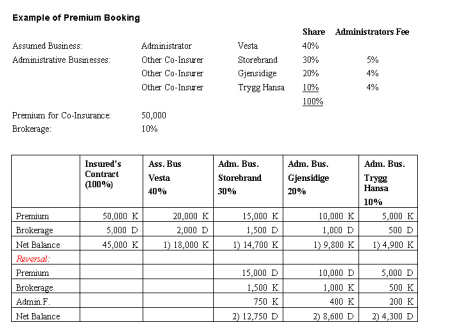
- Balances to be paid by the Insured to the Co-Insurer/Administrator (Vesta)
- Balances to be paid by the Administrator to the Other Co-Insurers.
Below is an overview of which partner on the business is assigned to the different partner links on the balances as default, when the balances are created on the different businesses (when no brokers are involved).
| Level of Business | Partner |
|---|---|
| Assumed Business | |
| Business Partner: | Insured (partner with Payment Task) |
| Responsible Partner: | Insured |
| Base Company: | Co-Insurer (Vesta) |
Administrative Businesses, Original bookings |
|
| Business Partner: | Insured (partner with Payment Task) |
| Responsible Partner: | Insured |
| Base Company: | Administrator (Vesta) |
Administrative Businesses, Reversal bookings |
|
| Business Partner: | Other Co-Insurer (Storebrand /Gjensidige /Trygg Hansa) |
| Responsible Partner: | Other Co-Insurer (Storebrand /Gjensidige/Trygg Hansa) |
| Base Company: | Administrator (Vesta) |
Generate Automatic Remittances on a Co-Insurance Agreement #
This functionality allows the Co-Insurer/Administrator to automatically generate remittances on the Administrative businesses.
Generate Automatic Remittances for Payments received from the Insured #
You, as the Co-Insurer/Administrator, receive a remittance from the Insured. This remittance is to cover all Co-Insurers share (the share on Assumed/Policy Ceded and Administrative Businesses).
You book this remittance on a Remittance Worksheet (Refer to Create Remittance Worksheet in the Accounting chapter for more information).
You then make a pairing (Refer to Create Balance Pairing in the Accounting chapter for more information), between the remittance and the technical bookings on the Assumed/Policy Ceded and Administrative businesses (marked with 1 in the example above).
When you click OK on the Create Balance Pairing window, the system will automatically do the following:
- The pairing objects are created as normal.
- For each balance in the pairing belonging to an Administrative business the system finds the related reversed balance (marked with 2 in the example above). For each of these reversed balances the system generates a payment request (Remittance Worksheet) based on the Unsettled Amount.
- You must now continue the Create remittance process as normal for the generated remittances. Refer to Create Remittance Worksheet in the Accounting chapter for more information.
- When you click Apply and OK, the system will make Balance Pairing between the new remittances and the reversed balances.
Generate Remittance Worksheets on Payments received from other Co-Insurers #
You, as the Co-Insurer/Administrator, wait for settlement from the other Co-Insurers before you for example settle a claim with the Insured. You book a settlement from one of the Other Co-Insurers on a Remittance Worksheet (Refer to Create Remittance Worksheet in the Accounting Chapter for more information).
You make the balance pairing (Refer to Create Balance Pairing in the Accounting Chapter for more information) between the Remittance Worksheet you created and the Reversal Balance on the Administrative Business for one of the Other Co-Insurer.
The system checks if all other reversal balances from other Co-Insurers are settled too. If not, the pairing objects are created as normal. If you have received payment from all the other Co-Insurers (that means all the balance on the reversed worksheet are Settled), the system will automatically do the following actions when you click OK on the Create Balance pairing window:
- The pairing objects are created as normal.
- For each of the settled reversal balances, the system finds the source balances on the administrative businesses. Together with the related balance on the assumed business, the system generates ONE payment (Remittance Worksheet) for the TOTAL of these balances.
- You must now continue the Create remittance process as normal for the generated remittance. Refer to Create Remittance Worksheet in the Accounting chapter for more information.
- When you click Apply and OK, the system will make Balance Pairing between the actual source balances and the generated new remittance.