Processing EDI JV Messages
The current version of SICS supports the RETACC, REBORD, RESETT, RECLAM and REDIAL message standards. RETACC and REBORD messages create bookings on Technical or Claim worksheets when processed. RESETT messages create remittance balances that are then paired against corresponding Technical or Claim balances. Only RESETT messages with a single group 2 records and a single group 3 records are supported.
RECLAM and REDIAL messages can be imported into the SICS EDI Archive, but only for viewing purposes. It is currently not possible to process RECLAM and REDIAL messages.
Referencing JV Messages #
The referencing action is the first action undertaken during validates or process, before the validation of data and the creation of worksheets. Referencing for JV is divided into three steps:
- Referencing of business partners (sender, receiver and third party)
- Referencing of business
- Referencing of booking mappings or balance mappings
Global Unique Message Reference #
The EDI JV ‘Global Unique Message Reference’ is created and stored for every type of EDI JV message imported in to the database. The purpose of the identifier is to create a unique identifier within a database per message type. This means that duplicate identifiers among messages of different types are accepted when processing. If however, a message is being processed and there exists another message in the database which is already processed and has the same Global Unique Message Reference, processing is stopped and an error is raised. Therefore multiple message of the same type with the same Global Unique Message Reference can exists in a database, but only one of them can be processed.
Combining these fields creates the ‘Global Unique Message Reference’:
Agency Code of Message Sender
[-]
Party Identifier of Message Sender
[-]
Unique REBORD/RETACC/RESETT/RECLAM Message Identifier found in the RFF6
The string size is 3 + 1 + 5 + 1 + 1 to 35. Maximum size is 45 characters.
The usage of ‘Agency Code of Message Sender’ and ‘Party Identifier of Message Sender’ is done in order to let the system accept different message senders using the same ‘Unique REBORD/RETACC/RESETT/RECLAM Message Identifier’.
Referencing Business Partners #
The Highlights tab of an EDI JV message is divided into three sections. The upper section shows important information extracted from the message (such as the sender and receiver identifier.) The middle section is specific for each message type. The bottom section shows SICS business partners referenced on the identifiers shown in the upper section.
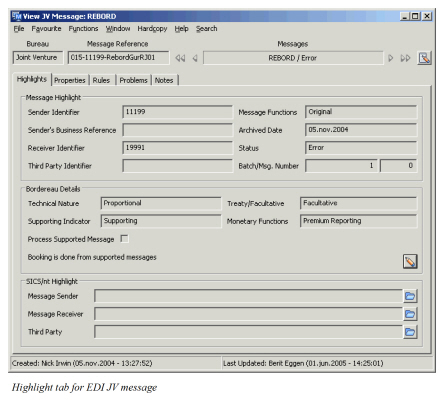
The business partners are referenced on the EDI JV details linked to every business partner. See EDI JV in the Business Partner chapter of the SICS User’s Guide for more information on how to define this information. Whenever possible during referencing, EDI matches the Sender Identifier, Receiver Identifier and Third Party Identifier against business partners in the system.
Referencing Business #
The message specifies both the sender’s and the receiver’s business references
SICS will first use the receiver’s business reference from the message to look for a SICS business. It looks for four different references in the following order
- SICS business identifier
- Business former identifier
- Insured period former identifier
- Insured period original identifier
As soon as a match is made, the search is concluded. If none of the references match, an error is set, and processing of the incoming message is stopped.
If the match is made using the SICS business identifier, only one possible SICS business can be identified. The system then compares the sender’s reference with the corresponding business partner reference on the matching business.
- If the partner reference is empty, a warning is issued
- If the partner reference does not match an error is set
- Otherwise the message is correctly linked to the referenced SICS business
If the match is made using one of the other references, SICS may find more than one matching business. If only one is found, the system then compares the sender’s reference with the corresponding business partner reference on the matching business.
- If the partner reference is empty, a warning is issued
- If the partner reference does not match an error is set
- Otherwise the message is correctly linked to the referenced SICS business
If more than one match is found, the system then compares the sender’s reference with the corresponding business partner reference on each matching business.
- If all the partner references are empty or do not match, an error is set
- If the sender’s reference matches more than one business, an error is set
- If the senders' reference only matches one business, this is the one to which the message will be linked. The message specifies the sender’s business reference only.
This reference is checked against the corresponding SICS business data. In case of mismatch, the processing of the incoming message is stopped; an error note is filed in the message problem tab and the “Error” status is assigned to the message.
EDI JV partners must be assigned an EDI partner identifier (EDI Company Code in the Partner EDI Detail tab) and must be recorded together with their respective ceded business references at assumed business level.
Referencing Booking Mappings #
The booking mapping consists of two parts, the booking mapping key and the booking mapping properties. The key is formed by extracting information from the message while the properties part contains user editable information used for bookings in SICS.
During referencing SICS searches the database for existing booking mappings in which the database keys are matching the key of the current booking mapping. If an existing booking mapping is found it is used. If none are found a new one is created.
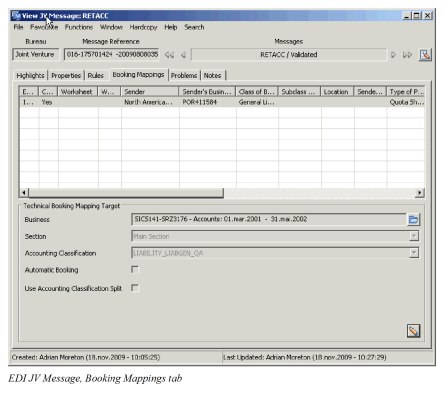
When viewing the booking mappings tab, the upper section lists one booking mapping per bookable RETACC group 3 and bookable REBORD group 5. The lower section shows the booking mapping properties. By clicking the Edit button this information can be edited.
Referencing Balance Mappings #
For this version, only RESETT messages with a single group 2 records and a single group 3 records are supported.
For a RESETT message, SICS creates a remittance balance for each group 3 record and, where possible, to reference technical or claim balances created by a preceding RETACC or REBORD message. This is done by matching the RETACC global unique reference stored on every balance as a RETACC message is processed.
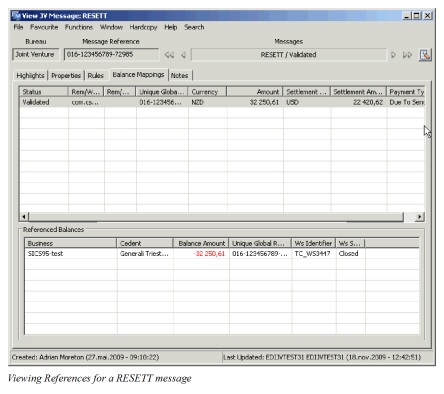
For each balance mapping, SICS displays referenced information, which consists of all SICS balances, identified as being produced by the RETACC message referred to in RESETT message (RETACC global unique reference.)
EDI JV Message Relations #
According to the JV standard, a RETACC message can be supported by one ore more REBORD messages. At the RETACC Account Entry level, a reference to the supporting REBORD message is held. Using this reference it is possible to identify the REBORD message that supports the RETACC account entry.
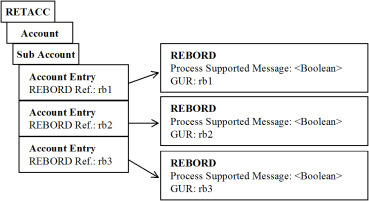
SICS allows for creating bookings from either the supporting REBORD or the supported RETACC:
If a supporting REBORD is processed, the ‘Process Supported Message’ flag must not be set. If the flag is set, an error will be generated and processing stops. If the flag is not set the message can be processed even if the RETACC messages it supports are not in the database.
If a supported RETACC is processed, the system will identify that the Account Entries are supported by a REBORD and will try to identify the message. If the supporting REBORD message is not yet imported into the database, the processing of the RETACC is stopped with an error. If the REBORD is found, the ‘Process Supported Message’ flag is checked. Processing is stopped with an error if this flag is not set.
When the RETACC is processed the system will check whether the supporting REBORD message has been processed. If this is the case bookings have already been made in the system, and new bookings are therefore not created. Instead the existing bookings are updated with the reference from the RETACC.
Automatic Validation of RETACC Technical Entries #
The processing of incoming RETACC messages allows for the fully automatic validation of the deduction and deposit entries that must be booked to the ledger. Validated deduction entries correspond to the conditions that are entered under the “D” button of the assumed business conditions Navigation bar. Validated premium and loss deposit entries are: deposits retained, deposits released, outstanding deposit positions (informational), taxable interest on deposits, taxes on deposit interests.
The validation is made against assumed business conditions. Automatic validation of worksheet details does not take place at all when the general pre-conditions below are not all met. Validation can fail for one or more of the following reasons:
- A worksheet detail amount does not match the amount calculated from business conditions;
- A worksheet detail does not have a corresponding business condition;
- A business condition does not have a corresponding worksheet detail;
- Automatic validation is not possible because some of the specific pre-conditions are not met.
In all these cases, the incoming RETACC message is set in error, error notes are filed in the message problem tab and all relevant technical worksheets are left open.
In order to close these still open worksheets and complete the process, the receiving accountant can:
-
Update the business conditions and re-process the message;
-
Add manual corrections to the worksheets and close them (“warning” and “error” validation rules);
-
Close the worksheets as they are (“warning” validation rules only). General Pre-conditions: Validation of Technical Entries
-
The assumed business is not flagged as an “EDI General Cover”;
-
All necessary validation rules have been defined - as “warning” or “error” rules - and are active. Specific Pre-conditions: Deductions Entries
Deductions are expressed as “direct” or “indirect” percentages of ceded premiums. Thus, sliding scale commission adjustments will not be checked, but provisional commissions will (when given as percentages). On the other hand, for “indirect” percentages of ceded premiums (function of function) to be validated automatically, it is not necessary that all components of an “indirect” percentage be themselves “direct” percentages of ceded premiums. Thus, for example, commissions expressed as “original” will not be validated automatically, but brokerage, when defined as a percentage of ceded premiums net of original commissions will.
Specific Pre-conditions: Premium Deposit Entries
-
Premium deposits to be retained are expressed as a percentage of ceded premium;
-
Premium deposits are retained in cash;
-
Premium deposits are retained with the same periodicity as technical accounts are rendered. Specific Pre-conditions: Loss Deposit Entries
-
Loss deposits to be retained are expressed as a percentage of loss reserves;
-
Loss deposits are retained in cash;
-
Loss reserves are communicated with the same periodicity as technical accounts are rendered, or yearly;
-
Loss reserves communicated in non-periodic cash claims accounts do not trigger any loss deposit withdrawal;
-
Loss deposits are retained with the same periodicity as loss reserves are communicated, or yearly;
-
Loss deposits retained in any periodic account are released in the next periodic account always.
Processing Multiple Worksheets Per Message #
SICS lets you book multiple worksheets from a single message to support complex messages referencing to many different booking mappings.
Processing RETACC with Claim Bookings #
If you want SICS to stop the processing of incoming RETACC messages with claim related bookings, you can activate the system parameter Stop automatic processing of RETACC with claims related bookings for certain types of business. The message has claims related bookings if it contains both claim entries and claim information:
Claim entries: The presence of certain main JV Entry Code, e.g. 729 Current Payment Losses for the Contract.
Claim information: The presence of RECLAM loss reference and/or the cedent’s claim reference, and/or the presence of loss name, and/or the presence of loss date.
When you process a RETACC message containing such details, the system will raise an error. You will then have the option of whether to continue processing the message through swap to worksheet or not.
See System Parameter Maintenance, EDI Default chapter in System Administrators Guide for more information.
Processing RETACC with Minimum and Deposit Premium #
When you process an incoming RETACC message containing Minimum and Deposit Premium (MDP) with the EDI system parameter Check Already Booked Instalments and Adjustments activated, the system checks whether the premium is already recorded and booked. The system first checks whether the MDP instalments are recorded on the referenced business by comparing the premium, net premium and due date on the message with the instalments on the business. If one of the entries does not match, the system stops the processing and raises an error on the message. If all entries are identical, the system then checks whether the premium is already booked on the business. For premium that is already booked, the system adds the RETACC reference of the message to the existing booking. It then sets the message status to Processed. If the premium is not booked, the system books the premium and sets the Autom. Booked flag on the instalment to Yes. See System Parameter Maintenance, EDI Default chapter in System Administrators Guide for more information.
Processing RETACC with XL Premium Adjustment #
When you process an incoming RETACC message containing XL Premium Adjustment with the EDI system parameter Check Already Booked Instalments and Adjustments activated, the system updates the business condition with related information. It first attempts to find the corresponding adjustment on the business and then checks if it is already booked. If no corresponding adjustment is recorded on the business, the system stops the processing and raises an error on the message. If a corresponding adjustment is found and it is already booked, the system stops the processing and an error is raised. If the corresponding adjustment is not booked, the system books the adjustment and updates the premium condition with adjusted subject premium income information from the message. The Autom. Booked flag on the adjustment is then set to Yes. See System Parameter Maintenance, EDI Default chapter in System Administrators Guide for more information.
Validation of periodic RETACC messages against account schedule in Administration Conditions #
For an assumed business prone to periodic account rendering - in principle, a proportional treaty business, the validation process assumes that account schedules have been defined in the business administrative conditions and that, when the business is not renewed, a run off account schedule has been defined for the last insured period in force.
For the instances where no run off account schedule has been defined, SICS can be set up to extrapolate a run off account schedule based on the latest available account schedule. E.g. if quarterly accounts have been defined for one accounting year in the administration conditions on the last insured period, SICS will extrapolate this account schedule to create fictitious quarterly accounts also for later accounting years. If, on the last Insured Period, Accounts in the Administration Conditions have been defined for more than one Accounting Year, the accounts for the last Accounting Year will be used to extrapolate the run off account schedule on later accounting years. These fictitious accounts are not recorded in SICS but calculated and used in the validation process of periodic RETACC messages. If you want SICS to validate periodic RETACC messages against fictitious accounts based on the latest available account schedule, RETACC validation rule Reject periodic messages for fictitious accounts must be se to inactive
When no match with existing or fictitious account details are obtained, the incoming periodic account message are stopped in error until the user duly updates the relevant account schedule
Population of Accounting Dates and Periods on Technical Worksheets #
A distinction must be made between periodic and non-periodic RETACC messages. In a non-periodic RETACC message, only the message preparation date [DTM07(137)] is specified in the message header. In a periodic RETACC message, the reinsurance accounting period [DTM07(240)] is also specified in the message header.
Period Account Messages #
When the system processes an incoming periodic RETACC message, the message reporting period is referenced against the business defined or fictitious account schedules and account details. If a match with an existing or fictitious account detail is obtained, the account detail data are used in the technical worksheet to populate the fields: Accounting Year, Accounting Period and Accounting Period From-To.
Non-Periodic Account Messages #
Non-periodic RETACC messages are, according to ACCORD standard, issued in the following cases:
- For Cash Call accounts on a proportional treaty business
- For all accounts on a non-proportional treaty business
- For all accounts on a proportional and non-proportional facultative business
When processing a non-periodic RETACC message, the procedures for assigning accounting year and period depend on the message entry type and the type of business of the referenced business.
Non-Proportional Treaty #
When you process a non-periodic account for a non-proportional treaty containing premium instalment or premium adjustment related details, the system uses the instalment or adjustment schedule of the business to populate accounting year and periods. The system parameter Check Already Booked Instalments and Adjustments must be activated.
‘Premium Instalments:’ For any premium instalment defined in the limit and premium condition the message is associated with, the system populates the attributes Accounting Year, Accounting Period and Accounting Period From-To according to online functionality for automatic instalment bookings. This means;
Accounting Year is set equal to Insured Period From Year
Accounting Period is determined by the number of instalments, meaning;
| Number of Instalments | Accounting Period |
|---|---|
| 1 Instalment | 1st Inst. = Yearly |
| 2 Instalments | 1st Inst. = 1st of 2 / 2nd Inst. = 2nd of 2 |
| 3 Instalments | 1st Inst. = 1st of 3 / 2nd Inst. = 2nd of 3 / etc |
| 4 Instalments | 1st Inst. = 1st of 4 / 2nd Inst. = 2nd of 4 / etc |
| 5-11 Instalments | 1st Inst. = 1st of 4 / etc. / 4th Inst. = 4th of 4 / 5-11 Inst. = <None> |
| 12>> Instalments | 1st Inst. = 1st of 12 / etc. / 12th Inst. = 12th of 12 / 13>> Inst. = <None> |
Accounting Period From-Todates are determined from the accounting year, accounting period and the insured period. If the accounting period is <None>, from and to dates are set equal to the insured period. If the accounting period has a value, e.g. 1stof 4, from and to dates are calculated as the 3 first months of the insured period. If the Accounting Year is higher than the insured period From year then the accounting period From year is set equal the Accounting Year.
Premium Adjustments: For any premium adjustment defined in the limit and premium condition the message is associated with, the system determines the accounting year, accounting period and accounting period from-to from the adjustment as of the date in relation to the insured period. This functionality only applies if the business and its premium adjustment schedule have the following characteristics:
- The premium is defined as a fixed rate premium
- The insured period is 12 months
- The first adjustment period is an integer multiple of the insured period
- Subsequent adjustment periods are 1, 2, 3, 4 or 12 months long
If this is not the case you must manually assign the accounting year, period and period from-to through the Swap to Worksheet option.
Example
Insured Period: 01.04.2003-31.03.2004
Number of Adjustments: 5
First Period: 12 months
Subsequent Periods: 3 months
| As of date | Acc Year | Acc Period | Acc Period From-To | |
|---|---|---|---|---|
| 1 | 31.03.2004 | 2003 | 1 of 1 | 01.04.2003 - 31.03.2004 |
| 2 | 30.06.2004 | 2004 | 1 of 4 | 01.04.2004 - 30.06.2004 |
| 3 | 30.09.2004 | 2004 | 2 of 4 | 01.07.2004 - 30.09.2004 |
| 4 | 31.12.2004 | 2004 | 3 of 4 | 01.10.2004 - 31.12.2004 |
| 5 | 31.03.2005 | 2004 | 4 of 4 | 01.01.2005 - 31.03.2005 |
Other Accounts: For RETACC messages that contain, for example claims, reinstatement premium or reinstatement premium adjustment entries, the accounting year and periods are not automatically assigned to the worksheet. You must manually assign the accounting year, period and period from-to through the ‘Swap to Worksheet ‘option.
Facultative Business #
When you process a non-periodic RETACC account for a facultative business, the system uses the message date [DTM07(137)] and the insured period of the referenced business to populate the worksheet accounting year and periods.
This functionality only applies if the referenced business has following characteristics:
- The business is a “facultative folder treaty” flagged as an EDI General Cover, or a single facultative treaty.
- The insured period is 12 months incepting on the first date of any month.
If none of the abpve applies, you must manually assign the accounting year, period and period from-to through the ‘Swap to Worksheet ‘option.
Accounting Year and Periodis set equal to the year and month of the message date after being re-interpreted by reference to the insured period of the referenced business.
Accounting Period From-To dates are set equal to the month of the message date.
Example 1: Insured Period: 01.01.2003 - 31.12.2003
| Message Date | Acc Year | Acc Period | Acc Period From-To |
|---|---|---|---|
| 20.04.2003 | 2003 | 4 of 12 | 01.04.2003 - 30.04.2003 |
| 10.01.2004 | 2004 | 1 of 12 | 01.01.2004 - 31.01.2004 |
| 30.09.2005 | 2005 | 9 of 12 | 01.09.2005 - 30.09.2005 |
Example 2: Insured Period: 01.04.2003 - 31.03.2004
| Message Date | Acc Year | Acc Period | Acc Period From-To |
|---|---|---|---|
| 20.04.2003 | 2003 | 1 of 12 | 01.04.2003 - 30.04.2003 |
| 10.01.2004 | 2003 | 10 of 12 | 01.01.2004 - 31.01.2004 |
| 30.09.2005 | 2004 | 6 of 12 | 01.09.2005 - 30.09.2005 |
Population of Due Date on Technical Worksheets #
When processing RETACC messages, the due date populated on technical worksheet is taken from the referenced business’ conditions. From where is dependent of the type of business and entry type.
Proportional Treaty Business #
The due date is taken from the administration condition of the referenced business. The system first finds which account the RETACC message applies for by comparing the message accounting period with the business existing or fictitious account schedule. The due date is then populated as the Payment Cedent date if the balance is in the reinsurer’s favour, or the Payment Reinsurer date if the balance is in the cedent’s favour.
Non-Proportional Treaty Business #
When a RETACC message contains minimum deposit premium or XL premium adjustment bookings, the due date is taken from the limit and premium condition of the referenced business. If you have the option Check Already Booked Instalments and Adjustments activated, the system sets the due date equal to the Payment Date of the corresponding instalment or adjustment. (See_Processing RETACC with Minimum and Deposit Premium on page 15-63_ and _Processing RETACC with XL Premium Adjustment on page 15-64_ above for further details.) Otherwise the system populates the due date reported in the message in segment DMT13 qualifier 265.
When a RETACC message referenced to a non-proportional treaty business contains claim bookings, the system populates the due date equal to the date you process the message.
Facultative Business #
RETACC messages for facultative business are issued as non-periodic accounts. When processing a RETACC message for a facultative business, the system sets the worksheet due date equal to the message date [DTM07(137)] adjusted for a payment lag defined by your system administrator. If the business has a warranty date defined in the limit and premium conditions, this date is set as due date for the first premium booking.
For information about non-periodic accounts, refer to the Population of Accounting Dates and Periods on Technical Worksheets.