Processing EDI VNAB Messages
P&C support messages from the Dutch Insurance Exchange Association (VNAB.) Many of the basic principles are the same as processing EDI LIMENT messages, but there are some important differences. When processing VNAB messages there are two major factors to consider:
- How to reference the messages
- How they will be applied.
In order to book any EDI message, it is first necessary to link the message to various objects in SICS, such a currency or a business. This linking is known as ‘referencing’. Some references, like that to the currency, happen entirely automatically, whilst the user can influence some if the automatic processing fails to make a connection.
Referencing #
There are two primary message subtypes that can be contained in a VNAB batch:
- Premium
- Claim
Premium Messages #
All messages carry a VNAB number. This number, assigned by the bureau, identifies the business to which the message relates. Premium messages try to link automatically to a business/section using VNAB number.
The VNAB number may be added to the section properties of a business (see the far right of structure tab on a business, though VNAB number is only enabled on sections if the EDI VNAB system parameter is checked ‘on’.) The number must be unique for a business, but may appear on a number of sections for that business. VNAB number can be copied forward on the section when business is renewed so can also exist for a number of insured periods, but VNAB number is not copied if one business is copied to another.
To find the right insured period, we use underwriting year. Manually, the user can link the message to any chosen business, whether or not the VNAB number, insured period or underwriting years match.
Businesses to which VNAB messages are linked have an indicator (on Insured Period EDI details) that indicates if the business is ‘leader’ or ‘follower’. This has little to do with whether the user is really the leader or not on this business, rather, it is used to control how SICS will process the message. A business that does not have a lead/follow status cannot be referenced by a message: - the message will always return an error, because without the lead/follow status the system does not know how to continue to reference and process the message.
For business with ‘follow’ status, the message is nearly referenced once the business is located. If the VNAB number occurs on just one section, then it is referenced fully, but when multiple sections have the same VNAB number, the message must be manually linked to just one. It is therefore advisable not to assign one VNAB number to multiple sections on follow business.
For ‘leader’ business, it is assumed the user will have already made a manual booking that corresponds to the contents of the message. The system will search the ledger to look for an unsettled balance that matches (within a tolerance limit set on the validation rule) the net value of the message. If just one balance is found within the tolerance limit, the message links to that balance, and because the balance has a single section, the system now knows the section to use for the new booking. If more than one balance is found the system will take the one with the earliest date of booking.
If no matching balance is found, the user must intervene manually. The message will fall into one of three categories:
- Missing balance
- Multiple slip
- Broker error
In the first case, the correct manual balance cannot be found, either because it is not been created yet or because the amounts do no match within tolerance (e.g. if a currency conversion is involved.) The user is offered a list of unsettled balances to select from, and if the required balance is not there, it must be created. If it is there, but is outside the tolerance level, the user must select the check box ‘Change to premium leader even if outside tolerance’. The message subtype is then set to ‘premium leader’.
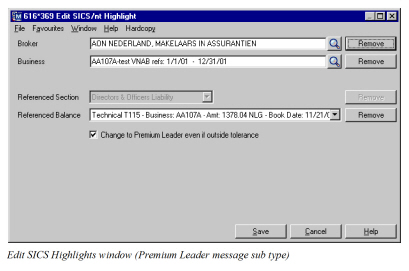
Multiple slip is where one balance on the ledger matches a number of VNAB messages. Typically, the balance will be well outside the tolerance, and the user must manually make the link to the balance required. Messages linked to a balance outside the tolerance automatically become ‘multiple slip’ subtypes, though the user may change them to ‘leader’ subtype by selecting the check box (as above.) In due course, further VNAB messages will be linked to the same balance, and all will be treated as multiple slip.
The broker error case occurs when the user does not expect this message, and wants to discard it. Whilst ‘discard’ is an option within EDI processing, the preferred way to handle such messages is to book them as a ‘broker error’, changing the subtype of the message so it will be processed differently at worksheet stage. For any message not linked to a balance, the user may select ‘broker error’ as the subtype. Messages linked to a balance must first have the link removed before they can be set as ‘broker error’.
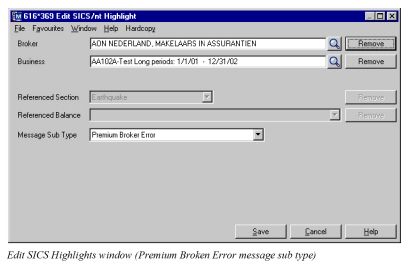
Referenced Premium messages will now be one of four subtypes:
- Premium leader
- Premium follower
- Premium multiple slip
- Premium broker error
Claim Messages #
Consideration must also be given to the claims messages. There is a single claim subtype, and these are handled very like premium leaders, except that we also link to a specific claim, using ‘UCR’ (Unique claim reference.) A claim message links to business via VNAB number, to claim via UCR and to a balance. There are no alternatives - any automatic links that fail must be made manually. The claim must a claim on the referenced business, and the balance must be a balance on the claim.
Application #
The application of the message is the process that books it to the ledger, and which automatically settles (or ‘pairs’) other balances with the new one. The application procedure to be used is determined by the subtype of the message.
Premium Leader #
From the matching balance, the system knows the section, accounting classification and original balance. We book premium and brokerage from the message, and a reversal of the original balance based on the value of the referenced details.
The reversal balance will settle the original balance and as the two amounts will always be equal and opposite, there is never any difference to consider.
Premium Follower #
Here we just book premium and brokerage, but no reversal. We know the section to use from the one to which the message is referenced. There is no pairing to be done in this case.
Premium Multiple Slip #
The worksheet is similar to a premium leader - we know the balance we are reversing, so we know the section and account classification. We book premium and brokerage amounts from the message, but the reversal is also made from the message (we book net amount rather than the referenced balance). The reversal booking from each message is fully settled, but the referenced balance is only partially settled until the last message finally changes it to settle.
Premium Broker Error #
For these messages, the system will book the net amount as premium, and reverse it straight away. The section & AC are irrelevant, so we simply take the first, as we do in LIMNET P&C. The booking and its reversal sum to zero, so the balance is settled automatically.
Claim #
Claims are very like premium leader, though the booking is made on claims worksheet. The system will book claim paid and reversal (the amount is taken from the referenced balance,) and we know the section and account classification from the referenced balance. The reversal balance will pair against the referenced balance.