Lloyds Outwards messages (LORS)
The eMessaging module in SICS can process messages created by the LORS system in the London Market. The messages, for outwards business, are not ACORD messages, but can still be processed by eMessaging. They must be converted externally from the original EDIFACT versions into an XML schema that is superficially similar to the ACORD RLC message schema. This conversion is outside the scope of SICS.
The following LORS message types are supported:
- LIMRIA - converted to LloydsOutwards,
- LIMRIS - converted to LloydsOutwards
- LIMRID - converted to LloydsOutwards
- LIMRES - converted to ACORD Acknowledgment with extensions
- LLDUWR - created by eMessaging as an ACORD Acknowledgment for return to the sender
The following message is not supported
- LIMRIN (message sent from broker to LORS, outside the scope of this project)
In addition, eMessaging will handle the so-called ‘ORI signing message’ created by Lloyds. These are sent by XIS as TechAccount messages, but are processed in a different way to standard TechAccount messages, as described below.
LORS Overview #
In order to understand the role eMessaging plays in processing these messages, it may help if we explain the LORS system in a bit of detail.
A broker submits a premium debit note to LORS (LIMRIN message). This is forwarded to the carrier for authorisation (LIMRIA). The carrier grants authorisation, either by making a response in the LORS system or by returning a message to LORS (LLDUWR). LORS will acknowledge receipt of the LLDUWR by returning their own acknowledgement (LIMRES). In both cases Central Settlement then transacts the business, creating a standard TechAccount sent to the carrier (ORI signing message). A similar process, using the same messages, exists for claims.
The carrier is not obliged to authorise the transaction. They may object instead. This may lead the broker to remove the transaction, in which case LORS will issue a LIMRID message to the carrier. This is a ‘delete’ message that will cancel the transaction. At the end of each day LORS sends a summary of actions (LIMRIS), This summary reflects both the messages sent (LIMRIA, LIMRID) and online authorisations, and for authorised items passing into Central settlement will include the signing date and number that will later appear on the ORI signing message.
The LIMRIA message is the most complex of these messages. In addition to identifying the transaction to be authorised, it also identifies the retrocessionaire participants involved in the transaction. This list of participants may be a subset of the list in SICS.
SICS Overview #
The aim of the LORS interface is to book the ORI signing message in such a way that it settles balances on the retrocessionaire particpants identified on a LIMRIA message. To do this, when a new LIMRIA message is received, it is linked to an Intermediary Participation, using, amongst other elements, the broker code in the message. We then link each Retrocessionaire in the message to an existing balance in SICS. We then create a LORS transaction in SICS, bringing together the retrocessionaire’s balances from SICS with the transaction identifiers supplied in the LIMRIA message.
Once authorisation has been granted (see below) and the transaction has been passed by LORS into Central settlement, the daily LIMRIS message will notify us of the signing date and number. Using the transaction identifiers, we find the LORS transaction created earlier, and update each balance found with the signing date and number.
When the ORI signing message arrives, the message function is set to Lloyds Outwards signing, and the message is linked to the LORS transaction. The message creates a settlement balance group from the retrocessionaire’s balances on the LORS transaction, and then creates a remittance from the settlement balance group. The remittance is then paired with the retrocessionaire balances previously identified.
Find Lloyds Outwards message #
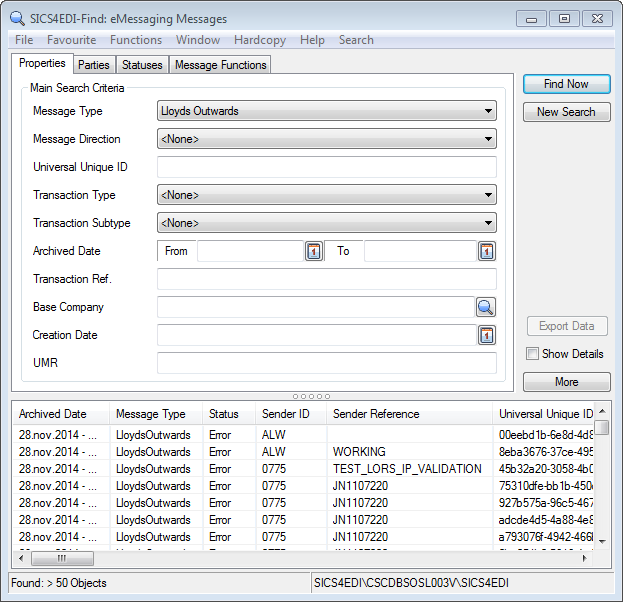
| Fields | Dscription |
|---|---|
| Message Type: | Narrows the search to a particular message type. Values: Any value in reference data table eMessaging Document Type. To show Lloyds Outwards, select Lloyds Outwards from the list. Default: ACORD Tech Account, but a user preference default may override this. If you only work with LloydsOutwards, change the message type in user preferences to Lloyds Outwards Mandatory: Yes (though by selecting None, all message types can be found) |
| Message Direction: | Limits the search to inbound or outbound messages. Default: Each user can select default value in user preferences. If no preference is made, ‘inbound’ is assumed. Values: <None> (shows both inbound and outbound), Inbound, Outbound Mandatory: Yes |
| Universal Unique Id: | This identifier is supposed to be unique, and so can identify one specific message. If you know the Universal Unique Id (UUid), this is best way to find a message. There are two points to consider however: True Uuid’s are long strings of seemingly random numbers and letters. Use copy and paste to enter a value here. If you load the same message more than once, you can get duplicate Uuids, though SICS will not allow more than one to process to completion. Values: Text Mandatory: No |
| Transaction Type: | The underlying LORS message_ _Values:_ <None> (in which case all are shown), LIMRIA, LIMRIS, LIMRID _Default: <_ None> _Mandatory:_ No |
| Transaction Subtype: | The subtype allocated to the LORS message Values: <None> (in which case all are shown), Authorised, Informational, New, Update Default:< None> Mandatory: No |
| Archived Date From - To: | The date on which the message was loaded into the eMessaging database. Values: Date Mandatory: No |
| Transaction Ref: | This is the LORS transaction reference_ _Values:_ Text _Mandatory:_ No |
| Base Company: | This option can find messages for one specific base company. The message must be linked to the SICS base company to be included in the results. Values: Text Mandatory: No |
| Creation Date: | The date the message was created Values: Date Mandatory: No |
| UMR: | The senders reference for the business to which the Lloyds Outwards message is related. UMR (Unique Market Reference) can be found in the eMessaging details of the Insured Period tab of the business. Values: Text Mandatory: No |
View Lloyds Outwards message #
LORS Approval #
The user has two methods for approving incoming LIMRIA transactions. One is to make a response in the LORS system directly, without involving SICS. The other is to make the approval in SICS, and return an LLDUWR message to LORS. Approving LIMRIA transactions is therefore optional in SICS.
To implement LORS approval from within SICS, the following message type rule must be in force for LloydsOutwards messages:
RejectUnauthorisedLloydsOutwardMessage
It is not compulsory to have this rule in force, but if it is, all new LIMRIA messages will have the ‘approval required’ flag set to true. The user must then grant approval to set the ‘approval received’ flag to true. Any message with no errors where the approval required flag is true and the approval received flag is false will be set to status ‘waiting approval’ and no updates will be done until approval is granted.
Manual Approval #
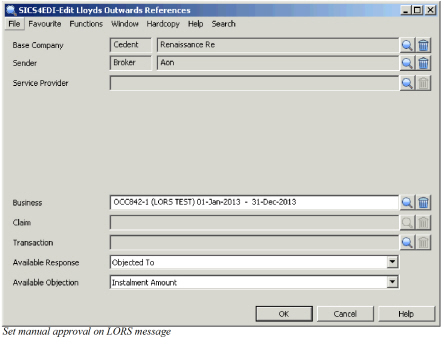 Approval is set on the Edit References window, by selecting an Available Response.
These are codes from the LORS codeset, and there are two usages that determine if the code is an acceptance (usage = LORS Acceptance codes) or an objection (usage = LORS Rejection codes). Where the selection is an objection, the user must also give an objection reason from the list of codes in Available Objection. When a selection made, the user has the opportunity to add further details once ‘OK’ is clicked. These details will appear on the acknowledgement returned to the LORS system.
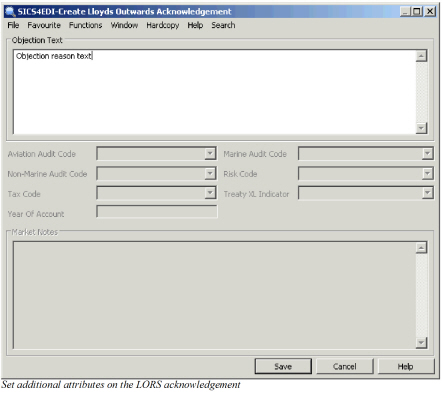 Although Objection text is prominent on this window, the same window appears for all messages where a response to LORS is made manually- for acceptances as well as objections. Some of the attributes are only available if you are the leader, and allow you to specify coding for Audit codes, Risk Code and Tax Code that will then be distributed to the following market through LORS.
On clicking Save, a LORS acknowledgement is created.
Automatic approval #
In addition to the user manually granting approval, three rules are provided to automatically grant approval. It is up to the user to choose if one or more of these automatic rules are in force.
Rule 1: Grants approval if the message itself carries authorisation.
Rule 2: Grants approval if the sum of balances on the message matches the sum of balances to which the items in the message are linked.
Rule 3: Grants approval if the sum of balances on the message is not greater than a threshold defined in the rule. Amounts in currencies other than the threshold currency are converted to the threshold currency at current daily rates.
LORS Acknowledgements #
When approval is granted, an Acknowledgement is returned to the LORS system. In eMessaging, this is created as an ACORD acknowledgement message, which is subsequently converted to a csv version of the LLDUWR message outside SICS. Unlike acknowledgements in the standard ACORD process, this message is acknowledged in return by LORS (LIMRES message).
Normally, an outbound acknowledgement would be given the status of ‘complete’ once the gateway has pulled it from the archive, but for the outbound LORS acknowledgements in response to incoming LIMRA messages, the status becomes ‘sent’. Only once the returning LIMRES acknowledgement has been received and processed does the status get changed to ‘complete. The usage ‘Set Acknowledgement incomplete’ controls which outbound acknowledgements remain as ‘sent’, based on the incoming message to which they are acknowledging.
LORS Transaction #
When a LIMRIA Lloyds Outward message is processed, it will create or update a SICS LORS transaction. Normally access to a LORS transaction is through an eMessage - either a Lloyds Outwards or a TechAccount (ORI signing message), but you can find and view them directly from the eMessaging window.
Find LORS Transaction #
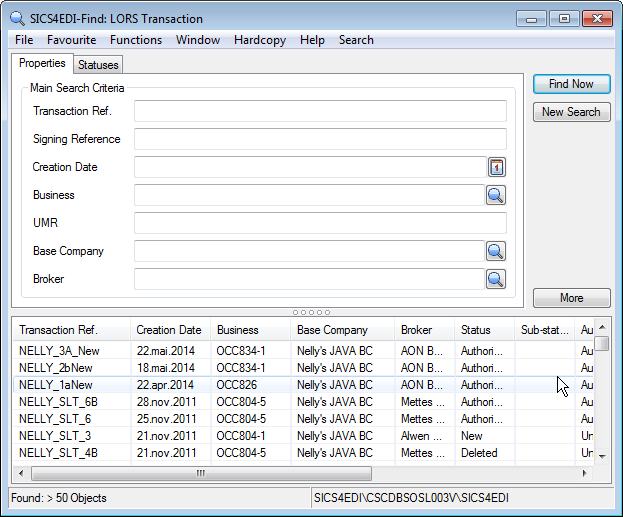
| Fields | Dscription |
|---|---|
| Transaction Reference: | This reference is used to uniquely identify a LORS transaction, and it is made up from the following four message elements: * Broker Number, * UMR: * LORS Transaction Reference * Lloyds Item Number Use this option to find the LORS transaction if you are starting from a LORS message. _Values:_ Text _Default:_ None _Mandatory:_ No |
| Signing Reference: | Once the transaction has been passed into central settlement, a signing reference will be issued by LORS, and this is recorded on the LORS transaction. Use this option to find the LORS transaction if you know the signing reference (e.g. you have a TechAccount ORI signing message). Values: Text Default: None Mandatory: No |
| Creation Date: | The date on which the LORS transaction was created. Values: Date Default: None Mandatory: No |
| Business: | The SICS business id to which the LORS transaction is related. This will be an Outward Cedent’s Contract. Useful for finding all the LORS transactions on one SICS business. Values: Text Default: None Mandatory: No |
| UMR: | The senders reference for the business to which the LORS transaction is related. UMR (Unique Market Reference) can be found in the eMessaging details of the Insured Period tab of the business. Values: Text Default: None Mandatory: No |
| Base Company: | This option can find LORS transactions for a single base company. Values: Text Default: None Mandatory: No |
| Broker: | This option can find LORS transaction for a single message sender. Values: Text Default: None Mandatory: No |
| Statuses: | The current status of the LORS transaction. This is useful for finding LORS transactions that have been updated, but not yet competed. Values: From Reference data table ‘LORS Transaction status’ 01137. Default: None Mandatory: No - if no specific status is chosen, all statuses are shown. |
View LORS Transaction #
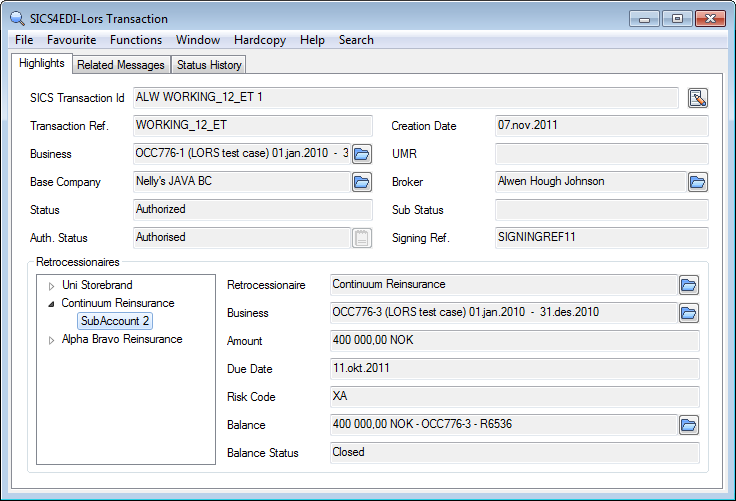
Highlights #
This tab consists of two parts. The upper part shows details of the LORS transaction, the SICS business to which it is related, and the base company and broker to which it is linked
The lower part shows the retrocessionaires to which the LORS transaction is linked. Selecting an individual retrocessionaire will show additional information for that partner, including the SICS balance to which the sub account is linked.
Related messages #
This tab shows the other messages in the archive related to this LORS transaction, and may include both LloydsOutwards and TechAccount messages.
Status history #
The status history tab shows the progress of the LORS transaction from creation to completion, and tells you when and by whom the transaction was updated.
LORS ORI Signing Message #
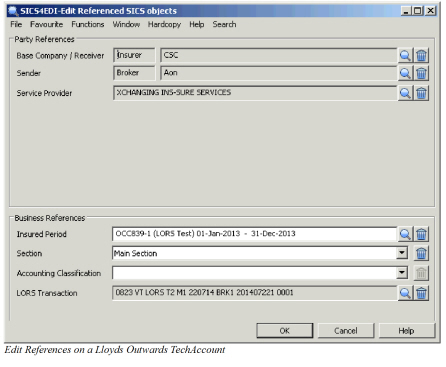
When a TechAccount is identified as a Lloyds Outwards TechAccount (sometimes known as an Outwards Reinsurance or ORI message), the message function will be set to Lloyds Outwards signing, and in order to process the message it must be linked to a SICS LORS transaction created earlier from a LORS message. Normally this link is made automatically using the signing date and number, but if this fails for any reason, the link can be made manually by editing the message references on the ORI message.
The ORI signing message does not create a new technical worksheet. The technical books will already exist in SICS. Instead the ORI message creates a remittance which will settle the existing technical bookings according to the details held in the SICS LORS transaction.