Outbound messages
As well as receiving ACORD RLC messages, SICS can create and send such messages. At present, it can create
- Acknowledgements
- Settlements
- TechAccounts for Outwards business
- Claim Movement for Outwards business
Other message types may be added in future.
When sending messages other than acknowledgements, the ACORD standard requires you to receive an acknowledgement back, and SICS now supports this requirement.
Life-cycle status #
Just as incoming messages have a sequence of messages statuses they go through, so do outbound messages. These are
- Created
- Pending delivery
- Sent
- Complete
Acknowledgements are set to ‘pending delivery’ when created. Other message types are set to ‘created’and must be processed in order to set them to ‘pending delivery’. The reason for this is to trap messages created in error before they are sent to your business partner. It is expected that a gateway will pull ‘pending delivery’ messages from the archive, and set them to ‘sent’ when this is done. If there is no gateway, the messages will remain in the archive as ‘pending delivery’.
When the receiver returns an acknowledgement to say the message they received has been processed, that acknowledgement is linked to the outbound message in the archive, and the status is changed to ‘complete’. As outbound acknowledgements do not normally receive a message in return, these are set to ‘complete’ when the gateway pulls them from the archive. (See also Find Outbound messages below for situations where the receiver does not return acknowledgements, and also the notes on acknowledgements for LORS in the following section).
Outbound messages may be discarded before they are sent. When the message is discarded, the links back to the object in SICS from which it was created are broken, thus allowing you to create a new message from that object. It is not allowed to restore a discarded outbound message.
Finding outbound messages #
The main eMessaging find window includes a ‘Message direction’ selection.. Each user can specify a preferred value for this -
- None
- Inbound
- Outbound
If no preference is made, SICS will show inbound messages. If the user normally finds inbound messages, selecting message type ‘Acknowledgement’ will reverse the message direction automatically, to show outbound acknowledgements.
An additional find window is provided especially for outbound messages that have been sent but not acknowledged. This can be selected from the eMessaging group on the desktop - Unacknowledged Outbound eMessage.
The purpose of this find window is to indicate outbound messages that have not been acknowledged by the receiver. As it may take the receiver a few days to process the messages they receive, only messages older than a certain number of days are shown. The number of days can be set as a user preference, or a system parameter.
For these outstanding messages it may be desirable to contact the receiver to ensure they have received them. If the message has been received and processed, you can change the status of the message from sent to complete using a menu option - ‘Set status to complete’. This avoids messages you know are completed by the receiver reappearing in this list.
It may be that the receiver does not have the capacity to return acknowledgements. If this is the case, there is an option on eMessaging properties of the business partner.
Send acknowledgements.
The default is for this to be ticked, but when it is unticked, messages created for that partner will be set to status ‘complete’instead of ‘sent’ when the gateway pulls them from the archive. This avoids such messages even becoming overdue.
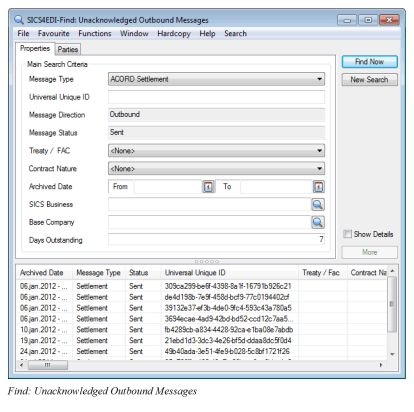
| Field | Description |
|---|---|
| Message Type: | Narrows the search to a particular message type. Values: Values from reference data table eMessaging Document type Default: ACORD Tech Account, but a user preference default may override this Mandatory: Yes (though by selecting None, all message types can be found) |
| Universal Unique ID: | This identifier is supposed to be unique, and so can identify one specific message. If you know the Universal Unique Id (UUid), this is best way to find a message. There are two points to consider however: True Uuid’s are long strings of seemingly random numbers and letters. Use copy and paste to enter a value here. If you load the same message more than once, you can get duplicate Uuids, though SICS will not allow more than one to process to completion. Values: Text Mandatory: No |
| Message direction: | Limits the search to outbound messages. Values: Outbound Default: Outbound as the only value. Mandatory: Yes |
| Message status: | This search will only find ‘sent’ messages, as it is intended to find messages sent from SICS that have not yet been acknowledged. (Once acknowledged, they become complete). Use the standard find window if you want to view other statuses. Values: Sent Default: Sent as the only value Mandatory: Yes |
| Treaty/FAC: | This is an ACORD code used to distinguish between different types of business. Values: e.g. Treaty, Facultative, Direct Default: None Mandatory: Yes (though by selecting None, all values can be found) |
| Contract Nature: | This is an ACORD code used to distinguish between Non-proportional and Proportional Values: e.g. Proportional, Non-proportional Default: None Mandatory: Yes (though by selecting None, all values can be found) |
| Archived Date From - To: | The date on which the message was loaded into the eMessaging database. Values: Date Mandatory: No |
| SICS Business: | Here you can select a SICS business and insured period to which messages are linked. The find will only return messages referenced to this insured period. Values: Text Mandatory: No |
| Base Company: | This option can find messages for one specific base company. The message must be linked to the SICS base company to be included in the results. Values: Text Mandatory: No |
| Days Outstanding: | The number of days the acknowledgement has been outstanding. Messages with an archive date this number of days (or greater) in the past will be returned. Values: Numeric, from 0-999999 Default: From user preference or system parameter defaults. Mandatory: Yes |
Task management triggers #
Two task management triggers are provided in this area. One notifies if a query acknowledgement has been returned by the receiver. A query acknowledgement does not indicate that the outbound message sent to the receiver has been processed, so the status of the related outbound message in the SICS archive is unchanged. But a query is likely to ask a question of the sender, and the task management trigger prompts the user to respond to such queries.
The other is started by a scheduled job (eMessaging Overdue Responses), which performs a similar function to the ‘Find unacknowledged outbound’ window, in that it returns a list of outbound messages requiring further attention because they have not been acknowledged within a certain number of day.
LORS Acknowledgements #
Please see the LORS section of this chapter for details of acknowledgement processing (both outbound and inbound) within the LORS framework.