Handle Default Period Estimates
The Default Period Estimates form the basis for estimations at the business. For example, you can provide a pattern at the Portfolio Program of how the premium is written over two years. You have percentages as estimation defaults. These percentages can be used at business (section) level to calculate the estimations.
Default Period Estimates are values that are usually produced by an actuary. Default Period Estimates can, for example, represent the development of the loss ratio of a portfolio. By specifying items as Estimation Defaults they become available to the Assumed Business matching the criteria of the Portfolio Program. The loss ratio can be referenced on an Assumed Business to calculate the incurred losses. There is no check in the system or limit in using the Default Period Estimates.
Period Estimates can be specified on a yearly basis, in addition to a quarterly or monthly basis, depending on the Estimation Frequency defined in your system. Defaults on a yearly basis represent a yearly pattern. Defaults on a quarterly or monthly basis represent a quarterly/monthly pattern of one of the yearly patterns. To maintain default pattern on a Portfolio Program;
- Click the Underwriters Estimates button on a Portfolio Program
- Select the Default Period Estimates tab.
- Switch to edit mode.
- The estimation Items that has a Period Estimate Rule matching the classifications of the Portfolio Program is displayed in the left hand window.
- In the upper part of the window you can enter the yearly pattern. The Estimation Items that are displayed in this display list depend on the settings in the System Parameters. The number of displayed years can be entered here.
- In the lower display list you can specify the quarterly/monthly pattern of the selected year. The quarterly/monthly pattern is maintained by clicking the Year column in the upper display list. Then the quarterly/monthly pattern in the lower display list opens up for edits.
- Click OK to save the pattern.
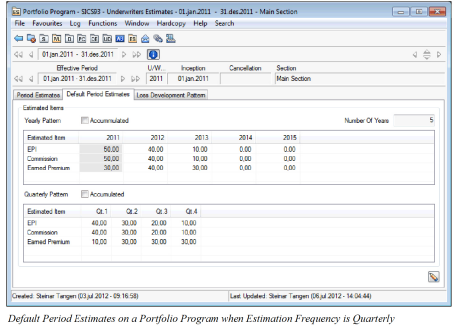

Field Descriptions Yearly pattern
Accumulated: Yearly pattern can be shown as accumulated figures for all years.
Calculation: Check box. Manually entered
Validations: If checked, the figures are accumulated.
Values: None
Functional Impact: Figures are shown accumulated or for each quarter separately.
Number of Years: The number of years that the pattern shall be valid for.
Calculation: Default value = 5. Manual change is possible.
Validation Max 3 positions
Values: Number
Functional Impact: The number of columns shown in the yearly pattern for which an estimation pattern shall be created.
Estimated Item: The item defined in the System Parameter Maintenance for which an estimation pattern shall be created.
Calculation: Calculated from Period Estimate Rules in System Parameter Maintenance
Validations: Validity Period, Classification, Base Company in Period Estimation Rule
Values: Alphanumeric value
Functional Impact: Estimation item must be visible for the creation of default pattern used in Multi GAAP.
Year: The calendar year for which the pattern is applied.
Calculation: System generated from a combination of Underwriting Year and Number of Years
Validations: Standard SICS year validation.
Values: Year value, 4 positions.
Functional Impact: Estimated item value is shown in the matrix between Estimated item and Year.
Field Descriptions Quarterly pattern (only available when Estimation Frequency is Quarterly)
Accumulated: Quarterly pattern can be shown as accumulated figures for all quarters.
Calculation: Check box. Manually entered
Validations: If checked, the figures are accumulated.
Values: None
Functional Impact: Figures are shown accumulated or for each quarter separately.
Estimated Item: The item defined in the System Parameter Maintenance for which an estimation pattern shall be created.
Calculation: Calculated from Period Estimate Rules in System Parameter Maintenance
Validations: Validity Period, Classification, Base Company in Period Estimation Rule
Values: Alphanumeric value
Functional Impact: Estimation item must be visible for the creation of default pattern used in Multi GAAP.
Quarter: The calendar quarter for which the pattern is applied. Four quarters on each year in the upper display list.
Calculation: System generated from Year-column in the upper display list.
Validations: 4 quarters for each year.
Values: Number, 1 position.
Functional Impact: Estimated item value is shown in the matrix between Estimated item and quarter.
Field Descriptions Monthly pattern (only available when Estimation Frequency is Monthly)
Accumulated: Monthly pattern can be shown as accumulated figures for all months.
Calculation: Check box. Manually entered
Validations: If checked, the figures are accumulated.
Values: None
Functional Impact: Figures are shown accumulated or for each month separately.
Estimated Item: The item defined in the System Parameter Maintenance for which an estimation pattern shall be created.
Calculation: Calculated from Period Estimate Rules in System Parameter Maintenance
Validations: Validity Period, Classification, Base Company in Period Estimation Rule
Values: Alphanumeric value
Functional Impact: Estimation item must be visible for the creation of default pattern used in Multi GAAP.
Month: The calendar month for which the pattern is applied. Twelve months on each year in the upper display list.
Calculation: System generated from Year-column in the upper display list.
Validations: 12 months for each year.
Values: Number, 2 positions.
Functional Impact: Estimated item value is shown in the matrix between Estimated item and month.