Handle Loss Development Patterns
Losses within the same category often develop in similar ways over time. Specific patterns of loss development can help the underwriter to e.g. calculate IBNR reserves.
Loss Development Pattern selected on Portfolio Program is inherited to linked Assumed Businesses. Inherited Loss Development Pattern can be overridden on Assumed Businesses - values can be changed or a completely different Loss Development Pattern can be selected.
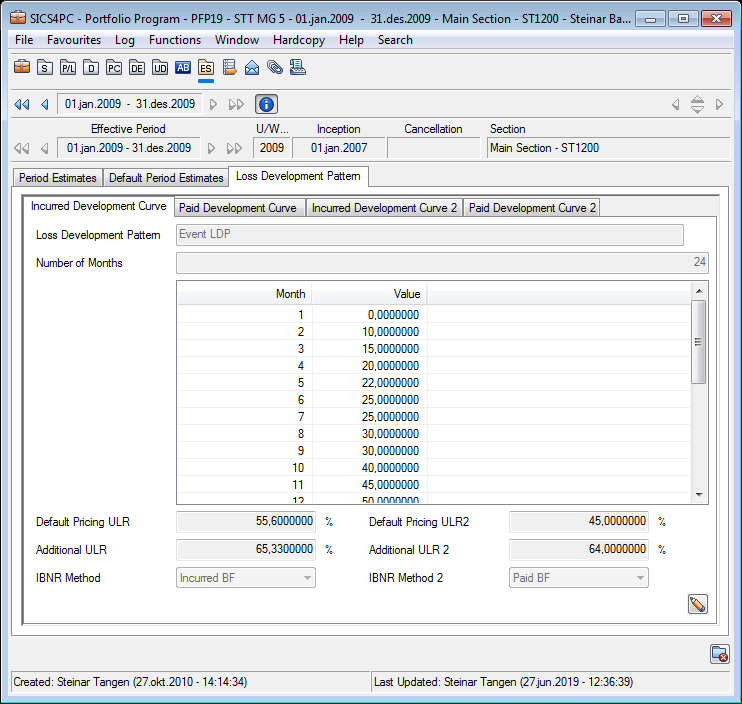
Register Incurred Development Curve: #
- Open Underwriters Estimates and select the Loss Development Pattern tab
- Select to open the Incurred Development Curve subtab in edit mode
- Click the edit button next to Loss Development Pattern field and select wanted pattern
- Save the selected Loss Development Pattern
- If required, make changes to Number of Months and values
- Save
Register Paid Development Curve: #
- Open Underwriters Estimates and select the Loss Development Pattern tab
- Select to open the Paid Development Curve subtab in edit mode
- Click the edit button next to Loss Development Pattern field and select wanted pattern
- Save the selected Loss Development Pattern
- If required, make changes to Number of Months and values
- Save
Register a second Incurred Development Curve: #
- Open Underwriters Estimates and select the Loss Development Pattern tab
- Select to open the Incurred Development Curve 2 subtab in edit mode
- Click the edit button next to Loss Development Pattern field and select wanted pattern
- Save the selected Loss Development Pattern
- If required, make changes to Number of Months and values
- Save
Register a second Paid Development Curve: #
- Open Underwriters Estimates and select the Loss Development Pattern tab
- Select to open the Paid Development Curve 2 subtab in edit mode
- Click the edit button next to Loss Development Pattern field and select wanted pattern
- Save the selected Loss Development Pattern
- If required, make changes to Number of Months and values
- Save
Your system may have been set up to automatically update Loss Development Curves whenever an update is made in system parameters. If this is the case, Number of Months and values cannot be changed on the business.
Field Description - Loss Development Pattern
Pattern Name Name of the Loss Development Pattern
Values: Customized by you company
Mandatory: Yes
Functional Impact: None
Number of Months: Number of months for which the pattern is valid.
Values: Minimum value: 1
Maximum value: 999
Number of decimals: 0
Mandatory: Yes
Functional Impact: Other Loss Development values
Months: One line per month is made available as per Number of Months entered
Values: Number of Decimals: 0
Validations: Months are not editable
Mandatory: Yes
Functional Impact:Underwriters Estimates
Values: Percentage to be used in calculation rules
Values: Minimum value: 0
Maximum value: 999,9999999
Number of Decimals: 7
Validations: Value for last month must be 100,0000000
Mandatory: Yes
Functional Impact: Underwriters Estimates