Periodic Functions
Estimation Complete Mass Update #
When closing of specifically selected Estimation Items has been set in the Multi GAAP system parameters, The Periodic Function, Estimation Complete Mass Update functionality can be used to perform the closing.
To get access to the Estimation Complete Mass Update functionality, the correct User Role must be assigned to the user who is about to perform the closing. This is done in the Security functionality.
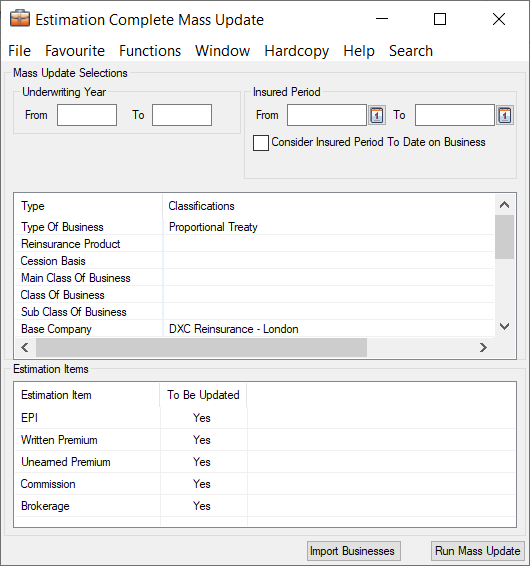
You can define which businesses that should be included in the Mass Update in two ways:
a) Define extract criteria in the Mass Update window, or
b) Import a file including businesses that should be updated.
Run the Estimation Complete Mass Update using extract criteria: #
- On the SICS desktop, select Periodic Functions and then open Estimation Complete Mass Update
- In the Underwriting Year section, enter From and/or To (optional)
- In the Insured Period section, enter From and/or To Date (optional)
- Select Consider Insured Period To Date on Business if you want your extraction on Insured Period From and/or To to consider the business' Insured Period To date. If this is not selected, the extraction on Insured Period From and/or To considers the business' Insured Period From Date.
- Select wanted selection criteria
- Include wanted Estimation Items
- Click on Run Mass Update
The system updates the “Compl.” column to “Yes” for the selected Estimation Items in Underwriters Estimates/Period Estimates on assumed businesses matching the given extract criteria.
Run the Estimation Complete Mass Update using an imported file #
- On the SICS desktop, select Periodic Functions and then open Estimation Complete Mass Update
- Click on Import Businesses
- Press the Find button to find and select an Excel Spreadsheet to be imported.
- Click on Process. The system validates that all Insured Periods/sections listed in the spreadsheet exists in SICS
- Click on Import. The imported businesses are shown in the Mass Update window
- Click on Run Mass Update
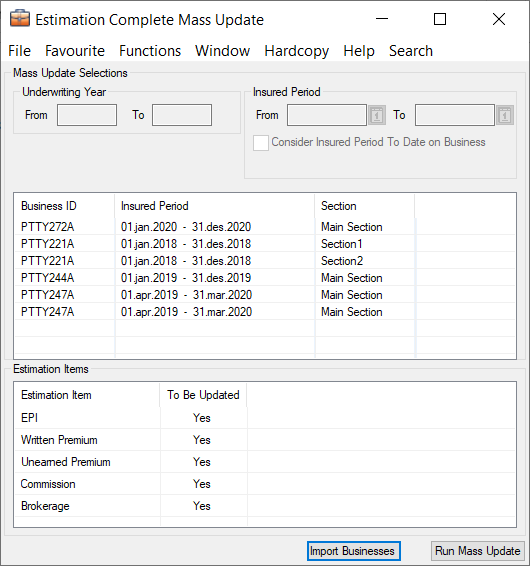
The system updates the “Compl.” column to “Yes” for the selected Estimation Items in Underwriters Estimates/Period Estimates on the assumed businesses which are imported and listed in the Mass Update window.
Note that Section Name is optional on the import file. If given, only the given sections are updated. If section is not given, all sections on the Insured Period are updated.
Multi GAAP Stop Calculation Mass Update #
When calculating Period Estimates, the general functionality is to always recalculate all items. Exceptions are:
A) If the values has been manually overwritten, then a flag is set to prevent recalculation
B) If the Complete flag is set on the Estimation item. This item will then not be recalculated for any periods (depending of a global system parameter).
You can also freeze the values on some Estimation Items / Periods by setting a Stop Calc flag on the relevant items and periods. This flag can be set by running the Multi GAAP Stop Calculation Mass Update.

Create and run the Multi GAAP Stop Calculation Mass Update #
- On the SICS desktop, select Periodic Functions and then open Multi GAAP Stop Calculation Mass Update
- In the Undeerwriting Year section, enter From and/or To (optional)
- In the Estimate Year and Estimate Period sections, enter the Estimate Year and Period From and To. (Both are mandatory)
- Select Remove Stop Calculation Flag, if required. This can be used if the flag has been set by error on some periods.
- Select required selection criteria
- Include the required Estimation Items. Available to select are all Estimation Items defined in Multi GAAP System Parameters. You can include/exclude specific items, or select to Include/Exclude all
- Press the Run Mass Update button to run the Mass Update
The system updates the StopCalc column to Yes on the included Estimation Items for the periods between the Estimate Year and Estimate Period From and To periods. The entered periods refer to the Booking Periods, i.e. the periods shown in Period Estimates when Estimation View = Booking Year.
Example: If Estimate Year is set From 2014 To 2019 and Estimate Period is set From Month 01 To Month 07, all periods from 2014 Month 01 to 2019, Month 07 are updated.