Handle Period Estimates on Prop Treaty Retrocessionaire's
The Period Estimate functionality on Proportional Treaty Retrocessionaires depends on Multi GAAP system parameter Period Estimation Calculation on Prop Outward Contracts
A: When system parameter Period Estimation Calculation on Prop Outward Contracts is cleared
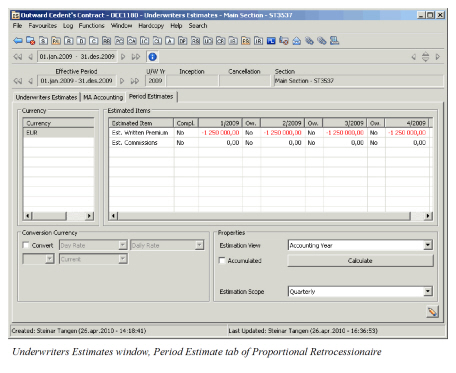
The Period Estimate tab on a Proportional treaty Retrocessionaire looks and works much like the one on a Proportional OCC. The only difference is that the estimates are collected from the business ledger of the Retrocessionaire. Figures marked ‘As Booking’ are shown on this tab.
Note! To see all estimated bookings made on the business ledger you have to set up your Period estimation rule accordingly. Refer to Multi GAAP System Administration later in this manual for details. In general only those Estimation Items are shown that match the classification of the Retrocessionaire and have the estimation level set to Retrocessionaire. Also, the entry code defined for the estimates are the one that will be used for ‘summing-up’ the estimates from the business ledger to the Period Estimates tab.
The sum-up to the quarters on the Period estimates tab from the business ledger is done from assigning the estimates according to booking year and period.
Example 1 (Estimation Frequency is Quarterly):
For a Proportional OCC with Insured Period Start Date 1st January 2000, estimates with Booking year 2000 and months 1, 2 and 3 will be summed-up to the 1st quarter. Estimates with booking year 2000 and month 4, 5 and 6 will be summed-up to the 2nd quarter, and so on.
For a Proportional OCC with Insured Period Start Date 1st April 2000, estimates with Booking year 2000 and months 4, 5 and 6 will be summed-up to the 1st quarter. Estimates with booking year 2000 and month 7, 8 and 9 will be summed-up to the 2nd quarter, and so on.
Example 2 (Estimation Frequency is Monthly):
For a Proportional OCC with Insured Period Start Date 1st January 2000, estimates with Booking year 2000 and month 1 will be uploaded to the 1st month. Estimates with booking year 2000 and month 2 will be uploaded to the 2nd month, and so on.
For a Proportional OCC with Insured Period Start Date 1st April 2000, estimates with Booking year 2000 and month 4 will be uploaded to the 1st month. Estimates with booking year 2000 and month 5 will be uploaded to the 2nd month, and so on.
When you add a Period Estimate currency on an OCC, you are given the option to create Period Estimates on all Retrocessionaires. Alternatively you can add the Period Estimate currency manually on each Retrocessionaire.
It is also possible to create Period Estimates on both OCCs and Retrocessionaires automatically using the Multi GAAP Recalculation Order. See the Create/Update Period Estimates Automatically chapter for further information.
Enter Estimation Complete Reason and Description
Manually register why an Estimated Item is completed.
- Open Underwriter’s Estimates / Period Estimates in edit mode
- Highlight wanted Estimated Item, right mouse click and select option Edit Complete Reason
- Select a Complete Reason from the drop down
- Enter a Description
- Press Save
- Press Save
View Estimation Complete Reason and Description
- Open Underwriter’s Estimates / Period Estimates in view mode
- Highlight wanted Estimated Item, right mouse click and select option View Complete Reason
Remove Estimation Complete Reason and Description. If entered in error an Estimation Complete Reason and Description may be removed.
- Open Underwriter’s Estimates / Period Estimates in edit mode
- Highlight wanted Estimated Item, right mouse click and select option Remove Complete Reason
- Confirm removal
- Press Save
Manually entered Complete Reason is for informational purposes only and has no functional impact
Field Description
Currency
Currency: Currency of the displayed estimation item amounts in the right hand field.
Calculation: Selectable from SICS table with currency codes
Validations: Currency codes from ISO table
Values: three positions
Functional Impact: Currency in which the Estimated Item values are displayed on Period Estimates.
Estimated Item: The item defined in the System Parameter Maintenance for which estimation values shall be calculated and displayed.
Calculation: System generated from System Parameter Maintenance, Multi GAAP
Validations: Period Estimation Rule
Values: Alphanumeric
Functional Impact: Estimated item value is shown in the matrix between Estimated item and Period/Year.
Compl.: Indicates that the Estimated Item is completed. This means that no further estimates will be booked and existing accruals can be reversed by the Multi GAAP Retrocession Order. This flag will also stop recalculation of the Estimated Item, if set up to do so by your system administrator.
Calculation: Default value; No. Manual change to Yes.
Validations: Only options; No/Yes
Values: Alphanumeric, 3 positions
Functional Impact: Multi GAAP Retrocession Order, Multi GAAP Recalculation Order, calculation of Period Estimates
P/YYYY: Period and Year for which an estimated amount is calculated. The period refers to a quarter or a month, depending on Estimation Frequency defined in your system parameters.
Calculation: System generated from System Parameter Maintenance, Multi GAAP
Validations: Period Estimation Rule
Values: Numeric
Functional Impact: Estimated item value is shown in the matrix between Estimated item and Period/Year.
Adj.: Option to make manual adjustment directly on the outwards cedent contract.
Calculation: Manually entered
Validations: Period Estimation Rule
Values: Numeric
Functional Impact: Estimated item value is shown in the matrix between Estimated item and Adj.
Ow.: Indicates if the value under P/YYYY is manually overwritten ‘Yes’. ‘No’ is default value.
Calculation: Manually entered ‘Yes’. Default value ‘No’.
Validations: None
Values: alphanumeric, 3 positions
Functional Impact: None
Conversion currency
Convert: check box for option to display estimation amounts in any currency in the system. Select currency, Exchange Rate Type, Exchange Rate Category and Exchange Rate As of Type.
Calculation: Check box
Validations: None
Values: None
Functional Impact: If checked, all other fields in ‘Conversion currency’ are editable.
Properties
Estimation view: Option to view the estimation values in Accounting Year or Booking Year mode.
Calculation: Fixed values selected from drop-down list
Validations: Hard coded values
Values: Alphanumeric
Functional Impact: Estimated values are shown either by Booking Year/Period or by Accounting Year/Period.
Accumulated: Option to view the estimation values as accumulated Year to date.
Calculation: Check box. Manually entered
Validations: If checked, the figures are accumulated.
Values: None
Functional Impact: Figures are shown accumulated or for each period separately.
Adj as Replacement: Option to replace the calculated estimates with manual adjustment.
Calculation: Check box. Manually entered
Validations: If checked, the figures are accumulated.
Values: None
Functional Impact: Adjusted figures are added with calculated figures for each period separately.
Calculate (button): By clicking the button all estimates will be recalculated
B: When system parameter Period Estimation Calculation on Prop Outward Contracts is selected
Period Estimates are calculated on the Proportional ORPs in the same way as for Non Proportional ORPs. See chapter Handle Period Estimates on N-P treaty Retrocessionaire’s for further description.