Run the Multi GAAP Accounting Order
A calculation order called “Multi GAAP Accounting order” does the booking of the estimates figures. The order does two things:
Books the estimates either on the business or portfolio ledger depending on where the estimates are entered. The estimate is always booked with the Estimate indicator set. The booked estimates are also created As original on the ledger of an OCC if the business or portfolio program is connected to a Proportional OCC
Compares the estimates and the accounted figures and books the difference. The difference is called accrual and has special entry codes.
The Multi GAAP Accounting order calculates accrued figures as the difference between the estimated figures and the accounted figures for every Estimation Item. The accrual works on a year to date basis, hence the difference is always calculated starting from the beginning of the insured period up to the specified end date = As of date on order screen (for example, the end of the quarter). Therefore the actual bookings are selected up to the order As of Date.
When you run the Multi GAAP Account order the system books the estimate amount with the Accounting Period From -To that corresponds to the period/year of the Estimate.
If the estimate changes so that closed period/year is recalculated on Period Estimates, the order calculates and books the difference for closed period/year with the correct AccPeriod From - To.
Example (assuming Estimation Frequency is Quarterly):
A Prop Treaty with UWY 2007 has Period Estimates with four quarters with the amount of 100 in each quarter.
The first quarter is booked on the business ledger by the MG account order. The AccPeriod From- To is 01.01.2007 - 31.03.2007
When the second quarter is due for booking, the Period Estimate has changed so that each quarter contains 150.
The order then books 50 (which is the difference between previously booked and the new estimate) with the AccPeriod From- To 01.01.2007 - 31.03.2007 and for the second quarter 150 is booked with a AccPeriod From To 01.04.2007 - 30.06.2007
Accruals are calculated for those currencies where estimations exist. If there are actual bookings in a currency but no estimation, the accrual calculation can still be performed by selecting ‘Create accruals for all currencies’ on the order.
The calculation is performed per business / section, insured period, estimated item and currency. However, your system may have been set up to include bookings made on sub sections. Refer to System Administration Guide / System Parameters for Underwriter’s Estimates.If the calculation should be done for a portfolio, it is performed for all business / sections connected to the portfolio / section. The result is a worksheet created on portfolio program level. This worksheet is then consequently booked on the portfolio program ledger.
To run the Multi GAAP accounting order:
- Double-click the Order icon in the Accounting folder on the SICS desktop. .
- In the Find: Account Order window, select Create New.
- In the Order Type Selection window, select Accrual Accounting from the drop-down list and then click Multi GAAP Accounting.
- Click OK. You see the Create Multi GAAP Accounting Order.
- Type the order title on the order.
- Select all the parameters.
- Check the classifications.
- List/add business as requested, or select the Include only Bus. Linked to Portfolio.option.
- Click OK. SICS saves your entries and displays the View Multi GAAP Accounting Order
- Click the Menu button in the lower right-hand corner and select Run Now.
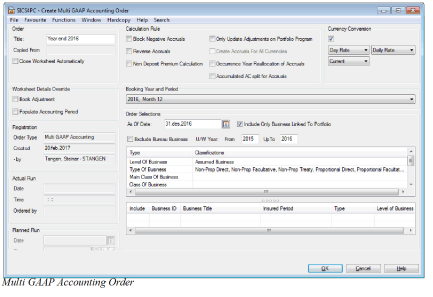
There are seven check boxes on the order screen that determines how the estimates and accruals shall be calculated and booked on the business ledger.
Calculation Rules #
Block Negative Accruals: This shall be selected if the technical bookings for some reason are greater than the estimates. This would result in negative accruals, which is not always requested.
Only Update Adjustments On Portfolio Program: When this is selected the business listed can include both Assumed Business and Portfolio Program. On the Portfolio Program business ledger only the manual adjustments are booked together with the Accrual for that manual adjustment. See the values in the Adj.-column on the Period Estimates of the Portfolio Program. If the check box is empty the order can only be run for either Level of Business equal to Portfolio Program or Assumed Business. Not both.
If an order is run with only one or several Portfolio Programs and this check box is not selected the Period estimates will be booked on the business ledger of the Portfolio Program. Accruals will also be calculated and booked accordingly. The calculation of accruals will be the Period estimates - the total technical bookings from all the attached Assumed Business.
Reverse Accruals: This is used when earlier calculated accruals needs to be reversed to zero. In this case the Complete indicator on the Estimation Item on Period Estimates of the Assumed Business or Portfolio Program has to be set to Yes.
Create Accruals For All Currencies: This check box makes it possible for the order to calculate accruals for all currencies with technical bookings on the ledger. No estimate figures for the currency must exist. The accruals will be calculated as zero - technical bookings. If the check box is empty, only accruals for the currency with estimate values will be considered
Non-Deposit Premium Method: When order is run with this check box selected the order will set Accrued figures to nil for quarters with already booked Actuals, and any discrepancy between the Estimated figure and Actual figure will be booked as an Accrual into next quarter without Actual bookings (see example below).
The Non-Deposit Premium Method is only applicable for Businesses that does NOT have any Deposit Premiums defined in the Premium Conditions. Businesses included in the order that have a Deposit Premium in the conditions will be calculated independent of setting of this parameter.
Example on calculation per quarter:
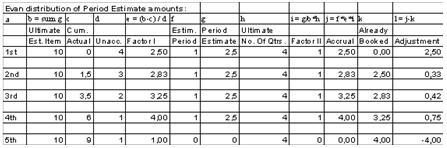
Where:
- A is Quarter number
- B is Ultimate Estimate for the Estimation Item = SEstimation Item amounts of all quarters in the Period Estimate.
- C is Cumulative Booked Actual amount on the Business Ledger for the Currency and Scope of Cover.
- D is Unaccounted Periods = Total numbers of quarters in the Period Estimate - already booked quarters.
- E is Factor I = (B-C) / D.
- F is Number of Estimation Period included in this Multi GAAP Accounting Order.
- G is Period Estimation Amount for the Quarter (period) to be included in the Multi GAAP Accounting Order.
- H is Total Number of Quarters in the Period Estimate conditions.
- I is Factor II = (G/B) * H
- J is Calculated Accrual Amount = F * E * I
- K is Already Booked Accrual Amount on the Business Ledger for the Currency and Scope of Cover.
- L= is Calculated Adjustment Accrual Amount to be booked by the Multi GAAP Accounting Order = J - K. Occurrence Year Reallocation of Accruals When order is run with this check box selected, the Multi GAAP Accounting order will calculate Estimates and the total Accruals. The calculated Accruals will then be split by Occurrence year as described below.
To allocate the Accruals to the correct Occurrence year, the system will first calculate the total Estimation Period (as number of days) for each Business/Insured Period/Section. The total Estimation Period will depend on whether or not actual bookings exist on the Business/Insured Period/Section for the relevant Accrual:
- If no actual bookings exists, the Estimation Period will be calculated as: (Insured Period End Date + number of months Extended Estimation Period) - Insured Period Start Date
- If actual bookings exist for the relevant Accrual the Estimation Period will be calculated as: (Insured Period End Date + number of months Extended Estimation Period) - (the last Accounting Period To on actual bookings + 1 day). If bookings exist for several currencies, system will find the last Accounting Period To for each currency, and apply this to the calculation of Occurrence Year split for the relevant currency.
System will then determine how much of the total Estimation Period that falls within the various calendar years and split the Accruals to the various Occurrence Years accordingly.
Example:
You have a business with Insured Period 01.08.2009 - 31.07.2010. Claim Basis on the business is defined to be Risk Attaching. The last Accounting Period To on actual bookings on the relevant True Up group is 31.03.2010. Extended Estimation Period for Claim Basis Risk Attaching is 12 months. For an Estimation Item, the total estimates for the business is USD 1.000.000, already accounted figures for the relevant True Up Match is USD 600.000. Accrual will therefore be calculated to be USD 400.000, this as per existing functionality.
System will then allocate the Accruals to Occurrence Year 2010 and 2011 as follows:
Total Estimation Period will be 487 days (31.07.2011 - 01.04.2010) + 1 day
Days to be applied to Occ. Year 2010 will be 275 days (31.12.2010 - 01.04.2010) + 1 day
Days to be applied to Occ. Year 2011 will be 212 days (31.07.2011 - 01.01.2011) + 1 day
Accrual to be booked with Occ. Year 2010 will be USD 225.873 (400.000 * 275 / 487)
Accrual to be booked with Occ. Year 2011 will be USD 174.127 (400.000 * 212 / 487)
You find information about setting up Extended Estimation Period for Claim basis in Chapter Extended Estimation Period.
Accumulated AC split for Accruals: When selected, Accrual bookings are split on different Accounting Classifications according to the Accounting Classification split defined on the business on a cumulative basis. This means that after each order run, the Accounting Classification split on the total accruals are equal to the current Accounting Classification split on the business. Applicable when:
- Accrual Split is not defined in Period Estimation Rule and Occurrence Year Reallocation of Accruals is NOT selected on the Order
- Accrual Split is not defined in Period Estimation Rule and Occurrence Year Reallocation of Accruals IS selected on the Order
- Accrual Split with split rule Occurrence Year Allocation is defined in Period Estimation Rule
Currency Conversion #
When this option is selected, the system will convert all actual bookings to the Main Currency on the business section. The accrual bookings will then be calculated as the estimate figures in Main Currency less the total of actual bookings converted to Main Currency.
Note! When using this option, actual bookings will always be converted to Main Currency. It is therefore advisable to have Period Estimates in Main Currency and only Main Currency when using this option.
When Currency Conversion is selected on the Order, the user has the option to select which rate to be used for the conversion to Main Currency. The following options are available:
| Exchange Rate Type | Exchange Rate Category | Exchange Rate As Of Type | Additional input | Conversion rule |
|---|---|---|---|---|
| Day Rate | Daily Rate | Current | The most recent Daily Rates is used | |
| Day Rate | Daily Rate | Fixed | Date | The Daily Rate valid at the specified date is used |
| Day Rate | Daily Rate | Sliding | For Technical bookings, the Daily Rate valid at the Date of Booking is used. For Claim bookings the Daily Rate valid at the Claim As At Date on the booking is used. | |
| Day Rate | Daily Rate | Inception | The Daily Rate valid at the business Inception Date is used. | |
| Period Rate | Period End Rate | Current | The most recent Period End Rate is used | |
| Period Rate | Period End Rate | Fixed | Year, Booking Period Frequency (e.g. month or quarter) and Booking Period | The Period End Rate for the specified year and period is used |
| Period Rate | Period End Rate | Sliding | The Period End Rate for the period equal to the booking period on each booking is used | |
| Period Rate | Period End Rate | Inception | The Period End Rate for the period prior to the business Inception Date is used. | |
| Period Rate | Provisional Period End Rate | Current | The most recent Provisional Period End Rate is used | |
| Period Rate | Provisional Period End Rate | Fixed | Year, Booking Period Frequency (e.g. month or quarter) and Booking Period | The Provisional Period End Rate for the specified year and period is used |
| Period Rate | Provisional Period End Rate | Sliding | The Provisional Period End Rate for the period equal to the booking period on each booking is used | |
| Year Rate | Year End Rate | Current | The most recent Year End Rate is used | |
| Year Rate | Year End Rate | Fixed | Year | The Year End Rate for the specified year is used |
| Year Rate | Year End Rate | Sliding | The Year End Rate for the year equal to the booking year on each booking is used | |
| Year Rate | Provisional Year End Rate | Current | The most recent Provisional Year End Rate is used | |
| Year Rate | Provisional Year End Rate | Fixed | Year | The Provisional Year End Rate for the specified year is used |
| Year Rate | Provisional Year End Rate | Sliding | The Provisional Year End Rate for the year equal to the booking year on each booking is used |
Worksheet Details Override #
Book Adjustment: When selected, estimate and accrual details are booked with Description of Account = Adjustment. When cleared, estimate and accrual details are booked with Description of Account = Regular Account.
Populate Accounting Period: When this option is selected, the AccPeriod on the booking will be populated. If Estimation Frequency is Quarterly, AccPeriod is set to “1 of 4”, “2 of 4”, etc. If Estimation Frequency is Monthly, AccPeriod is set to “1 of 12”, “2 of 12”, etc. For estimate bookings, the actual period is set equal to the period of the relevant estimate. For accrual bookings, the period is set equal to the booking period. If this option is cleared, AccPeriod on both estimate and accrual bookings is set to <None>.
On the order screen you can select which estimates should be booked. This is done by selecting a booking year and period on the order. For the Accounting Year method this also determines to which booking year and period the estimates will be booked. For the Booking Year method this information is given by the period estimate itself. (You can see the booking year and period in the column header of the Period Estimate tab.)
The order selection, As of date determines until which date the accounted figures are selected from the business ledger. Usually this is set to the end of the booking period of the order. If you prefer to run the order only for the Assumed Business linked to a Portfolio Program, a specific check box is available. Include Only Bus. Linked to a Portfolio. When this check box is active, the order will only calculate and book estimates and accruals for the business that has got a link to a Portfolio Program.
It is also possible to select the U/W Year From and Up To. This reduces the number of insured periods of the business listed. Usually one underwriting year is calculated in one order.
The actual bookings created by the order have different booking details allocated depending on the estimation basis. The booking details, which may differ between the two estimation basis, are:
- Booking year and period local
- Booking year and period legal
- Booking year and period global
- Accounting period from and to date
- Accounting year
Accounting Classification and Occurrence Year allocation. #
General Rules #
For Estimates and Accruals booked by the Multi GAAP Accounting Order, the general rules for setting Occurrence Year and Accounting Classification are as follows:
Occurrence Year: This is set equal to the Underwriting Year. In addition there is an option on the order labelled Occurrence Year Reallocation of Accruals. When this is selected, Accrual bookings are split on Occurrence Year based on a proportional split of the remaining Estimation Period.
Accounting Classification (AC): This is set as follows:
- If there is only one AC on the business, the estimates and accruals are booked on this AC.
- If there is more than one AC defined on the business, and a percentage split is entered with the sum of 100%, the estimates and accruals are split according to the defined split percentages. The split is made on a non-cumulative way. This means that if the AC split on the business is changed, the new AC split is applied only to the new bookings.
- If there is no percentage split entered, but one AC is selected as default AC, the estimates and accruals are booked on the default AC.
- If neither a percentage split nor a default AC is entered, but more than one AC is defined on the business, estimates and accruals are booked to a randomly selected AC.
- If NO Accounting Classification exists at all the order will create a worksheet in open status.
Specific rules for Accrual bookings #
It is possible to set up one or several Estimated Items so that the accruals get a different allocation of Occurrence Year and/or Accounting Classification than the general rules. This is set by selecting option Accrual Split on the Period Estimation Rule for the relevant Estimated Item(s). For Estimates, the general rules will always apply.
The following Split Rules are available:
Accounting Classification Split: Accrual bookings are split on different Accounting Classifications with the same split as actual bookings with entry codes defined in the Entry Code Group selected in the Split Group field in the Period Estimation Rule. If no relevant actual bookings exist, Accounting Classification will be set according to the general rules described above. The split is done on a cumulative basis. This means that after each order run, the Accounting Classification split on the total accruals are equal to the accumulated Accounting Classification split on the relevant actual bookings.
Occurrence Year Split: Accrual bookings are split on different Occurrence Years with the same split as actual bookings with entry codes defined in the Entry Code Group selected in the Split Group field in the Period Estimation Rule. If no relevant actual bookings exist, Occurrence Year will be set equal to the Underwriting Year. The split is done on a cumulative basis. This means that after each order run, the Occurrence Year split on the total accruals are equal to the accumulated Occurrence Year split on the relevant actual bookings.
Acc. Classification / Occ. Year Split: Accrual bookings are split on different Occurrence Years and Accounting Classifications with the same split as actual bookings with entry codes defined in the Entry Code Group selected in the Split Group field in the Period Estimation Rule. If no relevant actual bookings exist, Occurrence Year will be set equal to the Underwriting Year and Accounting Classification will be set according to the general rules described above. The split is done on a cumulative basis. This means that after each order run, the Accounting Classification and Occurrence Year split on the total accruals are equal to the accumulated Accounting Classification and Occurrence Year split on the relevant actual bookings.
AC Split - Business: Accrual bookings are split on different Accounting Classifications according to the Accounting Classification split defined on the business. The difference from the general rule is that this is done on a cumulative basis. This means that after each order run, the Accounting Classification split on the total accruals are equal to the current Accounting Classification split on the business.
AC Split - Business / Occ. Year Split: Accrual bookings are split on different Occurrence Years with the same split as actual bookings with entry codes defined in the Entry Code Group selected in the Split Group field in the Period Estimation Rule. If no relevant actual bookings exist, Occurrence Year will be set equal to the Underwriting Year. Within each Occurrence Year, accruals are split on different Accounting Classifications according to the Accounting Classification split defined on the business. The split is done on a cumulative basis. This means that after each order run, the Occurrence Year split on the total accruals are equal to the Occurrence Year split on the relevant actual bookings, and the Accounting Classification split on the total accruals are equal to the current Accounting Classification split on the business.
Occ Yr Split from Book Yr: Accrual bookings are split on different Occurrence Years in the same proportion as the Booking Year split for bookings with entry codes within the Entry Code Group selected in the Split Group field in the Period Estimation Rule. Both Estimates and Actual bookings in Split Group are considered as basis for the split. Bookings in the Split Group created by the same Multi GAAP Accounting Order are considered as basis, given that the Calc. Order on the Estimated Item(s) creating the basis bookings are less than the Calc. Order on the Estimated Item to be split. If no bookings exist in the Split Group, Occurrence Year will be set equal to the Underwriting Year. Within each Occurrence Year, accruals are split on different Accounting Classifications according to the Accounting Classification split defined on the business.
The split is done on a cumulative basis. This means that after each order run, the Occurrence Year split on the total accruals are equal to the current Booking Year split on the basis bookings, and the Accounting Classification split on the total accruals are equal to the current Accounting Classification split on the business.
Occurrence Year Allocation: Accrual bookings are split on different Occurrence Years based on how much of the Estimation Period which falls into each calendar year. The Estimation Period is defined as the period between the Insured Period Start Date and the lesser of a) the As of Date on the order and b) the Insured Period To date + Extended Estimation Period defined in Multi GAAP System parameters. The split is performed on a cumulative basis. This means that after each run, the total accruals have an Occurrence Year split as explained above.
AC / Orig UW Year Split: When Accruals are booked, they are split on Orig UW Year and Accounting Classification based on split on source bookings on the ORP. For Estimated Items using this Split Rule, the Accruals will be split into Original UW Year and Accounting Classifications as follows:
- Find all bookings for the relevant section and underwriting year for the entry codes included in entry code group specified in Split Group in the Period Estimation Rule. Both Actuals and Estimates will be included.
- Calculate total accruals as Total Period Estimates retrieved by the order less actual bookings with Entry Codes included in the Entry Code Group defined in the True Up Match in the Period Estimation Rule (as per existing functionality).
- Split total Accrual amount on Original UW year and Accounting Classification with the same split as actual booking with Entry Codes included in the Entry Code Group defined in the Split Group in the Period Estimation Rule
- Deduct any already booked accruals on each Original UW year and Accounting Classification.
- Book the adjusted accrual amount for each Original UW Year and Accounting Classification
Note: AC / Orig UW Year Split Rule only applies to Multi GAAP Retrocession Order. It does not work on Multi GAAP Accounting Order
Gross up of Accounting Classification split on child sections #
If you have an Insured Period with multiple sections, and the Accounting Classification (AC) split does not add up to 100% on each section, but adds up to 100% across all sections, the AC split on each section is grossed up to 100% and applied to the Estimate and/or Accrual bookings on each section.
The gross up is applied in the following situation:
- Period Estimates are created on child sections
- The estimated section has multiple Accounting Classifications
- One or several of the Accounting Classifications has a Split %
- the total split on the section does not add up to 100%
- The total split across all sections adds up to 100%
When all the above criteria are met, and when the Multi GAAP Accounting Order or Multi GAAP Retrocession Order is run, the split percentages on each estimated section are grossed up, so that they add up to 100% on the section. This grossed up AC Split is then applied to the estimate and/or accrual bookings. The gross up is applied in all situations where the AC Split on the business is used to allocate Accounting Classifications to Estimate and/or Accrual bookings, either alone or together with Occurrence Year split.
The grossed up split % for each Accounting Classification is calculated as follows: Split % defined on the business section / total split % on the business section * 100
Example: Business with two child sections. The below shows AC split defined on each section, and the grossed up percentages which will be used by the Multi GAAP Accounting and Retrocession Orders
| Section name | Accounting Classification name | AC split % defined on business section | Grossed up Split% applied to booking |
|---|---|---|---|
| Section 1 | AC1 | 10% | 25% |
| Section 1 | AC2 | 30% | 75% |
| Section 1 | Total both ACs | 40% | 100% |
| Section 2 | AC3 | 15% | 25% |
| Section 2 | AC4 | 15% | 25% |
| Section 2 | AC5 | 30% | 50% |
| Section 2 | Total all ACs | 60% | 100% |
Note: The grossed up AC Split is only calculated and used when the order is run, it is not stored on the business section.
Create Written Estimated Figures #
All written estimated figures including those on the produced worksheet are summed up per business / section, insured period, Estimation Item and currency.
The Multi GAAP order checks all previously booked estimates. If there are changes to previous estimates these changes are booked for each period separately. Depending on the estimation basis used this is reflected by the accounting period to and from dates and the booking year and period. Manually booked estimates are also taken into account.
Create Accounted Figures #
All technically accounted figures including those on the produced worksheet that:
- Is matching the entry code group (True up match) connected to an estimation item,
- Is having an Accounting Period From Date less than or equal to the As of Date on the Order
- Is having a Booking Year Period less than or equal to the Booking Year Period on the Order
Are summed up per business / section, insured period, Estimation Item and currency.
Create Accrued Figures #
The accrued amount is the difference between the amount of accumulated written estimated figures and the accumulated amount of the accounted figures with matching business / section, insured period and currency.
If there are technical bookings in a currency that does not have any booked estimates, and the check box “Create Accruals For All Currencies” is selected, an accrual for the difference between 0 and the technical bookings is calculated.
If the calculated accrued amount is negative and the Block Negative Accruals check box is selected then no booking is created. That means that the resulting balance is adjusted to zero with regard to the accrual entry code when negative. For entry codes that are usually booked as negative like commission the balance is adjusted to 0when positive. If there is already an accrual booking, the difference between the old and the newly calculated amount are booked (movement).
The Reverse Accruals check box only effects Estimation Items that have the Complete indicator set to Yes. In this case the balance for the accrual entry code is adjusted to zero but the estimates booked will be left as they are on the business ledger. This is done via the booking of the cumulated existing balance amount with the opposite sign on the business ledger.