Reinstatement Premium Calculation
SICS lets you automatically calculate Reinstatement Premium for your non-proportional Outward Cedent’s Contracts or XL CA Of Outward. The automatic calculation of a Reinstatement Premium is based upon Reinstatement Conditions, Recoveries and Premiums.
If Recovery Bookings created via the Recovery Calculation Order have been created on a sub section of an OCC, the system will calculate and book reinstatement premium on the same sub section.
Reinstatement Conditions #
Click the Reinstatement Conditions button to see the Reinstatement Conditions window. Refer to Handle Business Conditions chapter, Handle Reinstatement Conditions section for more information about this condition.
Reinstatement Currency #
The system performs two different calculations depending on the chosen Reinstatement Currency in the Reinstatement Condition.
Currency of Loss: Reinstatement Premium is calculated in the same currency and with the same currency split as the loss. This means that the booked recoveries are the basis for the currency of the reinstatement premium. If the loss is booked in only one currency, and the premium is booked in several currencies, the reinstatement premium is made by converting the premium to the loss currency using the exchange rate defined under the Reinstatement Premium Conditions (see Handle Reinstatement Conditions).
Currency of Premium: Reinstatement Premium is calculated in the same currency as the premium. The premium up-front decides the currency of the Reinstatement Premium. The Reinstatement Premium (either in one currency or in several) is the same as the premium up-front (before taking into the calculation the Reinstatement Premium percent and the loss' percent of the cover).
Reinstatement Conditions #
Use the drop-down list to select None, Specific or Unlimited as the type of reinstatement you want to add or create. If Specific or Unlimited is selected, a Reinstatement Payment Rule has to be defined. The system performs calculations for ProRata Amount, ProRata Time and ProRata Time and Amount.
Calculation Rule #
The Calculation Rule determines whether the Reinstatement Conditions should be calculated automatically, and at which level the booking is done. Possible options are <None>, No Calculation, Per Insured Period and Per Loss.
<None> means that no Calculation Rule is defined - and that no automatic Reinstatement Premium calculation is done.
No Calculation means that no automatic Reinstatement Premium calculation is done.
Per Insured Period calculates the Reinstatement Premium per Insured Period, with no reference to the claim that triggered this Reinstatement Premium. The booking is made only on the Business Ledger.
Per Loss calculates the Reinstatement Premium per loss, with a booking made directly on the Claim Ledger, connected to the claim that triggered the Reinstatement Premium calculation.
Deduction Conditions #
Click the Deductions Conditions button to see the Deductions Conditions window. Refer to Handle Agreement Terms and Conditions chapter, Handle Deduction Conditions section for more information about this condition.
Other Deductions #
The following Deduction Types, if defined, are calculated when you run the Reinstatement Premium Order for Protection Program or Single OCC:
- Additional OR Fee 1
- Additional OR Fee 2
- Commission on Accrued Premium
- Service Fee on Accrued Premium
- Service Fee on Accrued Reinstatement Premium
Calculation Method #
Only Calculation Method Percent is calculated.
The system calculates the deductions as follows:
Reinstatement Premium / Reserve (Deduction Basis amount) x Deduction Percentage = Deduction amount
The result of the calculation is booked to the RP’s Business Ledger As Booking with the Entry Code defined in the System Parameter Entry Code Usage for Accounting Function Loss Recovery, Non Proportional Treaty/Fac.
Recoveries #
The calculation of Reinstatement Premium is based upon the recoveries booked on the Outward Cedent’s Contract or XL CA Of Outward. Recovery Paid create Reinstatements Paid, and Recovery Reserves create Reinstatement Reserves.
If the business has Original Assumed Expenses defined as Part of Liability, any booked Recovery Paid Expenses are included in the basis for calculation of Reinstatement Premium.
Premiums #
The Premium Conditions must be registered and premiums must be booked on the Outward Cedent’s Contract or XL CA Of Outward. The basis for calculating reinstatements is Adjusted Premium. If Adjusted Premium is not registered/booked, the Deposit Premium is basis and if Deposit Premium is not registered/booked, the Minimum Premium is basis for the calculation. If the Outward Cedent’s Contract allow for ‘Special Premium’ on the placements, the reinstatement calculation applies the premium registered and booked on the placements. Refer to the Handle Business Conditions chapter, Handle Limit and Premium Conditions section for more information about premium on non-proportional treaty.
Calculate Reinstatement Premium considering System Parameter Settings #
Split Recoveries Proportionally On Accounting Classifications
System Parameter Off/On Single Currency:
The total reinstatement amounts are split into accounting classification details in the same proportion as the loss details it is reinstating, bear from the total loss.
Refer to the examples in the ‘Reinstatement Premium Calculation with Accounting Classification Split’ section in the appendix .
System Parameter Off/On Multiple Limit Currencies:
The recoveries are allocated to the limit currencies in the same proportion as they bear to the total from ground up (FGU) loss. Paid recoveries are split into currencies according to the currency split of paid FGU loss. Recovery Reserves are distributed “on the top”, using the currency split of the reserves FGU loss.
Refer to the examples in the ‘Reinstatement Premium Calculation with Multiple Limit Currencies’ section in the appendix.
Create Reinstatement Premium Order for Protection Program #
The Reinstatement Premium for Protection Program Order is started from the Protection Program.
- Navigate to the Insured Period you want to do Reinstatement Premium calculations for
- Open up one of the created XL-Treaty Parts
- Go to the Edit Menu button at the bottom of the window
- Select Create Reinstatement Premium Order and you see the order window.
- Specify your selection criteria for the business to be a part of the reinstatement premium calculation.
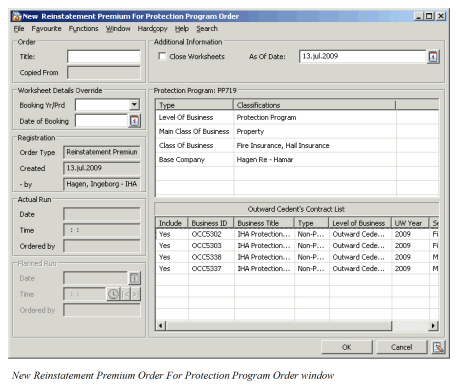
Order Information
Refer to Create Recovery Calculation Order for Protection Program to fill in the basic information.
Additional Information #
As Of Date: Fill in the last As Of Date of the adjustment to be extracted from the recovery bookings on the Outward Cedent’s Contracts. All items having an As Of Date equal to or older than the one entered in this field are extracted.
Open Worksheets:This is the default of the order and means that Close Worksheets is not selected. This option produces open worksheets.
Close Worksheets: Select this and worksheets are produced and closed automatically, without any possibility to verify the figures before they are booked on the ledger.
Create Reinstatement Premium Order for Single OCC and XLCA #
Reinstatement Premium for single OCC and XL CA Of Outward (XLCA) are calculated through the Reinstatement Premium for Single OCC/XLCA order. The order is created from the OCC or XLCA Claims List or from the Find Accounting Order window. The order lets you include one or more non-proportional OCCs and/or XL for Common Accounts.
Claims List: Select Create Reinstatement Order For Outward from the pop-up menu and you see the New Reinstatement Premium for Single OCC/XLCA Order window including the business you initiated the order from.
Find Accounting Order: Click the Create New… button and select Reinstatement Premium For Outward in Order Type Selection window. On the new reinstatement premium order define your selection criteria and select Add or List Business to include the businesses you want to calculate reinstatement premium for.
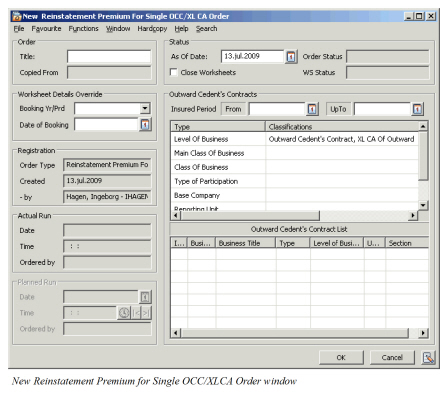
The order information is the same as described for Reinstatement Premium order for Protection Program. In the Outward Cedent’s Contract List display list the pop-up menu gives you following options:
- Properties, which opens the Properties window for the selected business.
- List Business, which lists all businesses that match the business classification for the order.
- Add Business, which lets you include a business you selected from the Find: Business window.
- Remove Business, which removes the business you selected.
- Exclude/Include, which excludes/includes the selected business from the recovery order.
Run Reinstatement Premium Orders #
To run the reinstatement premium orders select Run Now from the Edit Menu button. After the system has calculated reinstatement premium for the included OCCs and/or XLCAs, you can view the produced worksheets by selecting Worksheet from the Edit Menu button.
Reinstatement Calculation when Special Premium applies #
When the OCC has the ‘Special Premium’ indicator activated, the Reinstatement Premium Calculation applies the premium as it has been recorded and/or booked on each Placement. The bookings on the OCC reflect the sum of the placement bookings, and will therefore be different than had Special Premiums not applied.
Reinstatement Calculation when Claim is Indexed #
When the Non Proportional OCC is indexed, reinstatement premium is calculated based upon the indexed cover for each claim.
Reinstatement Premium paid: Paid loss / indexed paid cover * Premium * xx %
Reinstatement Premium reserve: Loss Reserve / Indexed incurred cover * Premium * xx %
The functionality is only applicable for reinstatements with calculation rule = Per Loss