Source Claim Bookings
When you have run an automatic recovery calculation for an Outward Cedent’s Contract (through the protection program), or for a stand-alone Outward Cedent’s Contract, SICS provides you with an overview of the source claim bookings. This overview gives you details about the assumed claims and businesses involved in creating the outward recovery. From the Source Claim Bookings window you can easily access a more thorough study of the booking details.
To inspect source claim bookings for an outward cedent’s contract:
- From the Outward Cedent’s Contract Properties window, click the ‘Claim ‘button. You see the Claims Overview window for current insured period.
- Select a claim from the display list and then select ‘View Source Claim Bookings ‘from the pop-up menu. You see the Source Claim Bookings Overview.
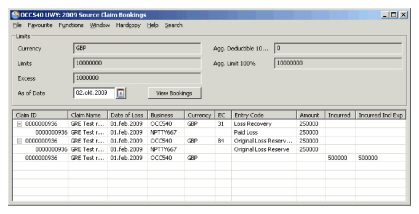
For each OCC claim, you can see the accumulated booked recoveries for the following entry code sub categories: Loss Recovery, Recovery Expense, Original Loss Reserve and Recovery Expense Reserv e. 3. Click in the display list and select ‘Expand all item’s from the pop-up menu to show all involved assumed claims and amounts contributing to the recovery.
To navigate to an assumed business from the Source Claim Booking Overview window:
- Select the assumed business/claim and select ‘Business Properties’ from the pop-up menu.
You see the Highlights tab of the assumed business for the current insured period where you can inspect more details about the business. 2. Close the assumed business to return to the Source Claim Bookings window.
To navigate to an assumed claim from the Source Claim Bookings window:
- Select the assumed business/claim, and then select ‘Claim Properties’from the pop-up menu.
You see the Highlights tab of the individual assumed claim where you can inspect more details about the assumed claim. 2. Click the Claim Ledger tab to see all detailed bookings in original currency. 3. Close the individual assumed claim to return to the Source Claim Bookings window.
Note! If the highlighted amount is a technical booking with a headline loss link (for more information, see Include Claim in Recovery Calculation), the Claim Properties options will not be available.
| Field | Description |
|---|---|
| Currency | Main currency Derived from: Premium Limit conditions, Outward Cedent’s Contract. Values: Expressed according to ISO definition, e.g. USD, GBP, etc Mandatory: Yes |
| Agg. Deductible 100% | Extra retained amount for claims otherwise recoverable hereunder. Derived from: Premium Limit conditions, Outward Cedent’s Contract. Values: Amount with 2 decimals Mandatory: No |
| Limits | Maximum amount covered per claim Derived from: Premium Limit conditions, Outward Cedent’s Contract. Values: Amount with 2 decimals Mandatory: Yes |
| Agg. Limit 100% | Maximum amount covered, considering number of Reinstatements. Derived from: Premium Limit conditions, Outward Cedent’s Contract. Values: Amount with 2 decimals Mandatory: Yes |
| Excess | Retained amount per claim Derived from: Premium Limit conditions, Outward Cedent’s Contract. Values: Amount with 2 decimals Mandatory: Yes |
| As of Date | Figures are shown accumulated as per this date. Use the calendar to choose a different As of Date. Default: Today’s Date Values: Standard date formula: DDMMYYYY Mandatory: Yes |
| View Bookings | If you change the As of Date, this button is used to change the view accordingly. Default: Today’s Date Values: Standard date formula: DDMMYYYY Mandatory: Yes |
| Claim ID | Outward Cedent’s Contract Claim ID / Assumed claim ID. Values: Sequential number according to Claim Identifier settings. Derived from: Outward Cedent’s Contract Claims for current Insured Period / Source Assumed Claim which contributes to the Outward Cedent’s Contract Claim Mandatory: Yes |
| Claim Name | Outward Cedent’s Contract Claim Name / Assumed Claim Name. Values: Free-text field Derived from: Claim properties Mandatory: Yes |
| Date of Loss | Outward Cedent’s Contract Claim Date of Loss / Assumed Claim Date of Loss. Values: Standard Date formula: DDMMYYYY Derived from: Claim properties Mandatory: Yes |
| Business | Outward Cedent’s Contract ID / Assumed Business ID. Values: Sequential number according to Business Identifier settings. Derived from: Business Properties Mandatory: Yes |
| Currency | Outward Cedent’s Contract Limit Currencies Values: Expressed according to ISO definition, e.g. USD, GBP, etc. Derived from: Business Properties Mandatory: Yes |
| EC | Entry Code used for Outward Cedent’s Contract Booking / Entry Code for Assumed Claim Booking is empty, since the bookings could come from more than one Entry Code. Values: Numbers according to Entry Code settings. Derived From: Claim Ledger Mandatory: Yes |
| Entry Code | Outward Cedent’s Contract Entry Code Name / Assumed Claim Entry Code Name. Values: Text field Derived From: Entry Code Properties Mandatory: Yes |
| Amount | Outward Cedent’s Contract Recovery Amount / Assumed Claim Amount. Values: Amount Derived from: OCC Claim booking / Assumed Claim contribution to corresponding Recoveries. Mandatory: Yes |
| Incurred | Outward Cedent’s Contract Recovery Incurred Values: Claim Paid + Claim Reserve Derived from: OCC Claim booking Mandatory: Yes |
| Incurred Incl Exp | Outward Cedent’s Contract Recovery Incurred including Expense Bookings. Values: Claim Paid + Claim Reserve Derived from: OCC Claim booking Mandatory: Yes |