Automatic generation of Retrocession Calculation/Account Order
If an Assumed Business is protected by an Outward Cedents’s Contract (OCC) being proportional treaty business which indicator ‘Automatic bookings on OCC & ORP’ is selected, this can be selected only when this OCC protects one AB only, for below scenarios a Retrocession Calculation and a Retrocession Account order will be created and run automatically in sequence, without any user interaction. The orders are closed after they have been run and cannot be edit or rerun by the user.
- Manually book the technical/claim worksheet on Assumed Business and close it.
- As Original bookings will automatically take place on the OCC.
- System will create a Retrocession Calculation order and book on the As Booking ledger on OCC/ORP and close it.
- System will create a Retrocession Account order and book on the As Account ledger on ORP and close it.
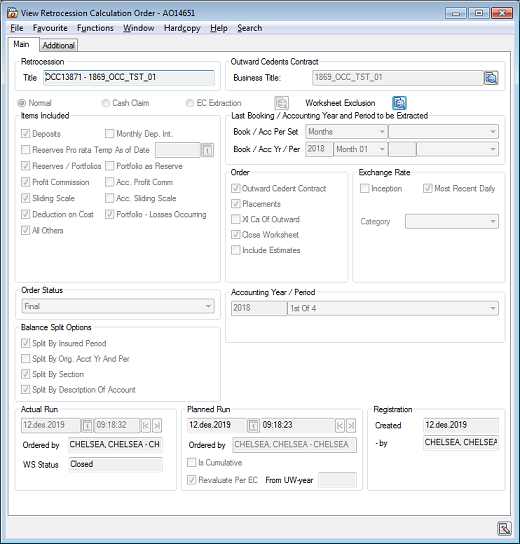
| Field | Description |
|---|---|
| Title | Default: Append OCC title to OCC identifier |
| Business Title | The title defined on the OCC business. Values: Output of text Derived from: The title field placed on the Business tab of the OCC business |
| Normal | Default: Selected |
| Cash Claim | Default: Unselected |
| EC Extraction | Default: Unselected |
| Items Included | Default selected for below checkbox: Deposits, Reserves/Portfolios, Profit Commission, Sliding Scale, Deduction on Cost, All Others and Portfolio - Losses Occurring. Default values for other indiciators will be unselected. |
| Override - Complete Accounting Years Only | Default: Unselected |
| Accounting Year/Period | Derived from: Booking details |
| Last Booking/Accounting Year and Period to be extracted - Booking Period Set | Default: Months |
| Last Booking/Accounting Year and Period to be extracted - Booking Year/Period | Default: Bring from Booking Terms, Base Company: |
| Order | Default selected for below checkbox: Outward Cedent Contract, Placements and Close Worksheet. Default values for other indiciators will be unselected. |
| Exchange Rate | Default: Most Recent Daily Rate. |
| Order Status | Default: Final |
| Balance Split Options | Default selected for below checkbox: Split By Insured Period, Split By Section and Split By Description of Account. Default values for other checkbox will be unselected. |
| Worksheet Details Override | All fields in this group will be NULL. |
| Is Cumulative | Default: Unselected. |
| Revaluate Per EC |
Default: Selected |
(For further information about other fields description, see Field description 1. - Retrocession Calculation Order)
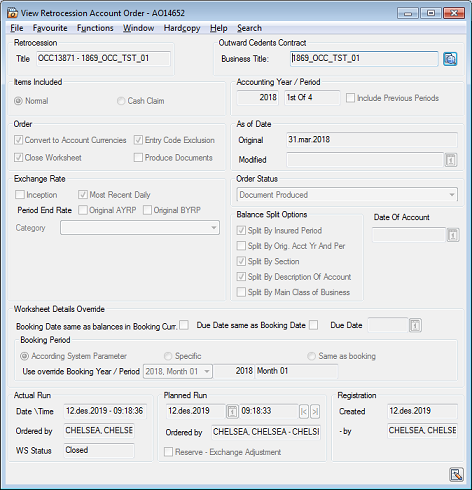
| Field | Description |
|---|---|
| Title | Default: Append OCC title to OCC identifier |
| Business Title | The title defined on the OCC business. Values: Output of text Derived from: The title field placed on the Business tab of the OCC business |
| Items Included | Default selected for below radio button: Normal. Other radio buttons will be default unselected |
| Override - Complete Accounting Years Only | Default: Unselected |
| Accounting Year/Period | Derived from: Booking details |
| Include Previous Periods | Default: Unselected |
| Order | Default selected for below checkbox: Convert to Account Currentcies, Entry Code Exclusion and Close Worksheet. Default values for other indiciators will be unselected. |
| Exchange Rate | Default: Most Recent Daily Rate. Other checkbox will be default unselected |
| Order Status | Default: Document Produced |
| Balance Split Options | Default selected for below checkbox: Split By Insured Period, Split By Section and Split By Description of Account. Default values for other checkbox will be unselected. |
| Worksheet Details Override | All fields in this group will be NULL. |
| Booking Period | Default selected for below radio button: Accounting System Parameter Default values for others will be unselected. |
(For further information about other fields description, see Field description 5. - Retrocession Account Order)
Note!: All the calculations like Deduction, reserve , Deposit, Profit commission and etc. will be follow existing functionality for retrocession calculation order and retrocession account order. When the booking on IAB not in correct sequence, deposit and reserve calcultion will follow existing functionality. Entry code Transformation term and currency transformation term will follow existing functionality of retrocession calculation order and retrocession account order. Automatically booked figures on Section level will follow existing functionality.